
Contents
Importante
For this feature to work, you need to configure Smart View in your environment, as per the documentation: Smart View - Configuration of the Protheus product integrated with Smart View.
This feature is available from the version 12.1.2610. For previous versions, you need to create the call in the menu and configure the questions as specified in section 05.
01. GENERAL DATA
Product: | TOTVS Backoffice | ||||||||||||||||||||||
Product Line: | Protheus Line | ||||||||||||||||||||||
Segment: | Backoffice | ||||||||||||||||||||||
Module: | SIGAATF - Fixed Assets | ||||||||||||||||||||||
Function: |
| ||||||||||||||||||||||
Country: | MEX | ||||||||||||||||||||||
Ticket: | Non-applicable. | ||||||||||||||||||||||
Requisition/Story/Issue (enter the related requirement) : | DMINA_CAPEX-30 |
02. OVERVIEW
This issues an accounting statement with updated asset values, with the option of grouping by ledger account.
03. EXAMPLE
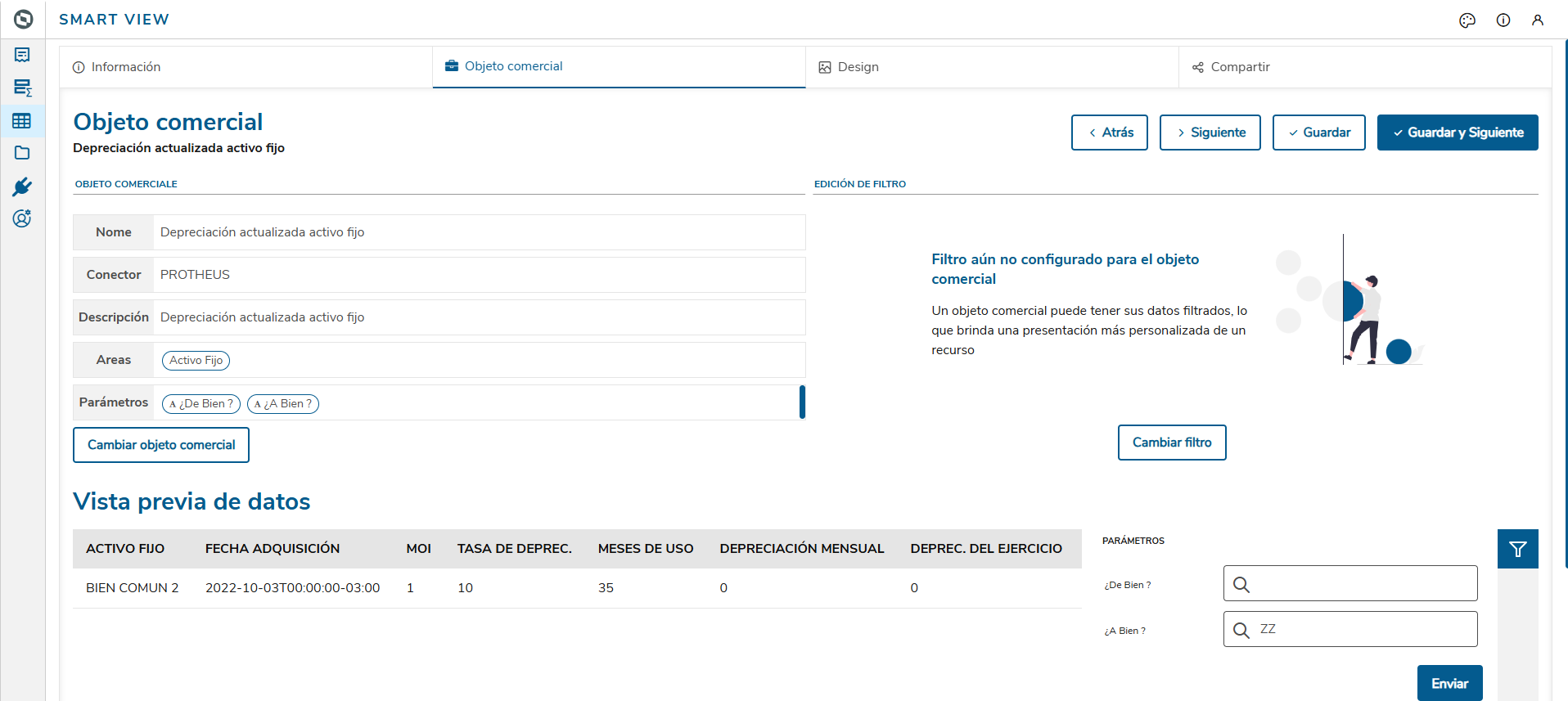
When executing the backoffice.sv.ctb.depreciatedassets_mex.tlpp object, the information is displayed as follows:
04. DATA VIEWS
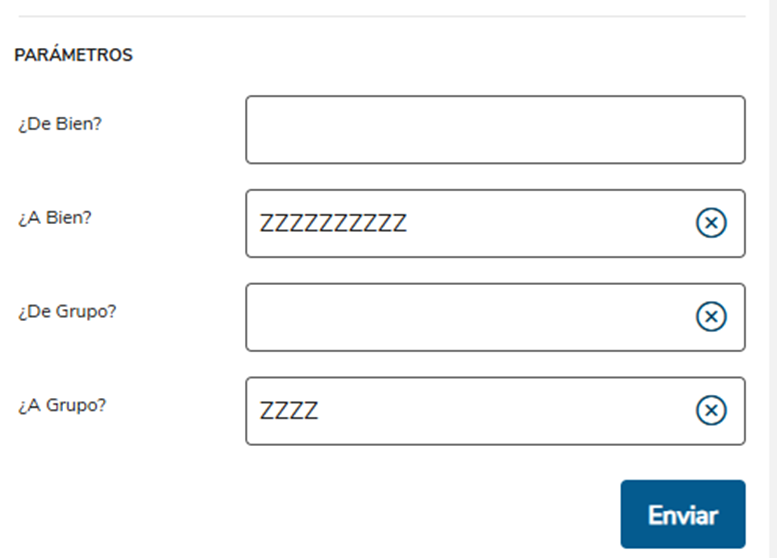
Set of parameters to filter the data to be displayed in the data views.
From Asset ? | Initial Asset |
To Asset ? | Final Asset |
From Group ? | Initial Group |
To Group? | Final Group |
| ATFSV500 |
|---|
|
backoffice.sv.atf.depreciatedassets_mex.default.dg.mex.trp


05. DATA DICTIONARY
Question Group: ATFSV500
Package: 015951
Order | Question | Type | Size | Decimal | Variable | Validation | Object | Query F3 | Options |
1 | From Asset ? | C | 10 | 0 | MV_PAR01 | G | SN1 | ||
2 | To Asset ? | C | 10 | 0 | MV_PAR02 | G | SN1 | ||
3 | From Group ? | C | 4 | 0 | MV_PAR03 | G | SNG | ||
4 | To Group ? | C | 4 | 0 | MV_PAR04 | G | SNG |
Menu option to run the report:
Module | SIGAATF - Fixed Assets |
Menu | Queries |
Sub-menu | Smart View |
Routine Name | Updated depreciation of fixed assets |
Program | ATFSV500 |
Type | Protheus Function |
06. FIELDS
Important
Field Customization:
The tool provides an interface for the Protheus administrator to view all available resources, make changes, modify the relationship between a standard report and a customized report, and register new customizable resources.
To learn more about the available resources, access: Protheus x Smart View Binding ( APCFG770 )
Note: The tool will be available in the configurator menu starting from release 12.1.2510; however, you can also add it manually by calling function APCFG770.
FIELD | TYPE | SIZE | DECIMAL | TITLE | DESCRIPTION |
N1_DESCRIC | C | 40 | FIXED ASSETS | FIXED ASSETS | |
N1_AQUISIC | D | 8 | ACQUISITION DATE | ACQUISITION DATE | |
N3_VORIG1 | N | 16 | 2 | MOI | MOI |
N3_TXDEPR1 | N | 9 | 4 | DEPRECIATION RATE | DEPRECIATION RATE |
MONTHS | N | 2 | MONTHS OF USE | TOTAL MONTHS ALREADY DEPRECIATED | |
N3_VRDMES1 | N | 16 | 2 | MONTHLY DEPRECIATION | MONTHLY DEPRECIATION |
N3_VRDBAL1 | N | 16 | 2 | DEPREC. OF THE PERIOD | DEPREC. OF THE PERIOD |
INPCP | N | 16 | 2 | INPC USED MEDIUM | CURRENT RATE IN SIE TABLE ( IE_INDICE ) |
INPCDATAAQ | N | 16 | 2 | INPC ACQUISITION DATE | ACQUISITION RATE IN SIE TABLE (IE_INDICE) |
FATORATU | N | 16 | 2 | UPDATE FACTOR | UPDATE FACTOR ( INPCP / INPCDATAAQ ) |
DPATUAL | N | 16 | 2 | UPDATED DEPREC. | SN3→N3_VRDBAL1 * FATORATU |
N3_VRDACM1 | N | 16 | 2 | ACCRUED DEPREC. | ACCRUED DEPREC. |
BALANCERED | N | 16 | 2 | BALANCE X REDEEM | SN3->N3_VORIG1-SN3->N3_VRDACM1 |
BALANCEREDA | N | 16 | 2 | REDEEM UPDATED | SALDORED * FATORATU |
N3_CCONTAB | C | 20 | ACCOUNT | ACCOUNTING ACCOUNT | |
N3_CCUSTO | C | 9 | EXPENSE CC | EXPENSE COST CENTER | |
CT1_DESC01 | C | 40 | Currency 1 Descr | Description of Currency 1 | |
N3_CDEPREC | C | 20 | Deprec. Expen Acct | Depreciation Expense Account | |
N1_GRUPO | C | 4 | Group | Asset Group |
07. TABLES
- SN1 – Fixed Assets
- SN3 - Balances and Values
- CT1 - Chart of Accounts
- CTT - Cost Center
- SIE - Inflation Adjustment Index
- documento_referencia
- smartview
- mercado_internacional
- mi
- sigaatf
- activo_fijo
- depreciacion_actualizada
- backoffice
- protheus
- atfsv500
- ativo_fixo
- depreciacao_atualizada
- atfr051
- protheus_12
- update_depreciated
- international_market
- fixed_assets
- totvs_protheus_line
- reference_document
- controllership
- fixed_asset
- accounting_configuration
- entry_point
Visão Geral
Import HTML Content
Conteúdo das Ferramentas
Tarefas