
Histórico da Página
Architectural Change
The Smart X Browser revolutionizes data visualization with a much more friendly and modern interface.
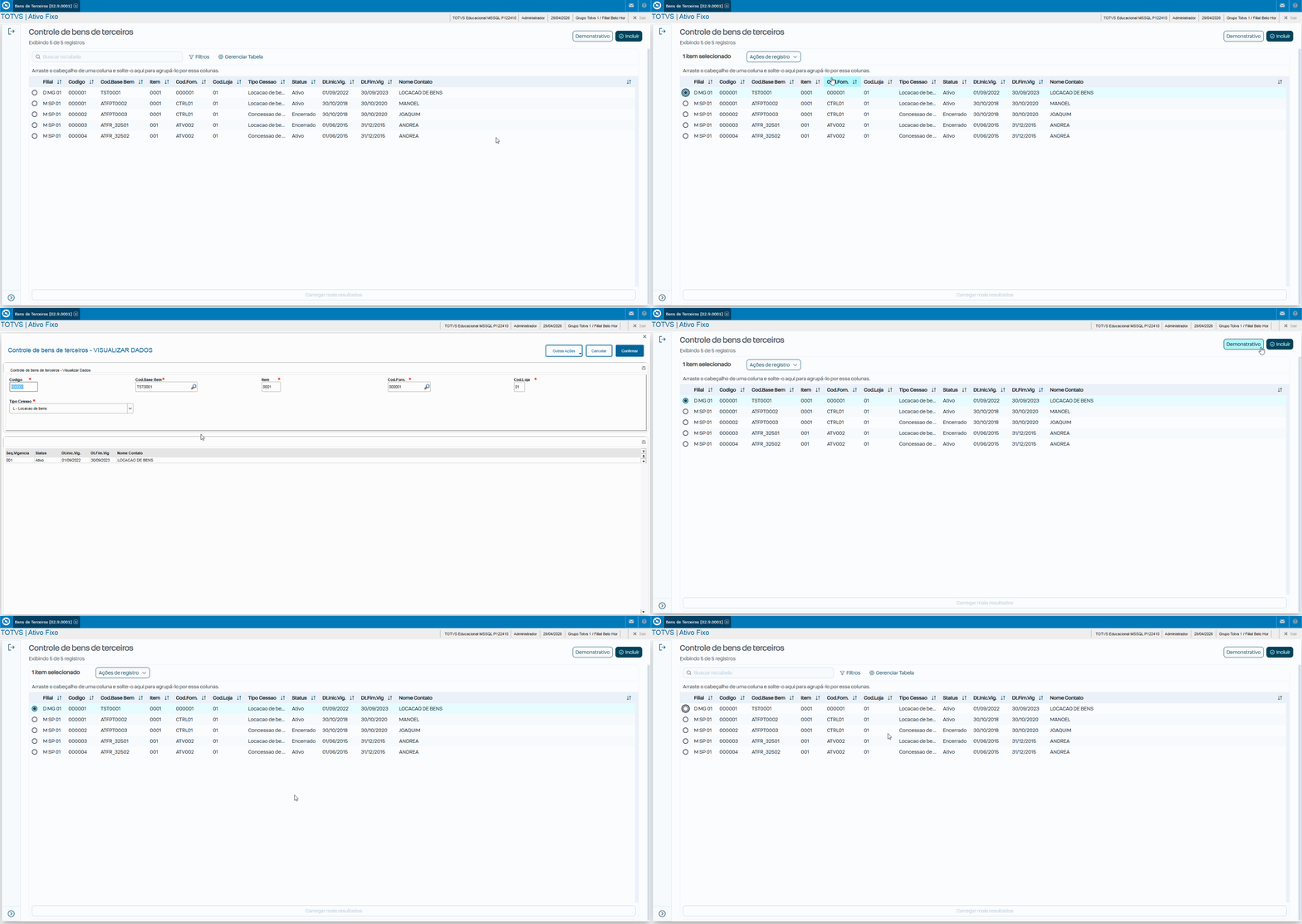
We applied this evolution to the Third-Party Assets Control routine (ATFA320), completely renewing the initial listing screen. The great advantage is that we preserve all the original inclusion, editing, and deletion rules intact. This way, you get a significant visual improvement with minimal impact on your existing customizations.
...
Below are the main changes::
Browser (Data Listing)
The standard browser lost some manual flexibility in order to gain much more performance and visual standardization.
- Quick Search (Magnifying Glass): It now searches only what is already loaded in memory, that is, the current grid page). To search for something in the database, you must use the Advanced Filter.
- Work Paper (SIGACFG): Maximum attention here! All Work Paper configuration is ignored in Smart X, including forced filters, button restrictions, and forced layout.
...
📋 What Works and What Does Not
Functionality | Standard Browser |
A Mudança na Arquitetura
O Browser Smart X revoluciona a visualização de dados com uma interface muito mais amigável e atualizada.
Aplicamos essa evolução para a rotina de Controle de Bens de Terceiros (ATFA320), renovando completamente a tela inicial de listagem. A grande vantagem é que preservamos intactas todas as regras originais de inclusão, edição e exclusão. Assim, você garante um expressivo ganho visual com o mínimo de impacto nas suas customizações já existentes.
Abaixo segue as principais mudanças:
Browser (Listagem de Dados)
O Browser padrão perdeu algumas flexibilidades manuais para ganhar muita performance e padronização visual.
Busca Rápida (Lupa): Agora ela só pesquisa o que já está carregado na memória (na página atual da grid). Para buscar algo que está no banco, deve-se usar o Filtro Avançado.
Papel de Trabalho (SIGACFG): Atenção máxima aqui! Toda a configuração de Papel de Trabalho é ignorada no Smart X (filtros forçados, restrição de botões, layout forçado).
📋 O que Faz e Não Faz
| Funcionalidade | Browser Padrão(MVC) | Browser Smart X | Migration Status | na Migração|||
Config. | Papel TrabalhoWork Paper | ✅ Faz Works (FiltrosFilters, Layout) | ❌ Não Faz | Crítico. Migrar para código ou Dicionário. | Does not work | Critical. Migrate to code or Dictionary. |
Filter with | Filtro com AdvPL | ✅ Faz Works (Date(), U_Func) | ❌ Não FazCrítico. Converter para Does not work | Critical. Convert to SQL/oData. | ||
Responsive Interface | Responsiva⚠️ Limitado (Legacy HTML antigo) | ✅ Faz WorksNativo | Native (PO UI). | |||
Captions (.BMP) | ✅ Faz ✅Works (Bitmaps/RGB) | ❌ Não FazCrítico. Usar Does not work | Critical. Use Tags/CSS (color-07). | |||
Master/ | DetalheDetail Panel | ✅ Faz Works (Mesma telaSame screen) | ❌ Não Faz Does not work | UX | muda para Drillchanges to drill-down ( | Nova telanew screen). |
Index Search | ✅ Faz Works (LupaMagnifie/DbSeek) | ❌ Não FazUsar Filtro Avançado. Busca rápida é só memória Does not work | Use Advanced Filter. Quick search is memory only. | |||
SetFilterDefault | ✅ Faz Works (AdvPL e and SQL) | ⚠️ ParcialPartialRequer SQL com prefixo @ | Requires SQL with the @ prefix. |
...
Smart X busca e Filtros
- A paginação do browser é apresentado apenas 100 registro sendo possível alterar para 1000 registros.
- No filtro a consulta busca todos registro na base de dados, retornando o registro filtrado.
Search and Filters
- Browser pagination displays only 100 records, and it is possible to change this to 1000 records.
- In the filter, the query searches all records in the database and returns the filtered record.
Screen converted to Smart Tela convertida para o SMART X:
...
...
Useful Links
...
:
- FWMBrowse - Abertura do Opening the browse utilizando using Smart X
- Mudança de Comportamento entre Rotinas MVC e Change in behavior between MVC and Smart X routines
Visão Geral
Import HTML Content
Conteúdo das Ferramentas
Tarefas