01. DASHBOARD DEPLOYMENT
| Expandir |
|---|
| title | Important Information 🛑 |
|---|
|
| Aviso |
|---|
The Dashboard requires Microsiga Protheus® Release 12.1.33 or higher. |
| Aviso |
|---|
The Dashboard requires the Binary from October/2021 or later. |
| Aviso |
|---|
The Dashboard requires the Lib from 1/6/2021 or later. |
| Informações |
|---|
The Dashboard is compatible with Protheus Backoffice modules. |
|
Follow the step-by-step instructions below to deploy and use the Backoffice Dashboard.
1. Adjust the appserver.ini and smartclient.ini files, with the Multiprotocol Port and other required keys, as explained below.
| Deck of Cards |
|---|
|
| Card |
|---|
| default | true |
|---|
| id | obrigatorias |
|---|
| label | Keys Required |
|---|
| Enter in appserver.ini the keys below, regardless of the type of communication used in the environment: [GENERAL]
App_Environment=ENVIRONMENT [DRIVERS]
MultiProtocolPort=1 |
| Card |
|---|
| id | CSSL |
|---|
| label | With SSLConfigure (secure communication) |
|---|
| Execute the steps below if you want to use secure communication:
1.1. Install in the server and in the computer(s) that will run Smartclient, the certificate totvs_certificate_CA.crt found in the appserver folder. For further information, refer to Application Server - Multiprotocol Port.
1.2. Execute totvs_certificates.exe available in Multiprotocol Port - Certificate Generation, to generate the certificate of the server (files totvs_certificate.crt and totvs_certificate_key.pem).
1.3. Copy the two files created in the previous step to the appserver folder.
1.4. In appserver.ini, enter the following keys:
[DRIVERS]
MultiProtocolPort=1
MultiProtocolPortSecure=1
[SSLConfigure]
SSL2 = 1
SSL3 = 1
TLS1_0 = 1
TLS1_1 = 1
TLS1_2 = 1
Bugs =1
State =1
CertificateServer=C:\Protheus12\totvs\tec\appserver\totvs_certificate.crt (adjust it to the path where the certificates have been placed)
KeyServer=C:\Protheus12\totvs\tec\appserver\totvs_certificate_key.pem (adjust it to the path where the certificates have been placed)
1.5.
In smartclient.ini, enter the following key:
[tcp]
secureconnection=1 |
| Card |
|---|
| id | SSSL |
|---|
| label | Without SSLConfigure |
|---|
| Execute the steps below if you do not want to use secure communication:
1.1. In appserver.ini, enter the following key: [DRIVERS]
MultiProtocolPort=1
MultiProtocolPortSecure=0
1.2. In smartclient.ini, enter the following key: [tcp]
secureconnection=0 |
|
| Bloco de código |
|---|
| language | delphi |
|---|
| firstline | 1 |
|---|
| title | Example of appserver.ini with SSLConfigure |
|---|
| linenumbers | true |
|---|
| collapse | true |
|---|
|
[ENVIRONMENT]
SOURCEPATH=C:\Protheus12\totvs\protheus\apo
ROOTPATH=C:\Protheus12\totvs\protheus\Protheus_data
STARTPATH=/system/
RPODB=TOP
RPOLANGUAGE=PORTUGUESE
RPOVERSION=120
LOCALFILES=CTREE
LOCALDBEXTENSION=.dtc
StartSysInDB=1
TOPMEMOMEGA=1
PICTFORMAT=DEFAULT
DATEFORMAT=DEFAULT

;sql
DBDATABASE=MSSQL
DBSERVER=LOCALHOST
DBALIAS=ENVIRONMENT
dbport=7892

[TDS]
AllowApplyPatch=*
AllowEdit=*

[DRIVERS]
ACTIVE=TCP
MultiProtocolPort=1
MultiProtocolPortSecure=1

[SSLConfigure]
SSL2   = 1
SSL3   = 1
TLS1_0 = 1
TLS1_1 = 1
TLS1_2 = 1
Bugs    =1
State   =1
CertificateServer=C:\Protheus12\totvs\tec\appserver\totvs_certificate.crt (adjust it to the path where the certificates have been placed)
KeyServer=C:\Protheus12\totvs\tec\appserver\totvs_certificate_key.pem (adjust it to the path where the certificates have been placed)

[TCP]
TYPE=TCPIP
PORT=1232

[GENERAL]
App_Environment=ENVIRONMENT
BUILDKILLUSERS=1
MAXSTRINGSIZE=10

[LICENSECLIENT]
server=LOCALHOST
port=8009

[HTTP]
ENABLE=1
PORT=88
ENVIRONMENT=ENVIRONMENT

[WEBAPP]
PORT=1255
WebSocket=0
LastMainProg=SIGAADV

[WebApp/webapp]
MPP= |
| Bloco de código |
|---|
| language | delphi |
|---|
| firstline | 1 |
|---|
| title | Example of appserver.ini without SSLConfigure |
|---|
| linenumbers | true |
|---|
| collapse | true |
|---|
|
[ENVIRONMENT]
SOURCEPATH=C:\Protheus12\ENVIRONMENT\totvs\protheus\apo
ROOTPATH=C:\Protheus12\ENVIRONMENT\totvs\protheus\Protheus_data
STARTPATH=/system/
RPODB=TOP
RPOLANGUAGE=PORTUGUESE
RPOVERSION=120
LOCALFILES=CTREE
LOCALDBEXTENSION=.dtc
StartSysInDB=1
TOPMEMOMEGA=1
PICTFORMAT=DEFAULT
DATEFORMAT=DEFAULT

;sql
DBDATABASE=MSSQL
DBSERVER=LOCALHOST
DBALIAS=ENVIRONMENT
dbport=7892

[TDS]
AllowApplyPatch=*
AllowEdit=*

[DRIVERS]
ACTIVE=TCP
MultiProtocolPort=1
MultiProtocolPortSecure=0

[TCP]
TYPE=TCPIP
PORT=1232

[GENERAL]
App_Environment=ENVIRONMENT
BUILDKILLUSERS=1
MAXSTRINGSIZE=10

[LICENSECLIENT]
server=LOCALHOST
port=8009

[HTTP]
ENABLE=1
PORT=88
ENVIRONMENT=ENVIRONMENT

[WEBAPP]
PORT=1255
WebSocket=0
LastMainProg=SIGAADV

[WebApp/webapp]
MPP= |
| Bloco de código |
|---|
| language | delphi |
|---|
| firstline | 1 |
|---|
| title | Example of appserver.ini MASTER with SSLConfigure |
|---|
| linenumbers | true |
|---|
| collapse | true |
|---|
|
[P12_DB_27_EXP]
SourcePath=C:\Protheus\Apo64
RootPath=C:\Protheus\Protheus_Data
STARTPATH=\system\
RPODB=Top
RPOLANGUAGE=portuguese
RPOVERSION=120
LOCALFILES=CTREE
TRACE=0
LOCALDBEXTENSION=.dtc
SpecialKey=FCO_P12
TopMemoMega=1
DBDATABASE=MSSQL
DBSERVER=LOCALHOST
DBALIAS=P12_DB_27_EXP
StartSysInDB=1

[LICENSECLIENT]
server=localhost
port=8009

[Drivers]
Active=TCP
MultiProtocolPort=1
MultiProtocolPortSecure=1

[SSLConfigure]
SSL2   = 1
SSL3   = 1
TLS1_0 = 1
TLS1_1 = 1
TLS1_2 = 1
Bugs    =1
State   =1
CertificateServer=C:\Protheus\Bin\64\appserver\totvs_certificate.crt
KeyServer=C:\Protheus\Bin\64\appserver\totvs_certificate_key.pem

[TCP]
TYPE=TCPIP
Port=1227

[General]
consolemaxsize=15728640
MAXSTRINGSIZE=10
MaxQuerySize=65536
App_Environment=P12_DB_27_EXP

[ServerNetwork]
MasterConnection=1
Servers=SLAVE

[SLAVE]
Type=TCPIP
;ip do server:
Server=10.111.1.11
Port=1228
Connections=1

[HTTP]
enable=1
port=8282

[WEBAPP]
Port=1210

[WebApp/webapp]
MPP=
|
| Bloco de código |
|---|
| language | delphi |
|---|
| firstline | 1 |
|---|
| title | Example of appserver.ini SLAVE with SSLConfigure |
|---|
| linenumbers | true |
|---|
| collapse | true |
|---|
|
[P12_DB_27_EXP]
SourcePath=C:\Protheus\Apo64
RootPath=C:\Protheus\Protheus_Data
STARTPATH=\system\
RPODB=Top
RPOLANGUAGE=portuguese
RPOVERSION=120
LOCALFILES=CTREE
TRACE=0
LOCALDBEXTENSION=.dtc
SpecialKey=FCO_P12
TopMemoMega=1
DBDATABASE=MSSQL
DBSERVER=LOCALHOST
DBALIAS=P12_DB_27_EXP
StartSysInDB=1

[LICENSECLIENT]
server=localhost
port=8009

[Drivers]
Active=TCP
MultiProtocolPort=1
MultiProtocolPortSecure=1

[SSLConfigure]
SSL2   = 1
SSL3   = 1
TLS1_0 = 1
TLS1_1 = 1
TLS1_2 = 1
Bugs    =1
State   =1
CertificateServer=C:\Protheus\Bin\64\appserver\totvs_certificate.crt
KeyServer=C:\Protheus\Bin\64\appserver\totvs_certificate_key.pem

[TCP]
TYPE=TCPIP
Port=1228

[General]
consolemaxsize=15728640
MAXSTRINGSIZE=10
MaxQuerySize=65536
App_Environment=P12_DB_27_EXP

[HTTP]
enable=1
port=8283

[WEBAPP]
Port=1210

[WebApp/webapp]
MPP=
|
| Bloco de código |
|---|
| language | delphi |
|---|
| firstline | 1 |
|---|
| title | Example of smartclient.ini with SSLConfigure |
|---|
| linenumbers | true |
|---|
| collapse | true |
|---|
|
[config]
lastmainprog=sigaadv
envserver=P12_DB_27_EXP

[drivers]
active=tcp

[tcp]
;ip do server:
Server=10.111.1.11
port=1227
secureconnection=1
|
| Informações |
|---|
|
There is no need to configure REST, because the REST Server of the Multiprotocol Port will be used. |
| Informações |
|---|
|
If Load Balance is used, the communication used in the appserver.ini of the slaves must be the same as that of the master, as explained in Multiprotocol Port. |
02. POSSIBLE ERRORS
| Expandir |
|---|
|
Possible Causes | Solution | API service down | Check whether the Protheus services are running | The API could be calling a nonexistent address | Check whether tables A1N, A1O, A1P, A1Q and A1R are populated | Server instability | Check whether the table is active |
|
| Expandir |
|---|
|
Possible Causes | Solution | The service may not be configured correctly | Check whether the appserver.ini and smartclient.ini settings are compliant with point 1 of this documentation | The service may be down or unstable | Check whether the Protheus services are running | The Server may be off | Check whether the Server is active |
|
| Expandir |
|---|
| title | NOFUNCW - Option Not Available in Protheus |
|---|
|
 Image Added Image Added
Possible Causes | Solution | The default functions responsible for Dash operation are not compiled | Apply the Dashboard patch available for download |
|
| Expandir |
|---|
| title | This page is not working |
|---|
|
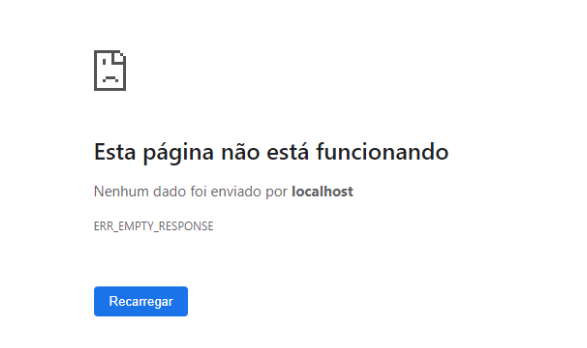 Image Added Image Added
Possible Causes | Solution | The service may be down | Check whether the Protheus services are running | The service may not be configured correctly | Check whether the appserver.ini and smartclient.ini settings are compliant with point 1 of this documentation |
|
03. RELATED SUBJECTS
| HTML |
|---|
<!-- esconder o menu -->


<style>
div.theme-default .ia-splitter #main {
    margin-left: 0px;
}
.ia-fixed-sidebar, .ia-splitter-left {
    display: none;
}
#main {
    padding-left: 10px;
    padding-right: 10px;
    overflow-x: hidden;
}

.aui-header-primary .aui-nav,  .aui-page-panel {
    margin-left: 0px !important;
}
.aui-header-primary .aui-nav {
    margin-left: 0px !important;
}
</style>
|
