
Histórico da Página

...
CONTENTS
- Visão Geral
- Exemplo de utilização
- Filtros
- Tipos de Visualizações
- Visualizar Detalhes
- Tabelas utilizadas
- Proteção de dados
...
Âncora OVERVIEW OVERVIEW
01. OVERVIEW
...
| Aviso | |||
|---|---|---|---|
| |||
The Sales Management Portal is available from release O Portal Gestão de Vendas está disponível a partir do release 12.1.33 onwards. |
Ao acessar a opção do menu, Minhas Vendas → Meus Orçamentos, o usuário pode consultar seus orçamentos, incluir um novo e visualizar suas informações através da opção 'Visualizar Detalhes'. Ao clicar nessa opção, também é possível gerar PDF, alterar e/ou excluir um orçamento.
...
When you access the menu option, My Sales → My Quotations, you may query your Quotations, add a new one and view its data through option 'View Details'. You can also click this option to create PDFs, to edit and/or delete a quotation.
When you add, edit or delete a quotation, the data are sent to the Protheus server, which then notifies the sales representative of the success or failure of the data update.
| Informações | |||
|---|---|---|---|
| |||
Only Sales Quotations related to entities (Customer or Prospect) linked to the Sales Rep are displayed. This link occurs through the relationship between fields Sales Rep Serão apresentados somente os Orçamentos de Venda referentes as entidades (Cliente ou Prospect) vinculadas ao Vendedor . Este vínculo ocorre por meio do relacionamento entre os campos Vendedor (A1_VEND) e Código do Vendedor and Sales Rep Code (A3_COD) para clientes e entre os campos Vendedor for customers and between fields Sales Rep (US_VEND) e Código do Vendedor and Sales Rep Code (A3_COD) para for prospects. |
| Aviso | |||
|---|---|---|---|
| |||
When using an administrator user, all quotations are displayed regardless of link with sales repAo utilizar um usuário administrador, serão apresentados todos os orçamentos, independente do vínculo com o vendedor. |
| Aviso | |||
|---|---|---|---|
| |||
If the Security Key is not entered in Caso a Chave Security não seja informada no "appserver.ini", ou seja informada com o valor 0, as permissões de acesso do usuário não serão validadas.Para maiores informações consulte o documento de referencia da rotina clicando aquior is entered with the value 0, the user access permissions will not be validated. For further information, click here to access the reference document of the routine. |
| Âncora | ||||
|---|---|---|---|---|
|
02.
...
EXAMPLE OF USE
See below a practical example of how to use the option My Sales → My Quotations, in which a quotation is added through option New Quotation
...
Abaixo será apresentado um exemplo prático de utilização da opção Minhas Vendas → Meus Orçamentos, onde será incluído um orçamento através da opção Novo Orçamento.
Âncora NOVONEW_ORCAMENTOQUOTATIONNOVO NEW_ORCAMENTOQUOTATION
a.
...
Minhas Vendas → Meus Orçamentos → Novo Orçamento.
...
New Quotation
My Sales → My Quotations → New Quotation.
1. Click New Quotation to select the option "Customer" or "Prospect", regarding the entity to be used in the addition. Then, search for the Code, Name or EIN of the entity. In this example, a prospect is used.

2.
...
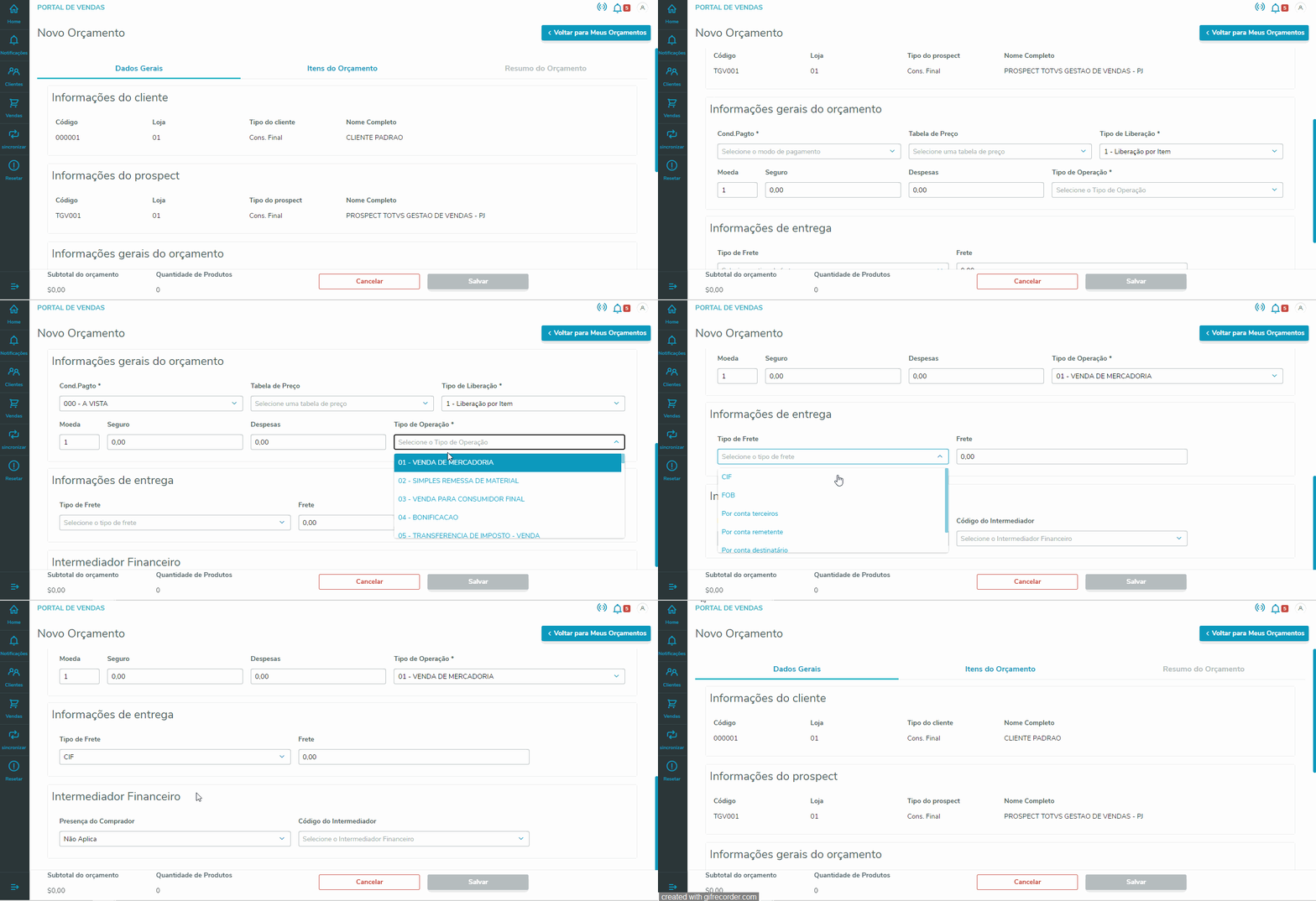
After selecting the entity, the system takes you to the quotation maintenance screen, with 3 tabs: General Data, Quotation Items and Quotation Summary. The tab General Data refers to the headerof the quotation (SCJ), the tab Quotation Items refers to the products of the quotation (SCK), and the tab Quotation Summary shows the totalizers and some data comprising these totalizers (header, items and quotation total) of the new quotation. At this point, we will fill out the quotation header.
| Aviso | ||
|---|---|---|
| ||
O Portal Gestão de Vendas não possui o campo Tipo Saída Sales Management Portal items do not have field Outflow Type (CK_TES) nos itens. Por esse motivo, o usuário pode optar pelo Tipo de Saída informado no cadastro do produto . Thus, you may select the Outflow Type entered in the product register (B1_TS) ou pelo TES inteligente (Campo Tipo de Operação no PGV). Será utilizada a mesma regra do Protheus: caso não tenha um TES configurado para o produto, será utilizado o TES inteligente. |
Campos obrigatórios: Cond.Pagto, Tipo de Liberação e Tipo de Operação.
...
or the Intelligent TIO (field Operation Type in SMP). The same Protheus rule applies: if a TIO is not configured for the product, the intelligent TIO is used. |
Required Fields: Paymt Terms, Release Type and Operation Type.
As a prospect was entered, the SMP loads the data of the customer entered in parameter MV_ORCLIPD.
3.
...
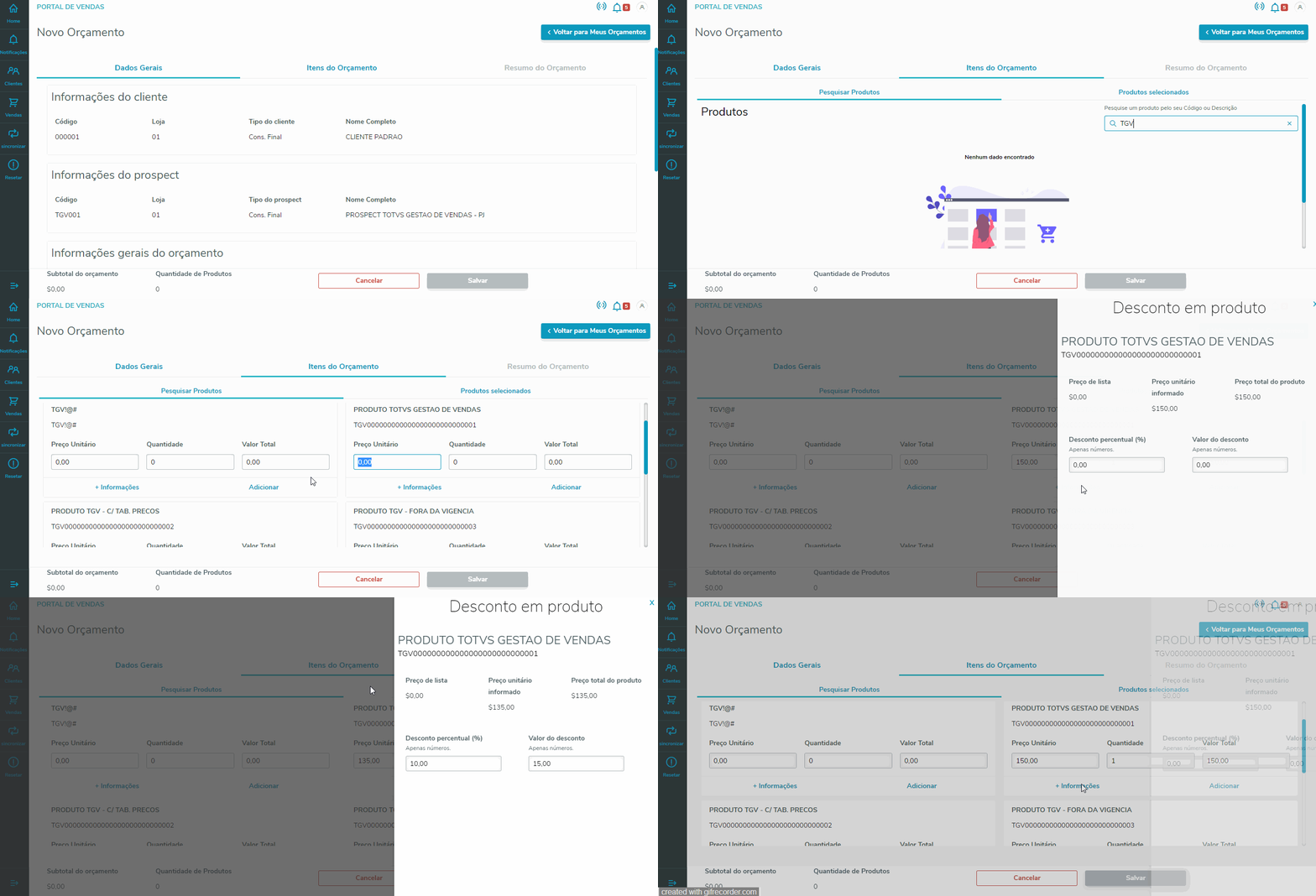
Para adicionar um desconto no item, basta clicar em '+ Informações' referente ao produto selecionado e adicionar o desconto por percentual ou valor. Clicando em 'Adicionar', o produto é adicionado ao orçamento, sendo possível visualizá-lo na aba 'Produtos selecionados'.
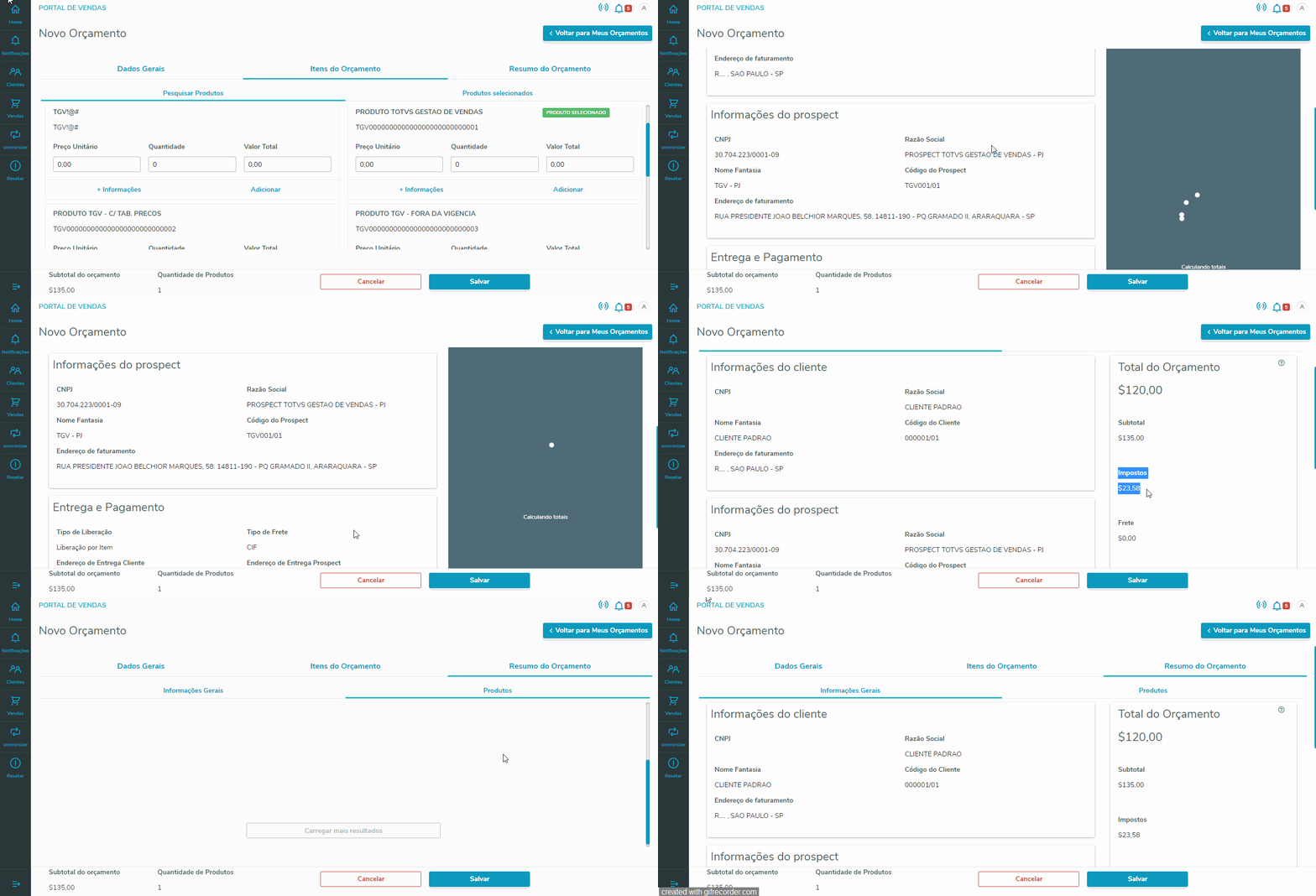
4. Na aba Resumo do Orçamento é possível consultar os valores totais do Orçamento, incluindo seus impostos, e pesquisar todos os itens adicionados.
...
In tab Quotation Items, search for a product using its Code or its Description.
To add a discount to the item, just click '+ Information' regarding the product selected and add the discount by percentage or value. Click 'Add' to add the product to the quotation, which you can view in tab 'Products Selected'.
4. In tab Quotation Summary, you can query the total values of the Quotation, including its taxes, and search all added items.
5. To finish adding the quotation, just click 'Save'. When you finish the process, the system displays details on the quotation you have just added.

| Informações | ||
|---|---|---|
| ||
- Para incluir um Orçamento de Venda com a condição de pagamento do tipo 9, pode ser utilizado o ponto de entrada GVBudFld que possibilita adicionar novos campos que serão processados na gravação de um Orçamento de VendasTo add a Sales Quotation with payment term of type 9, you can use the entry point GVBudFld which enables the addition of new fields to be processed when saving a Sales Quotation. |
Âncora CONFIRMACAOCONFIRMATIONCONFIRMACAO CONFIRMATION
b.
...
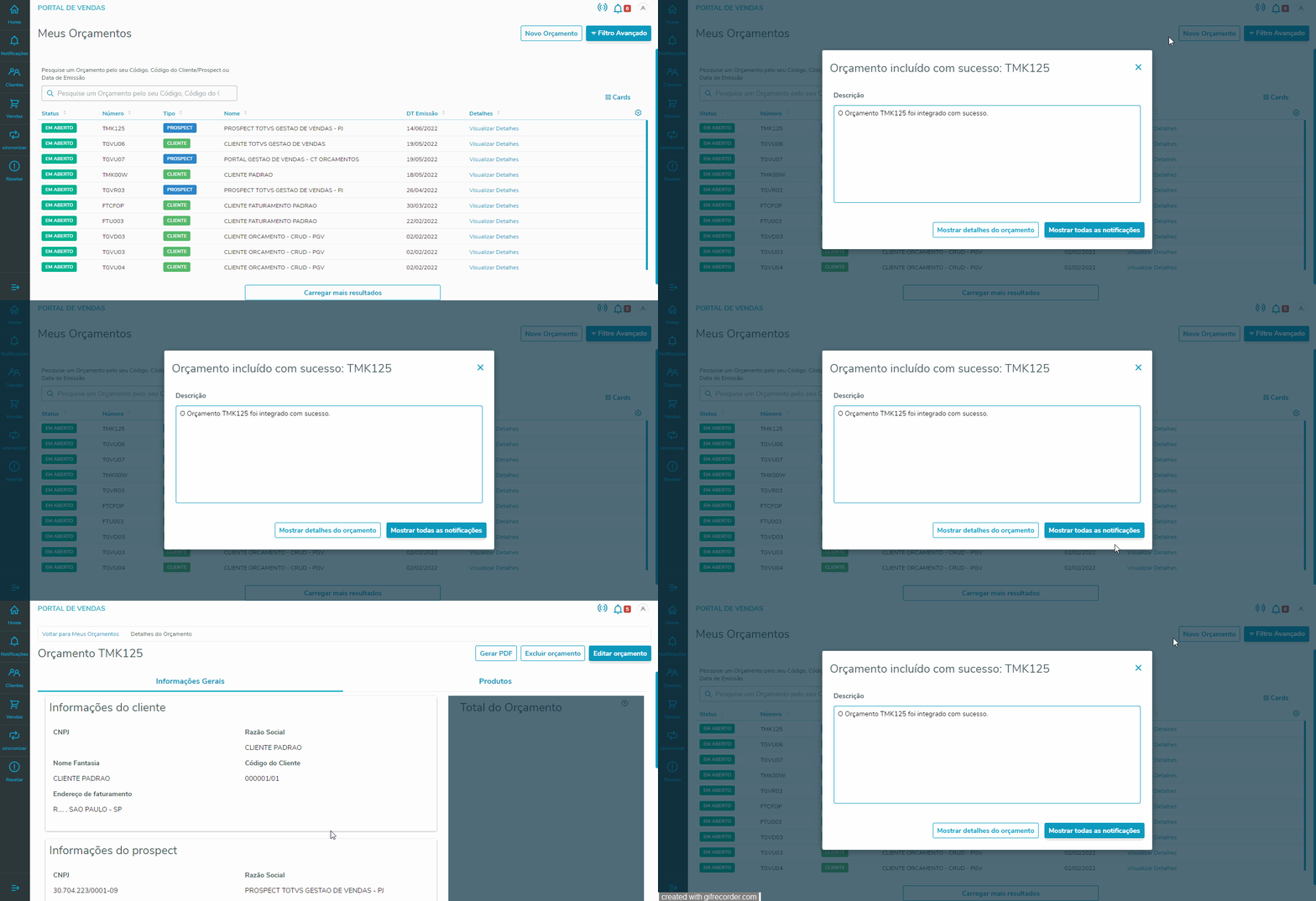
Ao finalizar a inclusão do orçamento, o servidor Protheus enviará uma notificação para o vendedor, informando se houve êxito ou se ocorreu algum erro no processamento do orçamento. Clicando na notificação, o vendedor poderá ser redirecionado para o orçamento que foi incluído ou exibir todas as suas notificações.
...
Confirmation of Addition
When you finish adding the quotation, the Protheus server sends a notification to the sales representative on whether the quotation was processed successfully or with error. By clicking the notification, the sales representative may be directed to the quotation added, or to view all their notifications.
If an error occurs when adding the quotation, the error message is shown in the notification.
Âncora FILTROS FILTROS
| FILTROS | |
| FILTROS |
03.
...
FILTERS
The page My Quotations lets you to filter records two ways, as followsA página Meus Orçamentos possibilita filtrar os registros de duas formas, sendo elas:
Âncora CONSULTAQUICKCONSULTA QUICK
a.
...
QUICK QUERY
The simplified quotation search enables quick quotation searches through the quotation code, entity code (customer or prospect) or date of issueA busca simplificada do orçamento permite buscar rapidamente os orçamentos por meio do código do orçamento, código da entidade (cliente ou prospect) ou data de emissão.

| Informações | ||
|---|---|---|
| ||
A busca por código do orçamento ou código da entidade, utiliza o operador "contém". Sendo assim, a regra da pesquisa da realizada é: buscar todos os orçamentos em que o código de orçamento e/ou o código da entidade utilizada no orçamento que contém a expressão digitada no campo da pesquisa . Já a busca por data de emissão, utiliza o operador "igual". Sendo assim, a regra pesquisa da realizada é: buscar todos os orçamentos que tem a data de emissão igual a data digitada no campo da pesquisa. |
...
| HTML |
|---|
<!-- esconder o menu -->


<style>
div.theme-default .ia-splitter #main {
    margin-left: 0px;
}
.ia-fixed-sidebar, .ia-splitter-left {
    display: none;
}
#main {
    padding-left: 10px;
    padding-right: 10px;
    overflow-x: hidden;
}

.aui-header-primary .aui-nav,  .aui-page-panel {
    margin-left: 0px !important;
}
.aui-header-primary .aui-nav {
    margin-left: 0px !important;
}
</style>
|
CONTEÚDO
- Visão Geral
- Exemplo de utilização
- Filtros
- Tipos de Visualizações
- Visualizar Detalhes
- Tabelas utilizadas
- Proteção de dados
Âncora VISAO_GERAL VISAO_GERAL
01. VISÃO GERAL
| Aviso | ||
|---|---|---|
| ||
O Portal Gestão de Vendas está disponível a partir do release 12.1.33. |
...
| Âncora | ||||
|---|---|---|---|---|
|
02. EXEMPLO DE UTILIZAÇÃO
Abaixo será apresentado um exemplo prático de utilização da opção Minhas Vendas → Meus Orçamentos, onde será incluído um orçamento através da opção Novo Orçamento.
Âncora NOVO_ORCAMENTO NOVO_ORCAMENTO
a. Novo Orçamento
Minhas Vendas → Meus Orçamentos → Novo Orçamento.
...
Âncora CONFIRMACAO CONFIRMACAO
b. Confirmação de Inclusão
Ao finalizar a inclusão do orçamento, o servidor Protheus enviará uma notificação para o vendedor, informando se houve êxito ou se ocorreu algum erro no processamento do orçamento. Clicando na notificação, o vendedor poderá ser redirecionado para o orçamento que foi incluído ou exibir todas as suas notificações.
...
Se houver falha na inclusão do orçamento, a mensagem da falha será apresentada na notificação.
Âncora FILTROS FILTROS
| FILTROS | |
| FILTROS |
03. FILTROS
A página Meus Orçamentos possibilita filtrar os registros de duas formas, sendo elas:
Âncora CONSULTA CONSULTA
a. CONSULTA RÁPIDA
A busca simplificada do orçamento permite buscar rapidamente os orçamentos por meio do código do orçamento, código da entidade (cliente ou prospect) ou data de emissão.
...
Visão Geral
Import HTML Content
Conteúdo das Ferramentas
Tarefas