
Histórico da Página
| Índice |
|---|
| Nota | ||
|---|---|---|
| ||
As informações, valores, fórmulas de cálculo e exemplos apresentados neste material são meramente ilustrativos e têm como finalidade exclusiva o apoio didático e conceitual. Esses dados não devem ser utilizados como base para lançamentos reais sem a devida validação junto à legislação vigente, normativos oficiais e orientação de profissionais habilitados. Recomenda-se que cada empresa avalie seus próprios cenários, considerando as regras específicas aplicáveis ao seu regime tributário, operações e obrigações acessórias exigidas pelos órgãos competentes. |
...
| |
The information, values, calculation formulas, and examples presented in this material are merely illustrative and are intended exclusively for educational and conceptual support. This data should not be used as a basis for actual accounting without proper validation against current legislation, official regulations, and the guidance of qualified professionals. It is recommended that each company evaluate its own scenarios, considering the specific rules applicable to its tax regime, operations, and ancillary obligations required by the competent authorities. |
01.Practical example
| Informações |
|---|
The fields F4_MALQPIS and F4_MALQCOF will no longer exist with the implementation of the project to discontinue fields from the SF4 table. More information can be found in the official documentation: CFGTRIB - Fields that Remain in the TES ( 🚧documentation under construction ) - Microsiga Protheus Line - TDN Currently, filling in these fields is necessary in scenarios where the N1_ALIQPIS and N1_ALIQCOF fields are expected to be used in the integration between Purchases and Assets, also taking into account the increased values in these fields. Given this, it became necessary to understand how this functionality will be handled in the Tax Configuration, considering the discontinuation of the aforementioned fields. |
For the increased rate and its respective calculated value to be recognized when posting the Inbound Fiscal Invoice, the rate must be applied to the desired NCM, along with the product's origin.
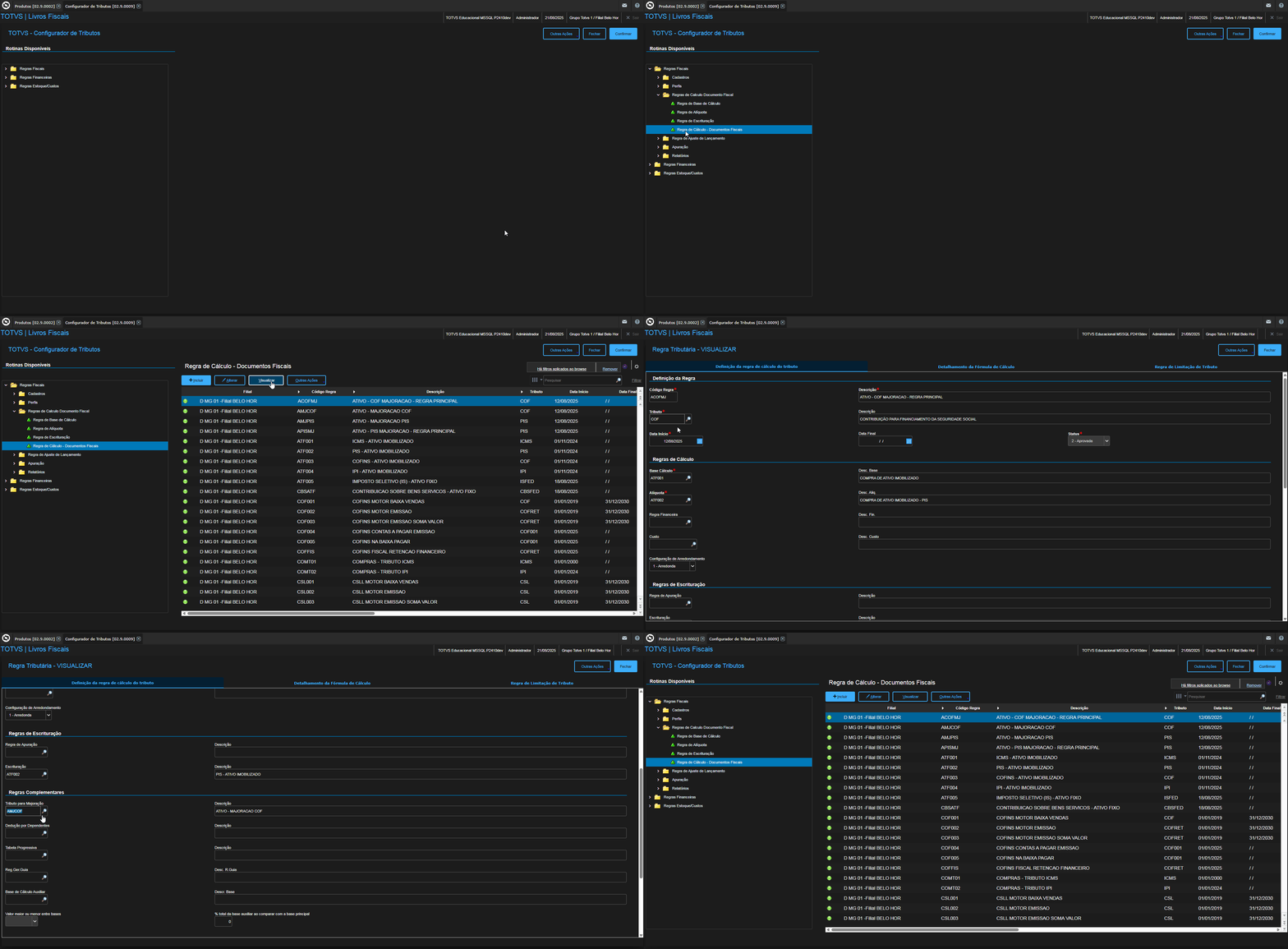
NCM x Product Registration

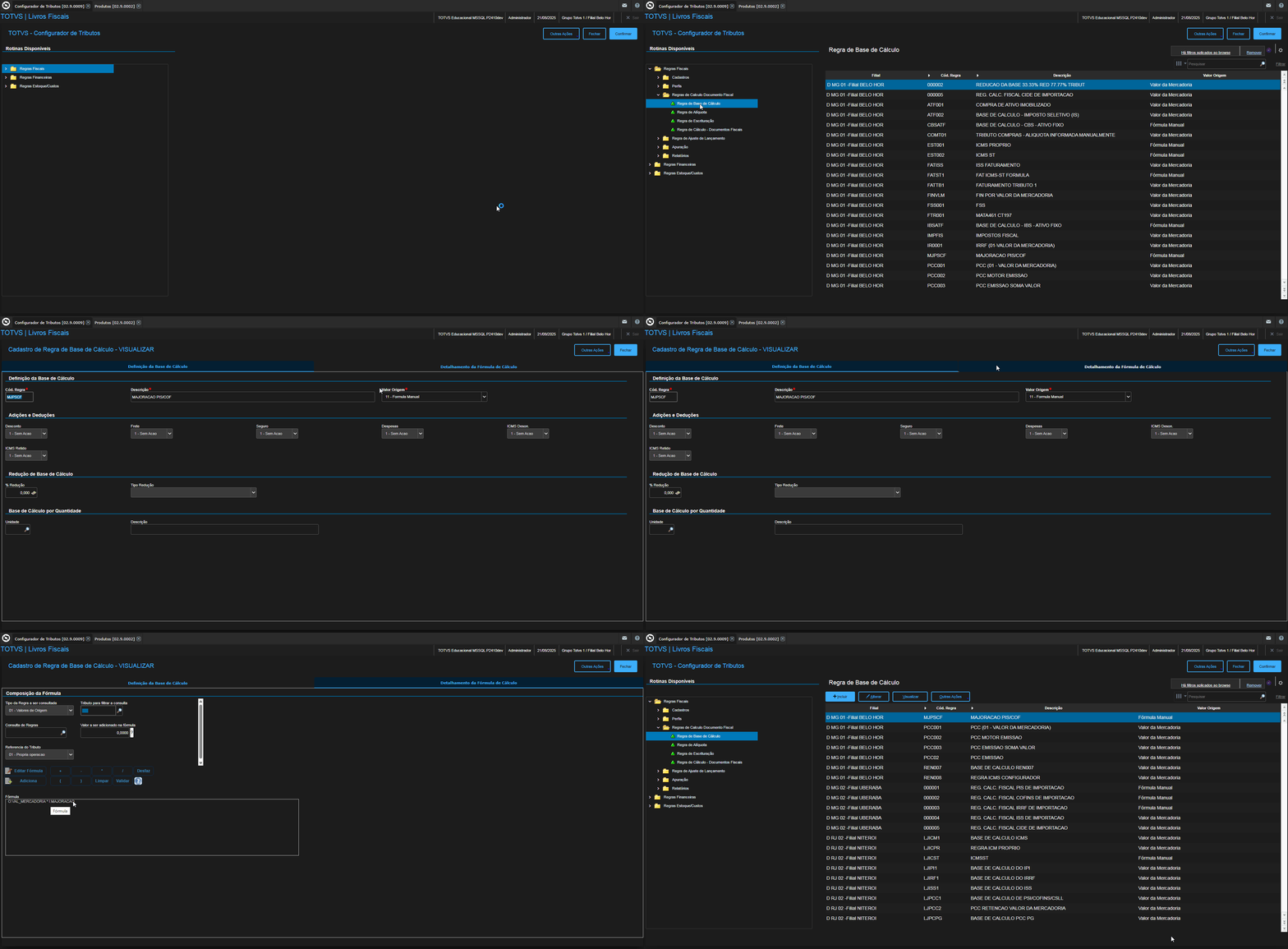
Registration of the Calculation Basis Rule – Increase
Registration of the Rate Rule – Increase (PIS)
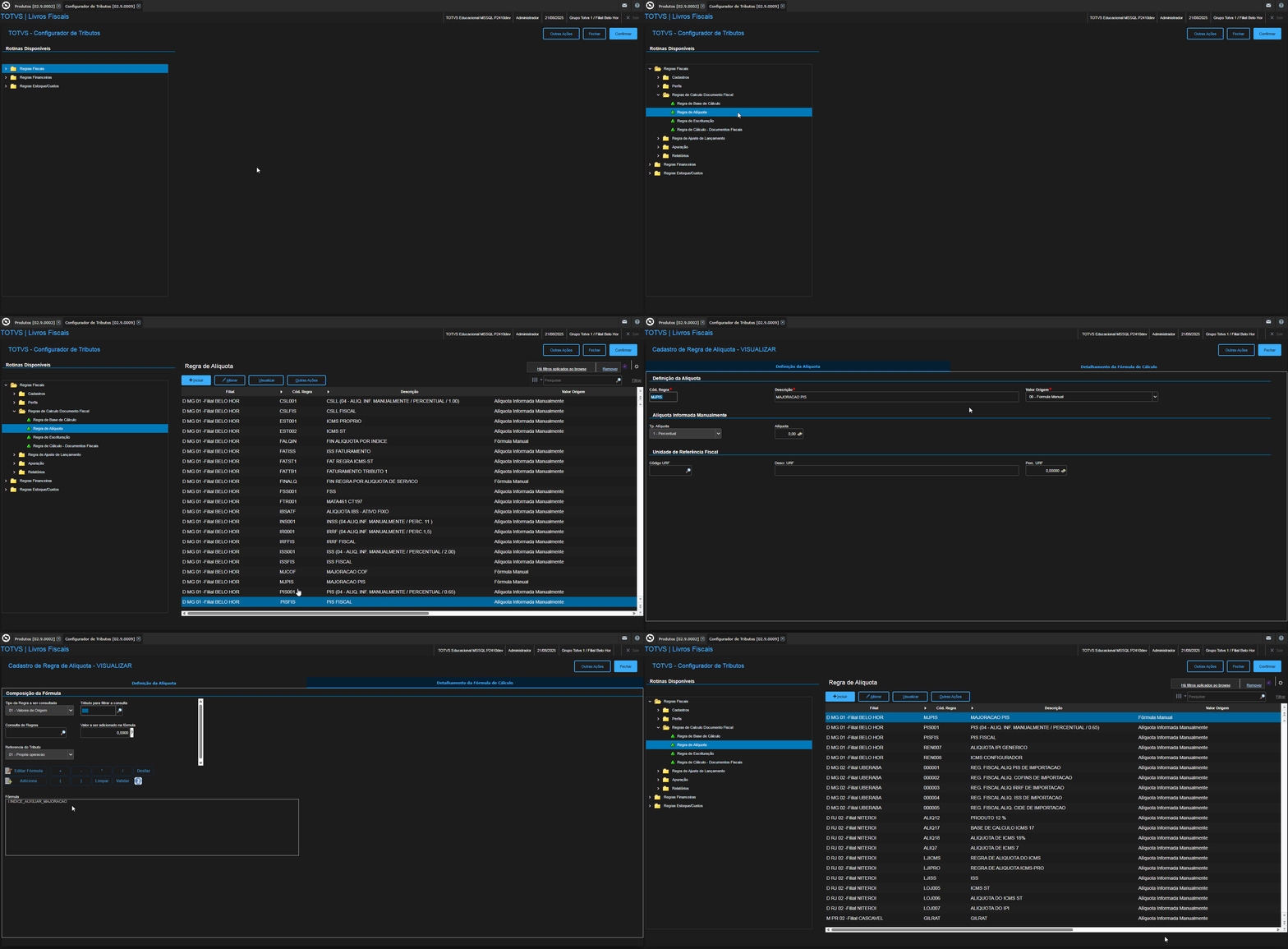
Registration of the Rate Rule – Increase (COF)

Registration of the Calculation Rule - Tax Documents - Increase (PIS)
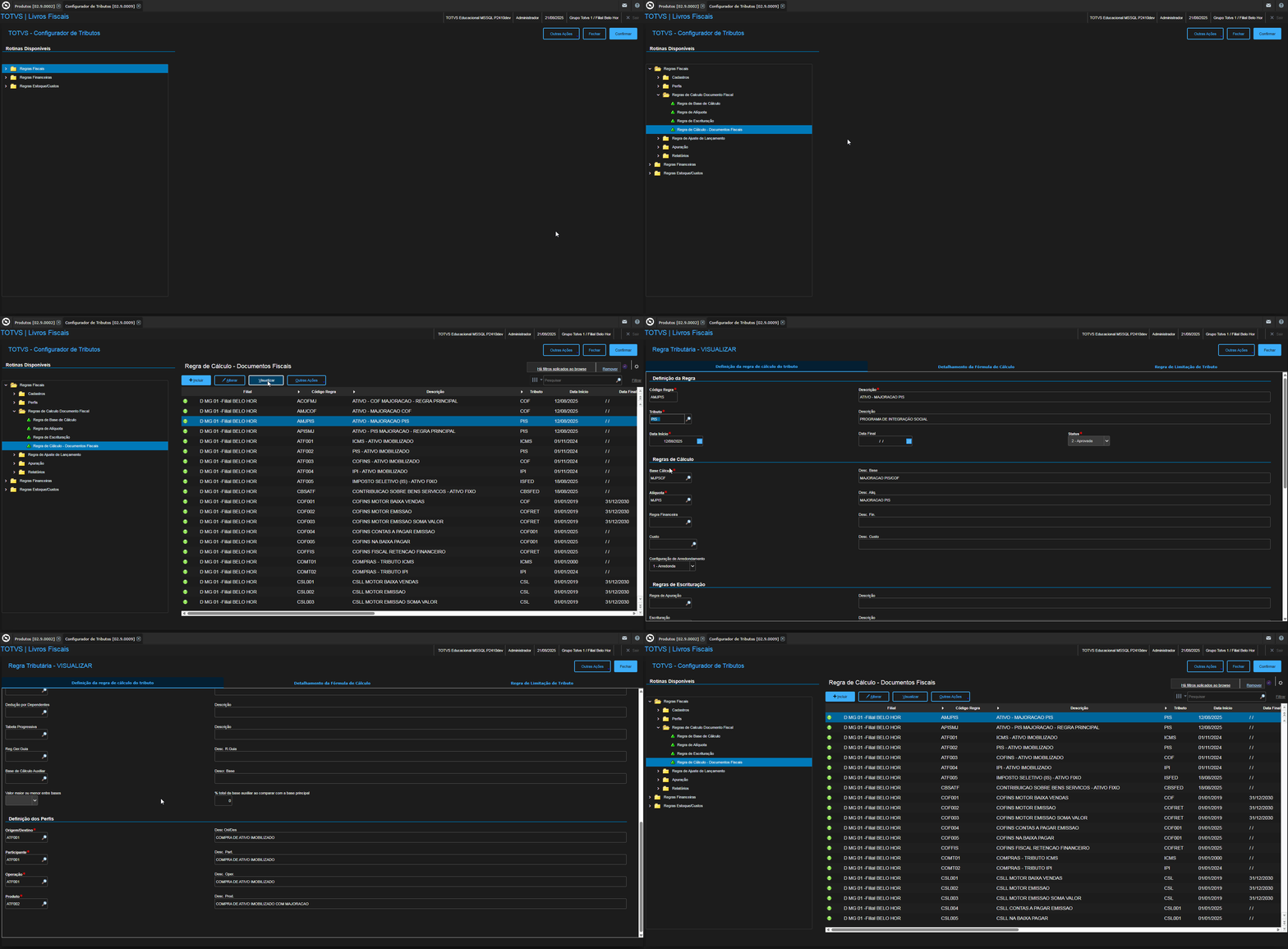
Registration of the Calculation Rule - Tax Documents - Increase (COF)

Linking the Tax for Increase in the Main PIS Rule
Note: The tax for the increase is the calculation rule registered for PIS Increase.
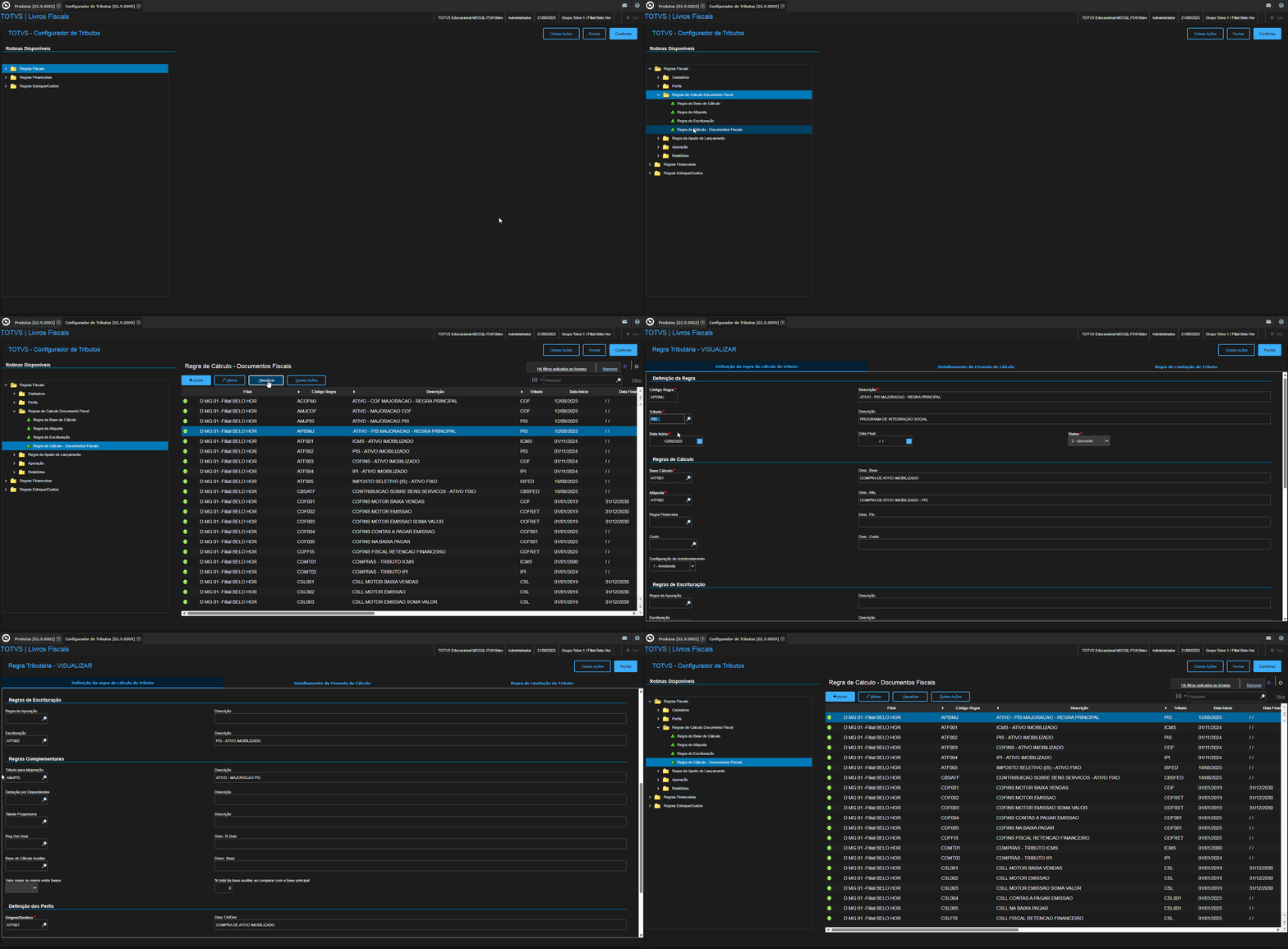
Linking the Tax for Increase in the Main COF Rule
Note: The tax for the increase is the calculation rule registered for COF Increase.
Entry Invoice Inclusion
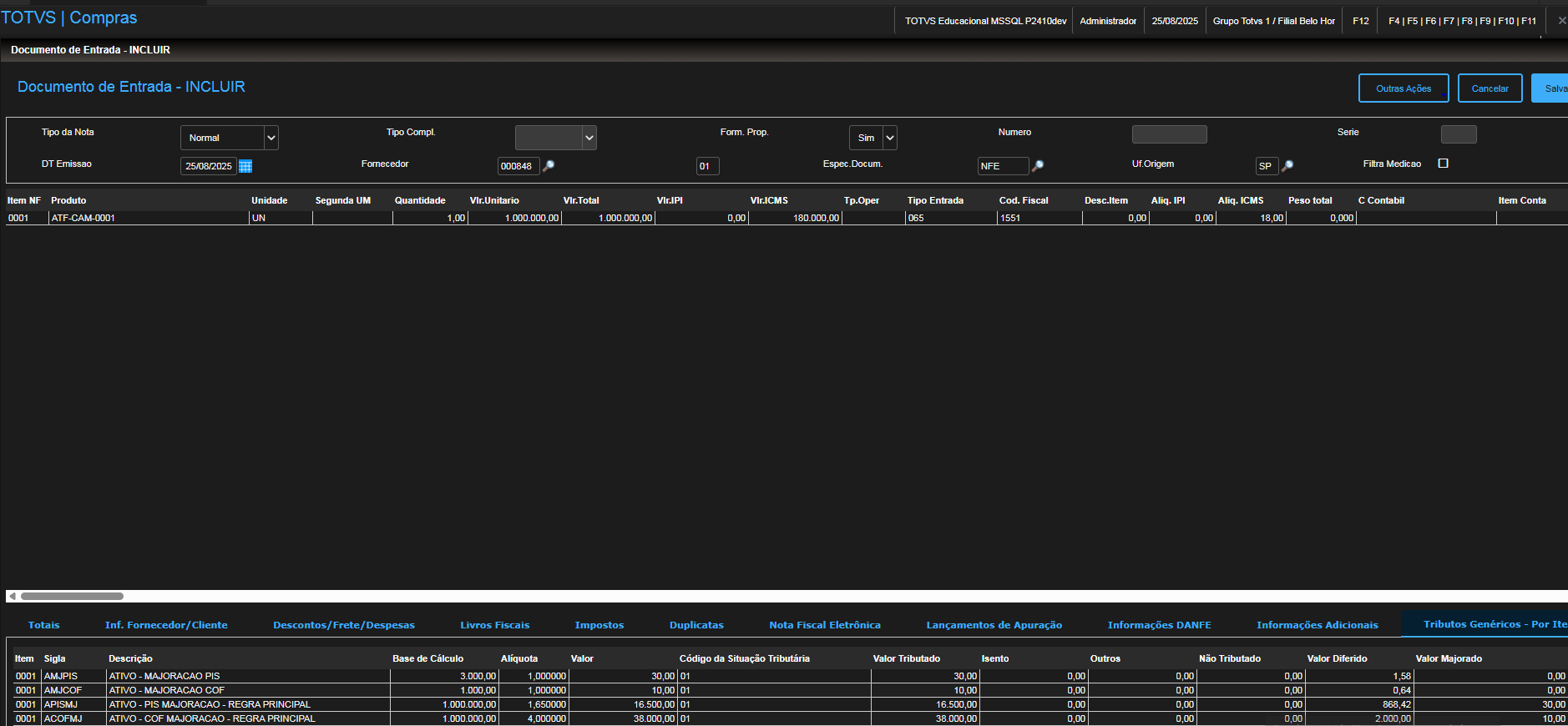
Increased PIS Value:
- Value of the Goods:
R$ 1,000,000.00 - Increased PIS Rate (NCM Registration):
0.30% - PIS Calculation Base:
1,000,000.00×0.30% = 3,000.00
- Increased Auxiliary Index (NCM Registration):
1% - Increased Value:
3,000.00×1% = 30.00
Increased COF Value:
- Value of the Goods:
R$ 1,000,000.00 - Increased PIS Rate (NCM Registration):
0.10% - PIS Calculation Base:
1,000,000.00×0.10% = 1,000.00
- Increased Auxiliary Index (NCM Registration):
1% - Increased Value:
1,000.00×1% = 10.
...
| Informações |
|---|
Os campos F4_MALQPIS e F4_MALQCOF deixarão de existir com a implementação do projeto de descontinuação de campos da tabela SF4. Mais informações podem ser consultadas na documentação oficial: CFGTRIB - Campos que Permanecem no TES ( 🚧documentação em construção ) - Linha Microsiga Protheus - TDN Atualmente, o preenchimento desses campos é necessário em cenários nos quais se espera a utilização dos campos o N1_ALIQPIS e N1_ALIQCOF na integração entre Compras e Ativo no contexto de também considerar os valores de majoração nesses campos. Diante disso, surgiu a necessidade de entender como essa funcionalidade será tratada no Configurador de Tributos, considerando a descontinuação dos campos mencionados. |
Para que no lançamento da Nota Fiscal de Entrada seja reconhecida a alíquota de majoração e o seu respectivo valor calculado, deve-se a alíquota no NCM desejado, juntamente com a origem do produto.
Cadastro NCM x Produto
Cadastro da Regra Base de Cálculo - Majoração
Cadastro da Regra de Alíquota - Majoração (PIS)
Cadastro da Regra de Alíquota - Majoração (COF)
Cadastro da Regra de Cálculo - Documentos Fiscais - Majoração (PIS)
Cadastro da Regra de Cálculo - Documentos Fiscais - Majoração (COF)
Vinculando o Tributo para Majoração na Regra Principal de PIS
Obs: O tributo para majoração é a regra de cálculo cadastrada para Majoração PIS
Vinculando o Tributo para Majoração na Regra Principal de COF
Obs: O tributo para majoração é a regra de cálculo cadastrada para Majoração COF
...
Valor Majorado PIS:
1. Valor da Mercadoria:
R$ 1.000.000,00
2. Alíquota de Majoração do PIS (Cadastro NCM):
0,30%
3. Base de Cálculo do PIS:
1.000.000,00×0,30% = 3.000,00
4. Índice Auxiliar de Majoração (Cadastro NCM):
1%
5. Valor Majorado:
3.000,00×1% = 30,00
Valor Majorado COF:
1. Valor da Mercadoria:
R$ 1.000.000,00
2. Alíquota de Majoração do PIS (Cadastro NCM):
0,10%
3. Base de Cálculo do PIS:
1.000.000,00×0,10% = 1.000,00
4. Índice Auxiliar de Majoração (Cadastro NCM):
1%
5. Valor Majorado:
...
00
Visão Geral
Import HTML Content
Conteúdo das Ferramentas
Tarefas