...
These steps refer to the manual inclusion of users in a company using TOTVS Identity. To learn about importing users from Active Directory, please refer to the Active Directory documentation.
01. Access the Users menu.
02. Click the Add User button.
...
| Painel |
|---|
| borderColor | #f2f2f2 |
|---|
| bgColor | #f2f2f2 |
|---|
|
The requested information is: First Name
User's first name
Last Name
User's last name
Would you like to enable access with a username?
This field is displayed only if username access is enabled for the company.
By enabling this option, the user will access the system using a username instead of an email. This access method is only available for regular users.
Username
This field is displayed only if username access is enabled.
Login used for authentication in Identity and TOTVS applications. This login must meet the following requirements: be up to 150 characters long, not start or end with special characters, and be unique within the company.
Email
This field is displayed only if username access is disabled.
Email address that will be used for authentication in Identity and TOTVS applications. The email address must be valid and unique for each account in the context.
Would you like to make this user an administrator?
By enabling this option, it defines that this user will have an administrator role, managing users, groups, applications, and other settings in the Identity context. In the Activation Options section, the method of account activation is selected. The available options are: - Invitation Email: When checked, account activation is performed through a link contained in the invitation sent to the user's email.
- Temporary Password: When checked, account activation is performed as soon as the registration is completed by the administrator. To view the generated temporary password, the administrator must access the user view page. No invitation is sent via email in this activation mode.
| Nota |
|---|
Both activation methods require the user to create a personal password to access the context. It is possible to configure which of the authentication methods will be pre-selected in the new user registration on the New Accounts page (documentation in Portuguese language). |
The Custom Fields section is displayed only if there are fields created in the Identity Customization feature. |
...
06. Click Add User to complete the user inclusion.
Visualizar usuário
A página de dados de usuário reúne informações de cadastro e permite ao administrador tomar uma série de ações relativas à conta do usuário como, por exemplo, reenviar o convite por e-mail, redefinir a configuração MFA, alterar o tipo do usuário, associar grupos, atribuir aplicativos, provisionar no Active Directory, desativar a conta, entre outros.
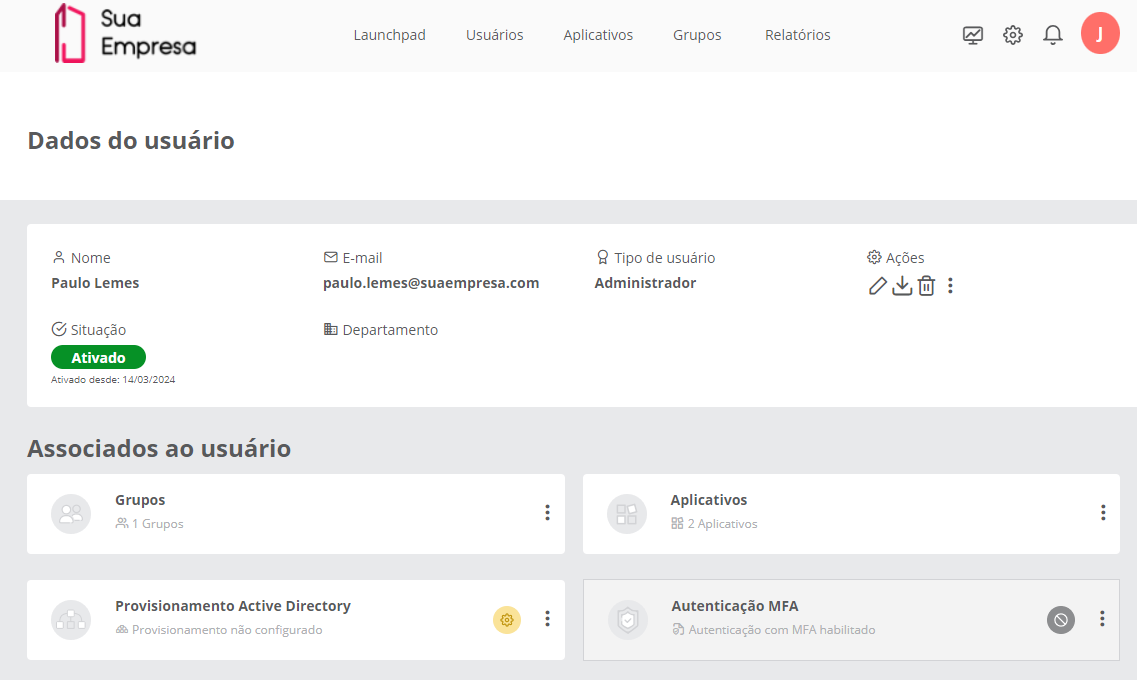 Image Removed
01. Acione o menu Usuários.
02. Localize o usuário desejado na lista.
View user
...
The user data page gathers registration information and allows the administrator to take a series of actions related to the user's account, such as resending the invitation via email, resetting the MFA configuration, changing the user type, associating groups, assigning applications, provisioning in Active Directory, deactivating the account, among others.
01. Access the Users menu.
02. Locate the desired user in the list.
03. Click on the user's name or the View  Image Added icon to open the respective page with the data03. Clique sobre o nome do usuário ou sobre o ícone Visualizar
  Image Removed para abrir a respectiva página com os dados.
| Painel |
|---|
| borderColor | #f2f2f2 |
|---|
| bgColor | #f2f2f2 |
|---|
|
| Estado |
|---|
| |
|---|
| title | DADOS DO USUÁRIO | user data |
|---|
|
Name
Single field for the user's first and last nameNome
Campo único para o nome e sobrenome do usuário. | Nota |
|---|
Para usuários sincronizados com o Active Directory, o Primeiro Nome (First Name) será considerado até o primeiro espaço. Os termos a seguir serão considerados Sobrenome (Last Name). Por exemplo: Se o nome informado neste campo for Luis Fernando da Silva, o primeiro nome será Luis e Fernando da Silva será considerado o sobrenome. |
E-mail ou nome de usuário
E-mail ou nome utilizado para acesso do usuário ao contexto da empresa no Identity. Tipo de usuário
Os tipos existentes são: administrador ou usuário comum. - Administrador: este tipo de conta garante o acesso ao gerenciamento de usuários, grupos, aplicativos e demais configurações do contexto no Identity.
- Usuário comum: este tipo de conta permite o acesso aos aplicativos navegáveis ou atribuídos ao usuário pelo administrador e ao perfil pessoal do usuário.
Situação
O usuário pode estar Ativado, Convidado, Desativado ou Bloqueado. Abaixo da situação é apresentada a data em que ocorreu a última alteração na situação do usuário. Departamento
Departamento vinculado ao usuário. Senha temporária
A senha temporária é exibida apenas se o usuário ainda não tiver alterado a senha temporária gerada pelo administrador. Campos customizados A seção Campos customizados só é apresentadase houver campos criados no recurso de Customização do Identity.
Caso tenham campos customizados, esses campos aparecem para consulta abaixo das informações cadastrais do usuário.seguir serão considerados Sobrenome (Last Name). Por exemplo: Se o nome informado neste campo for Luis Fernando da Silva, o primeiro nome será Luis e Fernando da Silva será considerado o sobrenome. For users synchronized with Active Directory, the First Name will be considered up to the first space. The following terms will be considered Last Name. For example: If the name entered in this field is Luis Fernando da Silva, the first name will be Luis, and Fernando da Silva will be considered the last name. |
Email or Username
Email or name used for the user's access to the company context in Identity.
User Type
The existing types are: administrator or regular user. - Administrator: this type of account ensures access to user management, groups, applications, and other settings in the Identity context.
- Regular user: this type of account allows access to navigable applications or those assigned to the user by the administrator and to the user's personal profile.
Status
The user can be Activated, Invited, Deactivated, or Blocked. Below the status, the date of the last change in the user's status is presented. Department
Department linked to the user. Temporary Password
The temporary password is displayed only if the user has not yet changed the temporary password generated by the administrator.
Custom Fields
The Custom Fields section is only presented if there are fields created in the Identity Customization feature.
If there are custom fields, these fields appear for consultation below the user's registration information. | Estado |
|---|
| |
|---|
| title | ASSOCIATED WITH THE USER |
|---|
|
Groups
Number of groups to which the user has been associated. Applications
Number of applications assigned to the user. Active Directory Provisioning
Status of users imported from Active Directory. Allows for the provisioning of the account in Active Directory, if there is a directory linked to the context. MFA Authentication
Indicates the status of multi-factor authentication access for this user: Disabled, Configured, and Not Configured | Estado |
|---|
| title | ASSOCIADOS AO USUÁRIO |
|---|
|
Grupos
Quantidade de grupos aos quais o usuário foi associado. Aplicativos
Quantidade de aplicativos atribuídos ao usuário. Provisionamento Active Directory
Situação dos usuários importados no Active Directory. Permite realizar o provisionamento da conta no Active Directory, caso exista uma diretório vinculado ao contexto. Autenticação MFA
Indica como está o acesso com autenticação multifator desse usuário: Desabilitado, Configurado e Não configurado.
|
Editar usuário
...
01. Acione o menu Usuários.
...