Histórico da Página
...
| Painel | ||||
|---|---|---|---|---|
| ||||
After selecting this option, the temporary password is copied to the clipboard of the authenticated user and must be passed on to the user who needs access to Identity. Upon first login, the user is required to change this password. |
Reset Password
...
This function is only allowed for users without an email. When a temporary password is generated for the user, they automatically can no longer access with the previous password.
01. Access the Users menu.
02. Locate the desired user in the list.
...
| Painel | ||||
|---|---|---|---|---|
| ||||
After selecting this option, a temporary password will be presented to the administrator. This password must be provided to the user so they can log in normally. Upon first login, the user is required to change this password. |
Desativação temporária
Esse recurso possibilita que o usuário seja desativado por um período predefinido e após esse período, seja automaticamente reativado no TOTVS Identity.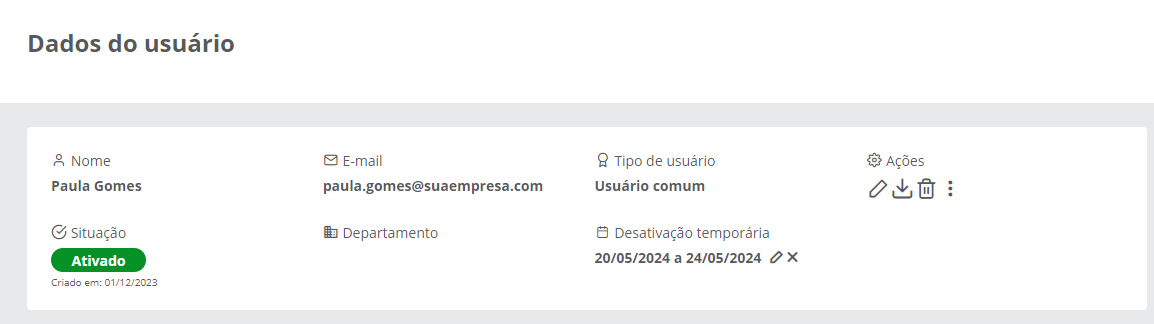
Planejar desativação temporária
01. Acione o menu Usuários.
02. Localize o usuário desejado na lista.
03. Clique sobre o nome do usuário ou sobre o ícone Visualizar  para abrir a respectiva página com os dados do usuário.
04. Em Ações, acione Mais opções  e então Desativação temporária.
Temporary Deactivation
...
This feature allows the user to be deactivated for a predefined period and after this period, to be automatically reactivated in TOTVS Identity.
Plan Temporary Deactivation
...
01. Access the Users menu.
02. Locate the desired user in the list.
03. Click on the user's name or on the View  icon to open the respective page with the user's data.
04. In Actions, click More options and then Temporary Deactivation.
05. Fill in the necessary information.05. Preencha as informações necessárias.
| Painel | ||||
|---|---|---|---|---|
| ||||
Data Inicial Data Final Descrição | ||||
Start Date |
06. Click Deactivate06. Acione Desativar.
| Painel | ||||
|---|---|---|---|---|
| ||||
After saving, the temporary deactivation period will be displayed on the user's data screen. Temporary deactivation does not synchronize the status of the deactivated user in TOTVS Identity with Após salvar, o período de desativação temporária será apresentado na tela de dados do usuário. A desativação temporária não sincroniza a situação do usuário desativado no TOTVS Identity com o Active Directory. |
Alterar período de desativação temporária
...
Visão Geral
Import HTML Content
Conteúdo das Ferramentas
Tarefas