
Histórico da Página
📘 Documentação Oficial - Integração LogClient Protheus com Fluent Bit + Grafana
...
🔧 Objetivo Geral
Integrar o LogClient (sistema de logs proprietário do Protheus) ao Fluent Bit com o objetivo de encaminhar os logs para uma estrutura centralizada e visualizá-los no Grafana. Para isso, será usado um script de parsing em Lua e um agente td-agent-bit (Fluent Bit).
...
🚀 1. Implantação
📥 Requisitos:
Protheus com LogClient configurado para saída via TCP;
Fluent Bit instalado (td-agent-bit);
Acesso root ao servidor de integração;
Script
parser_logclient.lua(presente nesta documentação);Configuração do
td-agent-bit.confcom entrada, filtro e saída.
🧱 Estrutura Geral:
[Protheus LogClient] → TCP (porta específica)
      ↓
[Fluent Bit (td-agent-bit)] → [Script Lua] → Envio HTTP/Elastic → Grafana
📂 Instalação do Fluent Bit (Ubuntu/Debian):
sudo apt-get install td-agent-bit
🛠️ Configuração do td-agent-bit.conf (exemplo básico):
[SERVICE]
    Flush        5
    Daemon       Off
    Log_Level    info

[INPUT]
    Name
Para a utilização do Agente https://fluentbit.io/ recebendo dados da integração [LogClient] .
O fluxo abaixo exemplifica bem o processo:
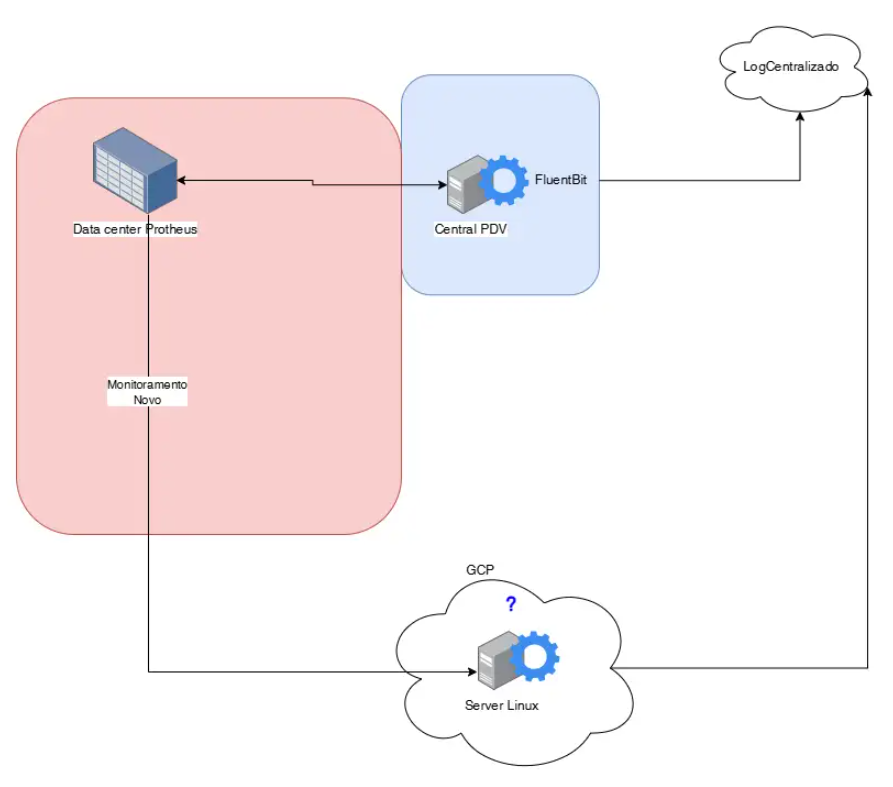
Processo de Configuração
...
editar o arquivo:
/etc/td-agent-bit/td-agent-bit.conf
...
| language | bash |
|---|
...
...
tcp
    Listen
...
0.0.0.0
...
Port ...
5170
...
...
...
...
Format ...
...
...
...
...
...
json
...
Tag ...
logclient

[FILTER]
    Name
...
...
...
 lua
    Match
...
...
...
...
...
logclient
...
...
...
...
script ...
...
...
/opt/td-agent-bit/parser_logclient.lua
...
call ...
...
...
...
 parse_logmsg

[OUTPUT]
...
Name ...
...
...
...
...
http
    Match
...
...
...
...
logclient
...
Host ...
...
...
...
...
...
...
 logs.meuserver.com
    Port
...
...
443
    URI
...
...
...
/api/logs
...
Format json
...
Header ...
...
...
...
Authorization ...
Bearer ...
TOKENX
    Compress    gzip
📜 Permissões:
Certifique-se de que o script .lua tem permissão de leitura:
chmod ...
+r /opt/td-agent-bit/parser_logclient.lua
...
🔍 2. Script Lua para Tratamento dos Logs
📄 Caminho sugerido: /opt/td-agent-bit/parser_logclient.lua
function parse_logmsg(tag, timestamp, record)
    if not record["log"] then
        return 0, timestamp, record
    end
...
local ...
log ...
= record["log"]
    local final_log = ""
    local space_found = false

    for i = 1, #log do
        local c = log:sub(i, i)
        if c ~= " " then
            final_log = final_log .. c
            space_found = false
        elseif not space_found then
            final_log = final_log .. c
            space_found = true
        end
    end

    final_log = final_log:gsub('\\"', '"')
    local keyValuePart = final_log:match("|(.*)|")

    if keyValuePart then
        local parts = split_string(keyValuePart, "|")
        for _, part in ipairs(parts) do
            local field, value
            if part:match("^Variavel=") then
                field, value = "Variavel", part:sub(10)
            elseif part:match("^Mensagem=") then
                field, value = "Mensagem", part:sub(10)
            else
                field, value = part:match("([^=]+)=([^=]+)")
            end

            if field and value then
                value = value:gsub('\\"', '"')
                local num_value = tonumber(value)
                if num_value then
                    record[field:trim()] = num_value
                else
                    record[field:trim()] = value:trim()
                end
            end
        end

        if not record["Tabela"] or record["Tabela"] == '' or record["Tabela"] == nil then
            record["Tabela"] = "_"
        end

        local valueBeforePipe = final_log:match("^(.-)%s*|")
        if valueBeforePipe then
            local date, machineName, machineIp, routine, routineId = valueBeforePipe:match("^%d+ <%d+>%d+ ([%d%-T:.]+)%S* ([%w%-]+)%(([%d%.]+)%)%((%d+)%) (%w+)%s(%d+)%s")

            if machineName or machineIp or routine or routineId then
                record["MachineName"] = machineName
                record["MachineIp"] = machineIp
                record["Routine"] = routine
...
record["RoutineId"] = routineId
...
end
...
end
...
if record["Data"] and (not record["HoraAtualizacao"] or not record["HoraAlteracao"]) then
...
if not ...
record["HoraAtualizacao"] then
...
...
record["HoraAtualizacao"] = record["Data"]
...
...
end
...
if not ...
record["HoraAlteracao"] then
...
...
record["HoraAlteracao"] = record["Data"]
...
...
end
...
end
...
else
...
record["log"] = nil
...
end

    return
...
1, timestamp, record
end

function split_string(input, delimiter)
...
local result = ...
{}
...
for match in (input .. delimiter):gmatch("(.-)" .. delimiter) do
...
    table.insert(result, match)
    end
...
return result
end

function string:trim()
...
return self:match("^%s*(.-)%s*$")
end
...
👨🔧 3. Manutenção
🔄 Reiniciar o Fluent Bit após qualquer alteração no
.confou.lua:
sudo systemctl restart td-agent-bit
📋 Logs do agente Fluent Bit:
journalctl -u td-agent-bit -f
🔐 Tokens expiram? Certifique-se de atualizar o token da API do Grafana ou servidor de logs na seção
[OUTPUT].
...
🎓 4. Formação Técnica e Treinamento
👨🏫 Recomenda-se formação básica em:
Protheus (LogClient);
Shell script (Linux);
Configuração Fluent Bit;
Leitura e escrita básica em Lua.
💡 Dica prática:
Use o seguinte comando para testar se a porta TCP está aberta:
nc -vz localhost 5170
...
📞 Suporte
Em caso de dúvidas ou erros:
Verifique logs do
td-agent-bite do Protheus.Teste o script
.luaisoladamente.Valide se os logs estão chegando no Grafana ou outro destino configurado.
Visão Geral
Import HTML Content
Conteúdo das Ferramentas
Tarefas