
Histórico da Página
📘 Documentação Oficial - Integração LogClient Protheus com Fluent Bit + Grafana
...
🔧 Objetivo Geral
Integrar o LogClient (sistema de logs proprietário do Protheus) ao Fluent Bit com o objetivo de encaminhar os logs para uma estrutura centralizada e visualizá-los no Grafana. Para isso, será usado um script de parsing em Lua e um agente td-agent-bit (Fluent Bit).
...
🚀 1. Implantação
📥 Requisitos:
Protheus com LogClient configurado para saída via TCP;
Fluent Bit instalado (td-agent-bit);
Acesso root ao servidor de integração;
Script
parser_logclient.lua(presente nesta documentação);Configuração do
td-agent-bit.confcom entrada, filtro e saída.
🧱 Estrutura Geral:
[Protheus LogClient] → TCP (porta específica)
      ↓
[Fluent Bit (td-agent-bit)] → [Script Lua] → Envio HTTP/Elastic → Grafana
📂 Instalação do Fluent Bit (Ubuntu/Debian):
sudo apt-get install td-agent-bit
🛠️ Configuração do td-agent-bit.conf (exemplo básico):
[SERVICE]
    Flush        5
    Daemon       Off
    Log_Level    info
Para a utilização do Agente https://fluentbit.io/ recebendo dados da integração [LogClient] .
O fluxo abaixo exemplifica bem o processo:
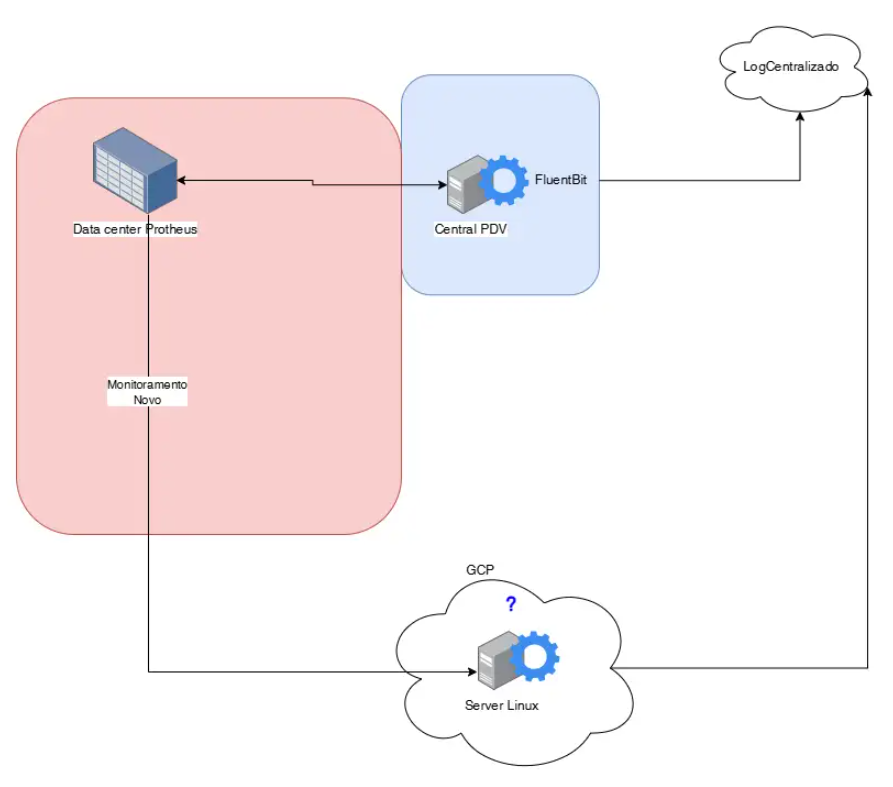
Processo de Configuração
...
/etc/td-agent-bit/td-agent-bit.conf
...
| language | bash |
|---|---|
| theme | RDark |
...
[INPUT]
    Name        tcp
    Listen      0.0.0.0
    Port
...
5170
...
Format ...
json
...
Tag ...
...
logclient

[FILTER]
    Name
...
...
lua
    Match
...
logclient
    script
...
/...
opt/td-agent-bit/...
parser_...
logclient.lua
    call
...
        parse_logmsg

[OUTPUT]
...
Name http
...
Match ...
logclient
...
Host ...
logs.meuserver.com
...
Port 443
...
URI /api/...
logs
...
Format json
...
Header Authorization Bearer ...
TOKENX
...
Compress ...
...
gzip
📜 Permissões:
Certifique-se de que o script .lua tem permissão de leitura:
chmod +r /opt/td-agent-bit/parser_logclient.lua
...
🔍 2. Script Lua para Tratamento dos Logs
📄 Caminho sugerido: /opt
...
/td-agent-bit/
...
parser_
...
logclient.lua
...
...
function parse_logmsg(tag, timestamp, record)
    if not record["log"] then
        return 0, timestamp, record
    end

    local log = record["log"]
...
    local final_log = ""
    local space_found = false

    for i = 1, #log do
        local c = log:sub(i, i)
        if c ~= " " then
            final_log = final_log .. c
            space_found = false
        elseif not space_found then
            final_log = final_log .. c
            space_found = true
        end
    end
...
final_log = final_log:gsub('\\"', '"')...
...
...
...
...
local keyValuePart = final_log:match("|(.*)|")

    if keyValuePart then
        local parts = split_string(keyValuePart, "|")
        for _, part in ipairs(parts) do
            local field, value
...
if ...
part:match("^Variavel=") then
...
field, ...
value ...
= "Variavel", part:sub(10)
...
elseif part:match("^Mensagem=") then
...
field, ...
value ...
= "Mensagem", part:sub(10)
            else
...
...
...
...
field, value = part:match("([^=]+)=([^=]+)")
...
...
       end

            if
...
field...
...
and ...
value then
...
value = value:gsub('\\"', '"')
...
local num_value = tonumber(value...
)
                if
...
num_value then
...
record[field:trim()] = num_value
...
...
...
...
...
...
...
...
else
                    record[
...
field:trim()] = ...
value:trim()
                end
            end
        end

        if not record["Tabela"] or record["Tabela"] == '' or record["Tabela"] ==
...
nil then
            record["Tabela"] = "_"
        end

        local valueBeforePipe = final_log:match("^(.-)%s*|")
        if valueBeforePipe then
            local date, machineName, machineIp,
...
routine, routineId = valueBeforePipe:match(...
"^%d+ <%d+>%d+ ([%d%-T:.]+)%S* ([%w%-]+)%(([%d%.]+)%)%((%d+)%) (...
%w+)...
%s(%d+)...
%s")

            if machineName or machineIp or routine or routineId then
                record["MachineName"] = machineName
                record["MachineIp"] = machineIp
                record["Routine"] = routine
                record["RoutineId"] = routineId
            end
        end

        if record["Data"] and (not record["HoraAtualizacao"] or not record["HoraAlteracao"]) then
            if not record["HoraAtualizacao"] then
                record["HoraAtualizacao"] = record["Data"]
            end
            if not record["HoraAlteracao"] then
                record["HoraAlteracao"] = record["Data"]
            end
        end
    else
        record["
...
log"] = ...
nil
    end

    return 1, timestamp, record
end
...
function split_string(input, delimiter)
    local result = {}
    for match in (input .. delimiter):gmatch("(.-)" .. delimiter) do
        table.insert(result, match)
    end
    return result
end
...
function string:trim()
    return self:match("^%s*(.-)%s*$")
end
...
...
👨🔧 3. Manutenção
...
🔄 Reiniciar o Fluent Bit após qualquer alteração no
.confou.lua:
...
sudo systemctl restart td-agent-bit
📋 Logs do agente Fluent Bit:
journalctl -u td-agent-bit...
-f
🔐 Tokens expiram? Certifique-se de atualizar o token da API do Grafana ou servidor de logs na seção
[OUTPUT].
...
🎓 4. Formação Técnica e Treinamento
👨🏫 Recomenda-se formação básica em:
Protheus (LogClient);
Shell script (Linux);
Configuração Fluent Bit;
Leitura e escrita básica em Lua.
💡 Dica prática:
Use o seguinte comando para testar se a porta TCP está aberta:
nc -vz localhost 5170
...
📞 Suporte
Em caso de dúvidas ou erros:
Verifique logs do
td-agent-bite do Protheus.Teste o script
.luaisoladamente.Valide se os logs estão chegando no Grafana ou outro destino configurado.
Visão Geral
Import HTML Content
Conteúdo das Ferramentas
Tarefas