Initialization of the Data Dictionary in the Database
From the Binary and LIB of the chart beside, the Data Dictionary of Protheus can be initialized directly in the Database, instead of being used in the System folder. This modification provides for major agility in the reading of the dictionary, centralization of data in the SGBD, optimization in the search of information, among others. For your data dictionary to be initialized in the database, see the features, requests and procedures below.
Notice:
The Initialization of Data Dictionary in the Database is exclusive for new bases, for customers using Protheus for the first time. Migration of base not available for database. Important: the Informix Database cannot be used with the initialization of Data Dictionary in the Database.
1. Description
The initialization of the Dictionary in the Database involves the following files (the other files of the System folder are ignore):
Menus - All files .XNU
Companies - Default company created (Default) or the chosen one in the Wizard
Help - SIGAHLP of the Systemload folder
Metadata (Data Dictionary) - File SXS_BRA.txt (or the file of the country chosen) in the Systemload folder (you must download the updated SXS_BRA of the corresponding release in the Customer's Portal - Update Protheus 12 Data Dictionary)
2. Advantages
The initialization of the Dictionary in the Database offers the following advantages:
For the Customer - Improve the management of the Customer configuration; - Centralization of metadata and database by the SGBD; - Use of C-TREE not required Windows environments.
For the User - System starts faster.
For the Microsiga Protheus system - Decrease of the I/Os in the AppServer; - Optimization of the programs in the search of information; - Easier integration with Identity.
3. Requirements
To start Protheus with the Dictionary in the Database, the following items must be considered: • Protheus 12 installed (but not initialized) with the basic configurations of connection with Database and with the updating of the Binary and LIB listed in the lateral chart ( installed is only when the Setup of installation executed for the creation of structure of folders, without opening the Smartclient not to create local dictionaries. Installation is different of Initialization); • PDV, per hour, is not supported; • Usage of License Server for the control of automatic number; • E-mail of validation for recover of password of the Admin must be registered in the first access to the Configurator, after initialization, as the Data Dictionary in the Database does not allow the recovery of the Admin password, only allows the use of the option "Forgot your password" ; • Key TOPMEMOMEGA configured in the appserver.ini file of the Application Server; • Requirement of the menu of the Configurator (SIGACFG.XNU) is in the StartPath (System folder in the standard configuration). If the file is not available for import, the message "Menu of configurator is not available in the Startpath to import" and the process is blocked; • Usage of only the standard menus of Protheus in the initialization. You cannot use the customized menus for initialization; • Evaluation of sizing of the Database, because with the use of the Dictionary in the Base, the space used and reading are larger than the regular size.
4. Important notes on the process
• The usage of the Dictionary in the Database is only available from 12.1.17 version of Protheus. • For each user connection, 2 connections are created with the DBAccess, when one of them does not consume the license and is not in transaction; • The connection used by tables of infrastructure is not in transaction; • You must not open the Company file (SIGAMAT) with DBUseArea, use the OpenSm0 or OpenSm0Excl; • You cannot opened the files of the dictionary with the DBUseArea, use function OpenSX. • The tables are created by using the multi-thread
5. Procedure for Implementation
Note:
There must be a database created, and the connection configuration (ODBC, DBAccess) must be OK.
Open the appserver.ini file, then add row {*}StartSysInDB=1* to the Environment section
\[P12DB\]
SourcePath=C:\TOTVS 12\Microsiga\protheus\apo\
RootPath=C:\TOTVS 12\Microsiga\protheus_data
CtreeRootPath=C:\TOTVS 12\Microsiga\protheus_data
StartPath=\system\
x2_path=
RpoDb=top
RpoLanguage=Portuguese
RpoVersion=120
LocalFiles=CTREE
Trace=0
localdbextension=.dtc
HELPSERVER=localhost:8079
TopMemoMega=1
DBAlias=P12DB
DBServer=localhost
DBDatabase=MSSQL
DBPort=7890
StartSysInDB=1
Important:
After initialization of environment is concluded, the key STARTSYSINDB *must not* be removed from the configuration file of the environment. Removing the key may lead to problems in the Protheus environment.  The STARTSYSINDB key *must not* be included in environments already initialized (which are not in the database).
\\ |
- Open the SmartClient, starting any Initial Program.

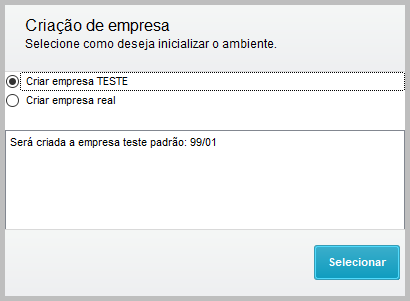
- In the window Creation of company, select whether to start the environment with the Test company or with a company with other code, then click Select
- In the window Select location, indicate the Country that is used as base for the Dictionary

- At this moment, the tables are already being created in the Database
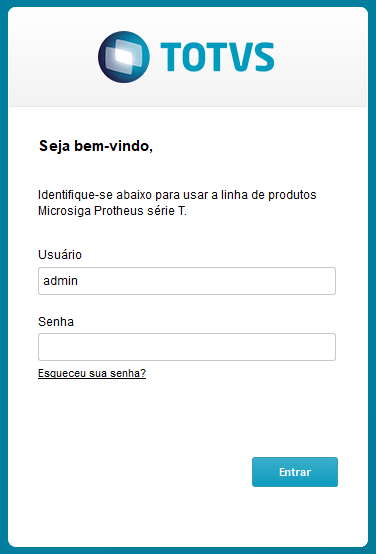
- When the login window is displayed, access with the Admin user. More tables are created at this moment.
Information:
If the initialization is interrupted by the user in any moment, the process restarted and continues from where it started, not being necessary to restore the database to proceed with the process.
- At the end of the creation of tables, the module is loaded and the base is ready to be used
Availability from:
LIB: version 20180820 Binary: Build 7.00.131227A - Jul 27 2018 DBAccess: Build 20171117-20180412
The Informix Database is not enable for the initialization of Data Dictionary in the Database.
Content: