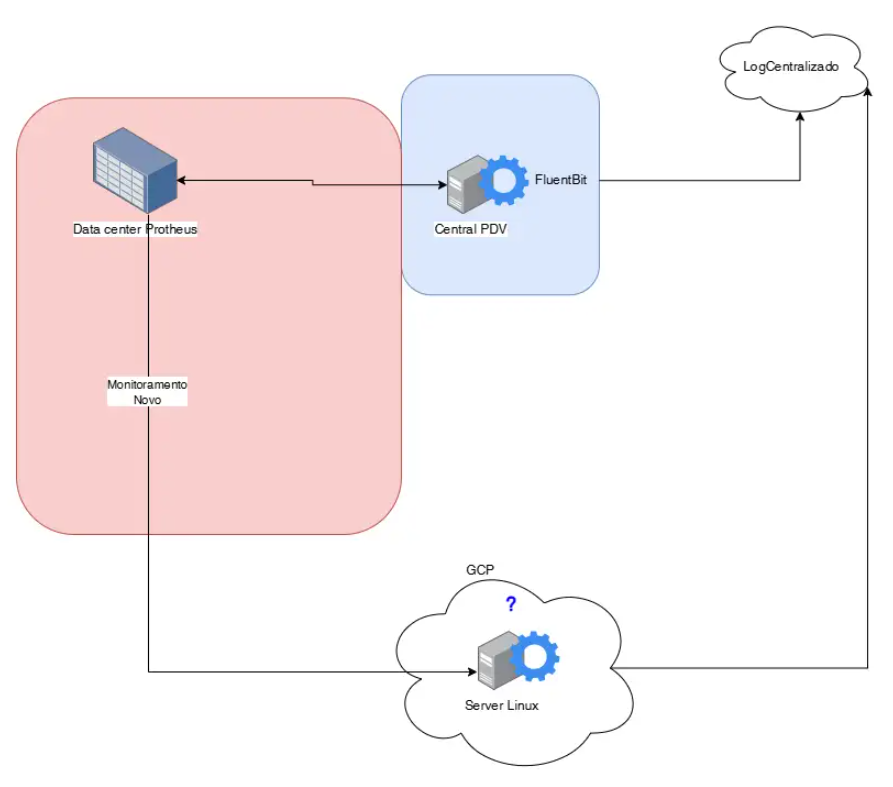
Para a utilização do Agente https://fluentbit.io/ recebendo dados da integração [LogClient] .
O fluxo abaixo exemplifica bem o processo:
editar o arquivo:
/etc/td-agent-bit/td-agent-bit.conf
E acrescentar essas regras:
[SERVICE]
    # Flush
    # =====
    # set an interval of seconds before to flush records to a destination
    flush        10

    # Daemon
    # ======
    # instruct Fluent Bit to run in foreground or background mode.
    daemon       Off

    # Log_Level
    # =========
    # Set the verbosity level of the service, values can be:
    #
    # - error
    # - warning
    # - info
    # - debug
    # - trace
    #
    # by default 'info' is set, that means it includes 'error' and 'warning'.
    log_level    trace

    # Parsers File
    # ============
    # specify an optional 'Parsers' configuration file
    parsers_file parsers.conf

    # Plugins File
    # ============
    # specify an optional 'Plugins' configuration file to load external plugins.
    plugins_file plugins.conf

    # HTTP Server
    # ===========
    # Enable/Disable the built-in HTTP Server for metrics
    http_server  Off
    http_listen  0.0.0.0
    http_port    2020

    # Storage
    # =======
    # Fluent Bit can use memory and filesystem buffering based mechanisms
    #
    # - https://docs.fluentbit.io/manual/administration/buffering-and-storage
    #
    # storage metrics
    # ---------------
    # publish storage pipeline metrics in '/api/v1/storage'. The metrics are
    # exported only if the 'http_server' option is enabled.
    #
    storage.metrics on

    # storage.path
    # ------------
    # absolute file system path to store filesystem data buffers (chunks).
    #
    storage.path /tmp/storage

    # storage.sync
    # ------------
    # configure the synchronization mode used to store the data into the
    # filesystem. It can take the values normal or full.
    #
    storage.sync full

    # storage.checksum
    # ----------------
    # enable the data integrity check when writing and reading data from the
    # filesystem. The storage layer uses the CRC32 algorithm.
    #
    # storage.checksum off

    # storage.backlog.mem_limit
    # -------------------------
    # if storage.path is set, Fluent Bit will look for data chunks that were
    # not delivered and are still in the storage layer, these are called
    # backlog data. This option configure a hint of maximum value of memory
    # to use when processing these records.
    #
    storage.backlog.mem_limit 800M

[INPUT]
    Name        tcp
    Listen      0.0.0.0
    Port        5140
    Tag         udp.logs
    Format      none
#[OUTPUT]
#    Name        file
#    Match       udp.logs
#    Path        /var/log/fluent-bit-output.log
#    Format      plain
#    Buffer_Chunk_Size  1M
#    Buffer_Max_Size    5M

#[OUTPUT]
#    Name        stdout
#    Match       udp.logs

[FILTER]
    Name          lua
    Match         udp.logs
    script        /etc/td-agent-bit/processa_log.lua
    call          parse_logmsg

[OUTPUT]
    name        http
    match       udp.logs
    host        35.202.7.125
    port        443
    uri         /ProtheusProduction.logs
    format      json
    tls         On
    tls.verify  Off
    http_User   protheus
    http_Passwd protheus456#
    Retry_Limit False
    net.connect_timeout 15s
    net.keepalive true
    net.keepalive_idle_timeout 60s
|