This documentation refers to the new process editor of the platform. If you are using the current process editor, access Configure activities and flows. |


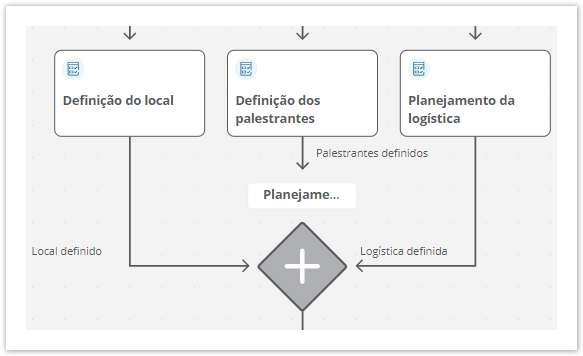
The Join component indicates the end of parallelism in the process flow, that is, the end of parallel stages (activities or flows), returning to the main and single flow.
This component must necessarily be used at the end of activities and parallel flows initiated by a Parallel component.
When there are still pending parallel stages, the request remains positioned at the Join component of the process until all of them are completed. When all parallel stages (activities or flows) are completed, the request is automatically sent to the next stage.
If the Join component is related to a stage that does not have a defined assignment mechanism, the request is sent to the first person found in the list of people with active registration on the platform in alphabetical order, even if that person has no participation or involvement in the process in question.
In this case, the request will be automatically sent to Adelina da Costa, even though she was the last person to be registered on the platform, since if the list of people is arranged in alphabetical order, her name will be the first on the list. 1 → The names listed in this example are fictitious and merely illustrative. |

|
01. In the process diagram, click on the Join component  you want to configure.
02. Define a title or name for the component that represents the end of the parallel steps in the process flow.
The name can also be changed directly on the component by clicking on its current name and then on Edit
|
03. Click on Save draft – located on the right side of the top bar – to save the settings made on the Join component.
04. In the message displayed, click on Ok, I understand.
This documentation is valid from the Voyager update (2.0). If you are using a previous update, it may contain information different from what you see on your platform. |
<!-- Hotjar Tracking Code for http://tdn.totvs.com/display/fb -->
<script>
    (function(h,o,t,j,a,r){
        h.hj=h.hj||function(){(h.hj.q=h.hj.q||[]).push(arguments)};
        h._hjSettings={hjid:1280165,hjsv:6};
        a=o.getElementsByTagName('head')[0];
        r=o.createElement('script');r.async=1;
        r.src=t+h._hjSettings.hjid+j+h._hjSettings.hjsv;
        a.appendChild(r);
    })(window,document,'https://static.hotjar.com/c/hotjar-','.js?sv=');
</script> |
 – located on the right side.