
CONTENTS
01. OVERVIEW
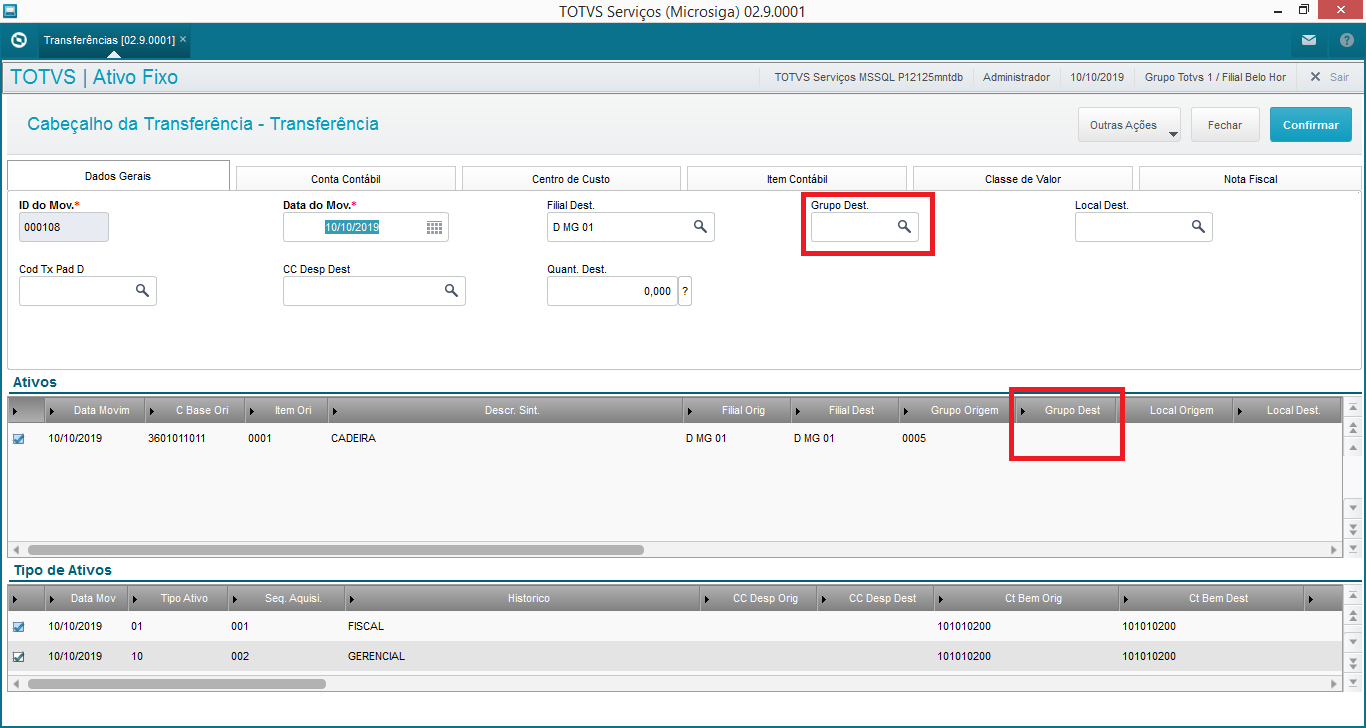
When transferring an asset, fields Dest. Group of folder General Data (FN9_GRPDES) and of Assets Grid (FNR_GRPDES) are not filled in, because field Assets Group is a facilitator to fill in the accounting data of the asset and you must not regard it as a prerequisite to execute an operation.
This field is not completed in order to avoid the following collateral effects:
- In an environment in which table Assets Group (FNG) is exclusive between company/branch, when making a transfer, if there is a trigger, the destination asset group may not exist at the destination branch;
- In an environment in which table Assets Group (FNG) is exclusive between company/branch, when making a transfer, if there is a trigger, the destination asset group may not have the same characteristics as the destination branch;
Thus, to meet all scenarios, field Destination Asset Group is not filled in when you make a transfer.
If there is a need for field Destination Group to be filled in with the Group tied to the Asset for transfers between branches, we suggest the creation of a custom trigger.
Important
Routines that use Assets Group:
- ATFA012 - Fixed Assets Register;
- ATFA036 - Asset Posting;
- ATFA060 - Asset Transfer;
- ATFA240 - Asset Classification;
- ATFA251 - Acquisition by Transfer;
- ATFA125 - Requests for Posting and Transfer.
02. EXAMPLE OF ROUTINE BEHAVIOR
Assets Register (ATFA012) with tied Assets Group.
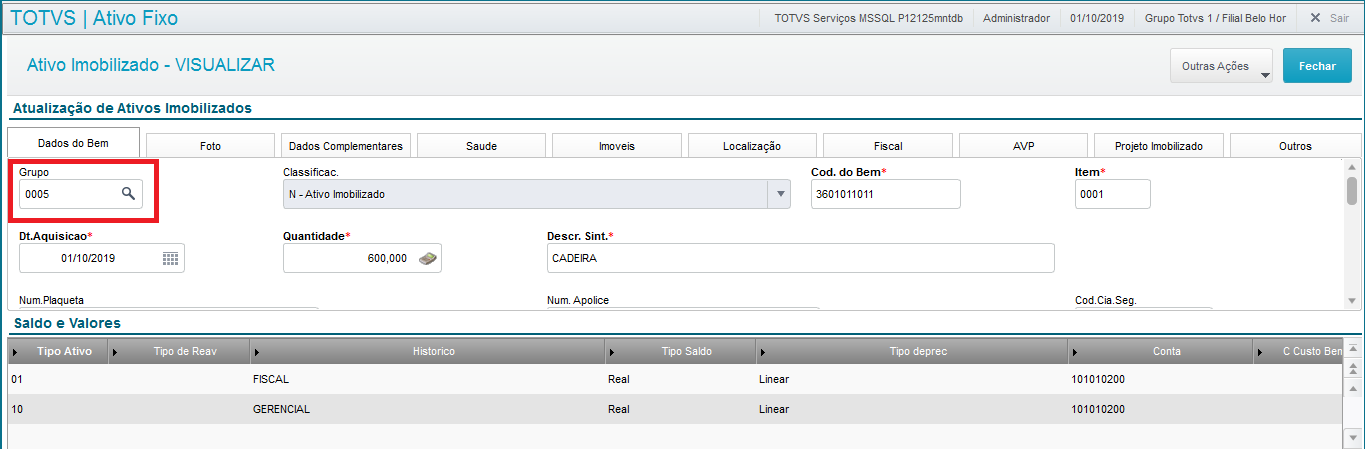
When you execute the Asset Transfer (ATFA060) of this asset, the fields of Destination Group (FN9_GRPDES/FNR_GPRDES) are not filled in.

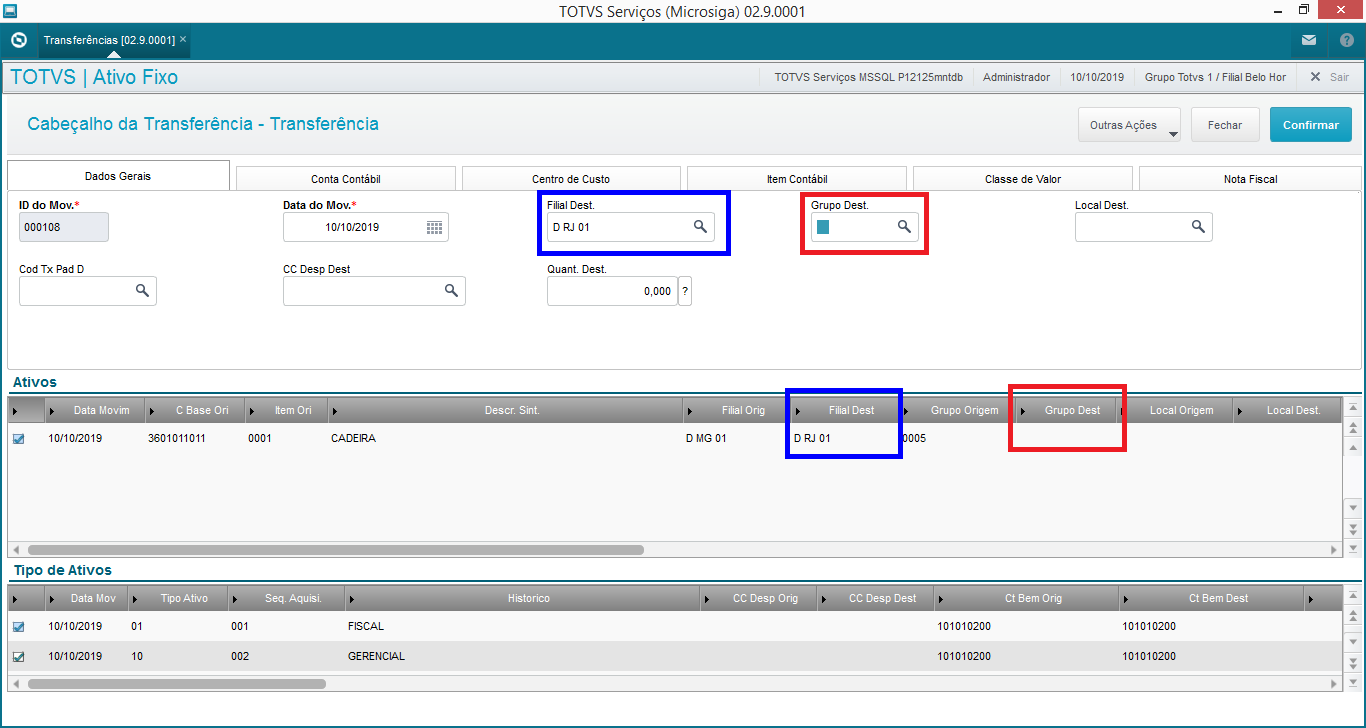
If you change the Destination Branch (FN9_FILDES/FNR_FILDES), field Destination Group remains blank.
03. EXAMPLE OF TRIGGER CREATION
Suggestion of trigger creation for field Asset Group, if set to be triggered when editing field Destination Branch:
SX7 | TRIGGERS |
X7_CAMPO | FNR_FILDES |
X7_SEQUENC | 001 |
X7_REGRA | M->FNR_GRPORI |
X7_CDOMIN | FNR_GRPDES |
X7_TIPO | P |
X7_CONDIC | !EMPTY(M->FNR_GRPORI) |
Note:
- When it comes to transfers between branches, the Asset Group of origin must be at the destination branch.
- Once the trigger is activated, the fields related to accounting entities (FNS table) are loaded in accordance with the group register at the destination branch, disregarding origin branch data.
- The group is just a facilitator, so you can change it even if it is tied to an asset.
04. FIELDS YOU CAN TRANSFER THROUGH THE ASSET GROUP
If you fill in the asset group (FN9_GRPDES), the system triggers some fields for tables FNR and FNS containing the data transferred. You may know what has been changed through the source and target fields available on the transfer screen. Therefore, routine ATFA060 does not use all asset group fields to update the asset. Basically, it uses only the fields required to perform the accounting transfer, being a facilitator to fill out the routine.
The trigger of the field FN9_GRPDES can fill in the following fields:
- FNR_GRPDES - Target Assets Group
- FNR_TXPADD - Regulated Rate
- FNS_CONCOD - Corr Acct
- FNS_CONTAD - Des Acct
- FNS_CONDDD - Dep Exp Acct
- FNS_CONDAD - Accr Dep Acct
- FNS_CONCDD - Depr Corr Acct
- FNS_CCDESD - Depreciation Expense CC
- FNS_CCBEMD - CC of Source Asset
- FNS_CCCORD - Indexation CC
- FNS_CCDDD - Depreciation Exp CC
- FNS_CCDAD - CC of Accrued Depr
- FNS_CCCDD - Depreciation Corr CC
- FNS_ITBEMD - Asset Item
- FNS_ITCORD - Indexation Item
- FNS_ITDEAD - Accrued Depr Item
- FNS_ITCDED - Depreciation Corr Item
- FNS_ITDESD - Expense Item
- FNS_ITDEDD - Depreciation Exp Item
- FNS_CVDSPD - Expense Val Class
- FNS_CVDEPD - Depreciation Exp Val Class
- FNS_CVBEMD - Asset Value Class
- FNS_CVCORD - Indexation Val Class
- FNS_CVCDED - Accrued Depr Val Class
- FNS_CVDESD - Depreciation Corr Val Class
You can also transfer the additional entity fields of the asset group to the asset in the transfer, given that the environment contains the documentation improvement: DT Additional Entities in the Asset Transfer routine
The fields above are the target fields, the values of which are transferred to table SN1 or SN3 when confirming the asset transfer operation. The source fields of tables FNR and FNS keep the previous content for history purposes and transfer cancellation.
Note
The fields group trigger asks whether you want to Mirror or Update depending on the group.
The Mirror option fills in the fields above even if they are blank in the group register, leaving them without data if needed.
The Update option fills in the field only if it is completed in the assets group (SNG).
Visão Geral
Import HTML Content
Conteúdo das Ferramentas
Tarefas