
CONTENTS
01. OVERVIEW
The purpose of this business object is to display the asset form in accordance with the asset register, based on the Position Valued on Date report.
Important
For this report to work, follow the documentation below to configure the Smart View in your environment: Smart View - Configuration of the Protheus product integrated with Smart View.
Test Phase
This feature is on a test phase with pilot customers, being officially introduced in Release 12.1.2310.
This page and functionality may change until the release date of the functionality.
02. EXAMPLE
Contextualization
Report:

Data View:

Dynamic Table:

Important
We must emphasize that it is up to the customer to optimally organize the dynamic table as needed and following the rule desired, in accordance with fields provided in the schema and parameter settings.
Parameters:
Parameters | Description | Activated in business object? |
SV_MULTBRANCH | Branches | Yes |
SV_MOEDAS | Currency? | Yes |
SV_CLASSPATR | Asset Classif. | Yes |
MV_PAR01 | Date of Balance? | Yes |
MV_PAR02 | Type? | Yes |
MV_PAR03 | Select Currency? | No |
MV_PAR04 | From Acquisition Date? | Yes |
MV_PAR05 | To Acquisition Date? | Yes |
MV_PAR06 | From Base Code? | Yes |
MV_PAR07 | From Item? | Yes |
MV_PAR08 | To Base Code? | Yes |
MV_PAR09 | To Item? | Yes |
MV_PAR10 | From Group? | Yes |
MV_PAR11 | To Group? | Yes |
MV_PAR12 | From Account? | Yes |
MV_PAR13 | To Account? | Yes |
MV_PAR14 | From Cost Center? | Yes |
MV_PAR15 | To Cost Center? | Yes |
MV_PAR16 | From Accounting Item? | Yes |
MV_PAR17 | To Accounting Item? | Yes |
MV_PAR18 | From Value Class? | Yes |
MV_PAR19 | To Value Class? | Yes |
MV_PAR20 | Select Branches? | No |
MV_PAR21 | Start Sheet? | No |
MV_PAR22 | End Sheet? | No |
MV_PAR23 | No. Restart Page ? | No |
MV_PAR24 | Display information ? | Yes |
MV_PAR25 | Balance Type? | Yes |
MV_PAR26 | Select Asset Classification | No |
MV_PAR27 | Display Realized Assets Provis ? | Yes |
MV_PAR28 | Use it? | Yes |
Important
Parameters set to No in the list above are hidden in the report or Smart View design. These fields neither affect the report nor its objects (Data View, Design and Dynamic Table).
Selection of Branches and Header in the Design
The features below are improvements to Smart View evolution, advising the directives below
- Framework offers the Branch Selection parameter as an improvement in Smart View, implemented in all modules that use this feature in their reports.
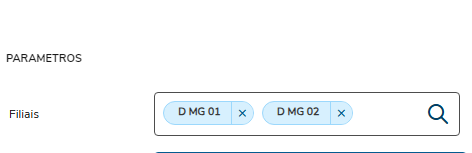
- The branch description on the report header is an improvement to the Smart View design that is expected to be released in upcoming continuous dispatches.

These evolutions will be available in upcoming continuous dispatches, in accordance with the calendar and the release schedule.
For further information, refer to the link below.
03. BUSINESS OBJECT FIELDS
Name Displayed | Description | Origin |
Branch | Record Branch Code | N3_FILIAL |
Record Branch Descr. | Record Branch Description | System |
Asset Base Code | Base Code of Asset | N3_CBASE |
Summ. Descr. | Summarized Description of Asset | N1_DESCRIC |
Acquisition Dt | Date of acquisition of Asset. | N1_AQUISIC |
Transac. Date | Date of Transaction | N4_DATA |
Balance Type | Balance Type | N3_TPSALDO |
Balance Type Descr. | Balance Type Description | System |
Item Code | Asset Item Code | N3_ITEM |
Group | Asset Group | System |
Asset Type | Type of Asset | N1_GRUPO |
Descr. Asset Type | Asset Type Description | System |
Depr. Type Descr. | Depreciation Type Description | System |
Classification | Classification Code | N1_PATRIM |
Classific. | Classification Description | System |
Quantity | Asset Quantity | N1_QUANTD |
Account | Ledger Account | N3_CCONTAB |
Mask Account | Account Mask | System |
Account Description | Account Description | System |
Asset Cost C | Asset Account Cost Center | N3_CUSTBEM |
Asset Item | Asset Account Item | N3_SUBCCON |
Asset Val Cl | Asset Value Class | N3_CLVLCON |
Sequence | Acquisition Sequence | N3_SEQ |
Reassessment Sequence | Reassessment Sequence | N3_SEQREAV |
Registration No. | Registration Number | N1_CHAPA |
Posting Dt | Posting Date | N1_BAIXA |
Flag of Posting | Flag of Posting | System |
Currency | Currency of Entry | System |
Original Value | Original Value | System |
Exp Value | Expansion Value | System |
Updated Value | Updated Value | System |
Accrued Depreciation | Accrued Depreciation | System |
Residual Value | Residual Value | System |
Accrued Depreciation Correction | Accrued Depreciation Correction Value | System |
Accrued Correction | Accrued Correction Value | System |
Postings Value | Value of Postings | System |
Sale Value | Sale Value | System |
Company Name | Logged Company Name | System |
Branch Name | Logged Branch Name | System |
Currency 01 Description | Description of Currency 01 (Symbol) | MV_SIMB1 |
Currency 02 Description | Description of Currency 02 (Symbol) | MV_SIMB2 |
Currency 03 Description | Description of Currency 03 (Symbol) | MV_SIMB3 |
Currency 04 Description | Description of Currency 04 (Symbol) | MV_SIMB4 |
Currency 05 Description | Description of Currency 05 (Symbol) | MV_SIMB5 |
Groped Asset Qty | Grouped Asset Quantity (Used only for validation in report design) | System |
Display Tax | Display Tax Flag (Used only for validation in report design) | System |
Display Managerial | Display Managerial Flag (Used only for validation in report design) | System |
Display Encouraged | Display Encouraged Flag (Used only for validation in report design) | System |
04. ACCESS TO THE OBJECT VIA PROTHEUS MENU
You can run the Position Valued on Date business object through the Protheus menu using the program ATFSV005.
05. TABLES
- SN1 - Fixed Assets
- SN3 - Balances and Values
Visão Geral
Import HTML Content
Conteúdo das Ferramentas
Tarefas