
Histórico da Página
...
CONTENT
- Visão Geral
- Exemplo de utilização
- Campos do ativo para o EFD Contribuições
- Próximos passos
- Demais Informações
01. VISÃO GERAL
Neste documento iremos detalhar como realizar a inclusão de Ativos Imobilizados que foram adquiridos e possuem depreciação acumulada ou que são controlados em outros sistemas/planilhas.
A inclusão dos ativos pode ser efetuada pelo usuário através do compras, na rotina MATA103 e depois realizando a classificação do bem(ATFA240) ou manualmente na rotina ATFA012(Ativos).
Também é possível incluir ativos de forma automática através do ExecAuto da rotina ATFA012 ou pelo importador MILE, lembrando que essas opções são customizadas e é responsabilidade do cliente a alimentação dos campos que entender necessários.
02. EXEMPLO DE UTILIZAÇÃO
O Protheus não realiza a depreciação retroativa dos bens, mas é possível incluí-lo com depreciação acumulada, para que o sistema saiba quanto o ativo já depreciou e assim poder continuar a sua depreciação mês a mês.
Portanto, ao incluir um bem que já possui depreciação, deverá informar normalmente os campos de inicio de aquisição, data de inicio de depreciação e depreciação acumulada, isso com os dados de quando o bem foi adquirido de fato.
Exemplo:
Há um ativo que está sendo controlado através de planilha, mas ainda não está cadastrado no Protheus, o bem está na empresa desde 01/01/2020 e será cadastrado para começar a depreciar mês a mês a partir de 01/01/2024.
Com isso o parâmetro MV_ULTDEPR da filial que será cadastrado o bem precisará estar igual a 20231231 e o bem poderá ser alimentado conforme imagem abaixo:
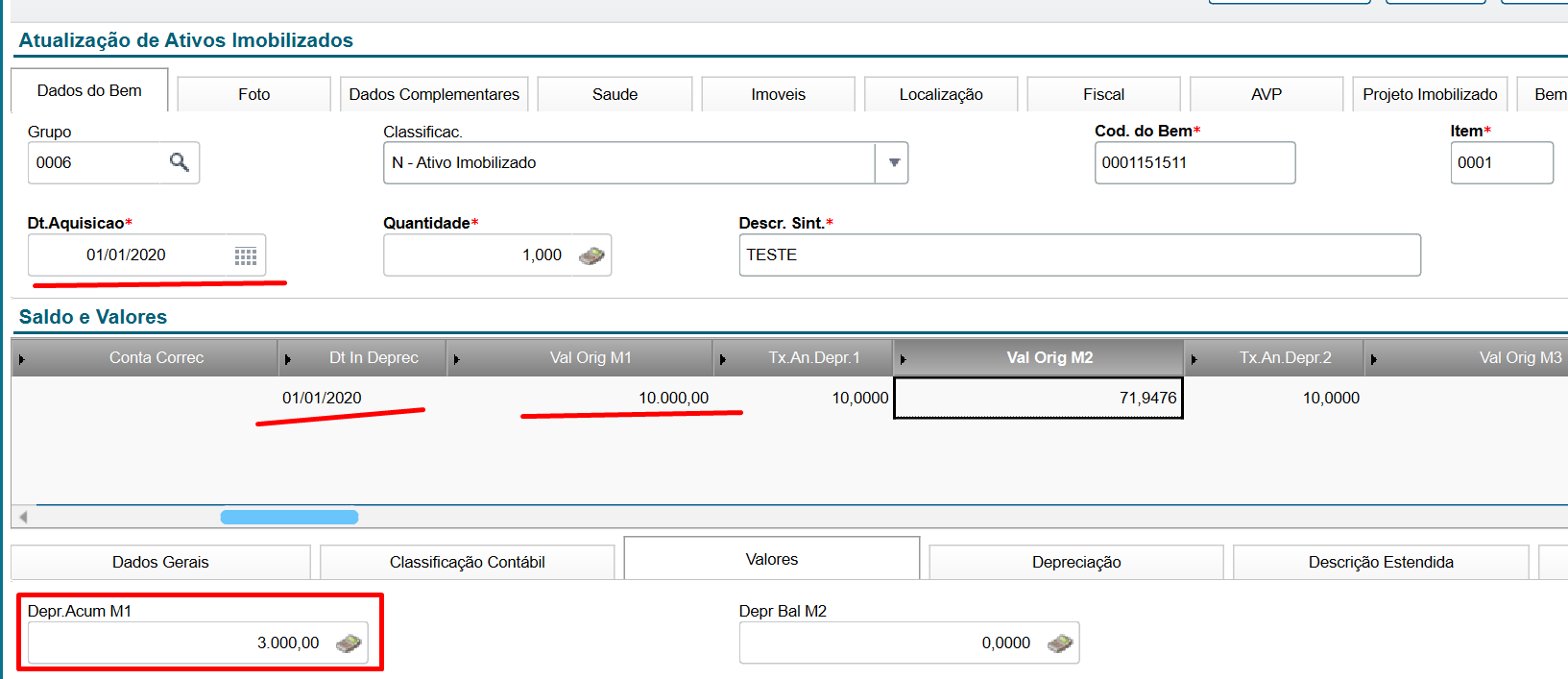
Dessa maneira o sistema gerará o registro de inclusão(N4_OCORR = 05) e de depreciação acumulada(N4_OCORR = 06 e N4_TIPOCNT = 4) na tabela de movimentos, assim como na SN3 também ficará registrado esses valores e a depreciação mês a mês do bem poderá ser feita normalmente, parando de depreciar assim que o valor da depreciação acumulada chegar no valor original do bem. Lembrando que o exemplo é de uma depreciação linear, mas o bem deve parar de depreciar conforme a sua regra de depreciação.
03. CAMPOS DO ATIVO PARA O EFD CONTRIBUIÇÕES
Para que o bem imobilizado seja apresentado no registro F120 do EFD Contribuições é importante o preenchimento dos seguintes campos do cadastro do ativo imobilizado.
- Overview
- Example of use
- Asset fields for EFD Contributions
- Next steps
- Other Information
01. OVERVIEW
This document details how to include Fixed Assets that were acquired and already have accumulated depreciation or are controlled in other systems/spreadsheets.
The inclusion of assets can be performed by the user through the Purchasing module, using routine MATA103 and then classifying the asset (ATFA240), or manually via routine ATFA012 (Assets).
It is also possible to add assets automatically through the ExecAuto functionality of routine ATFA012 or via the MILE importer. Note that these options are customized, and it is the customer’s responsibility to fill in the necessary fields as required.
02. EXAMPLE OF USE
Protheus does not perform retroactive depreciation of assets, but it is possible to include them with accumulated depreciation so that the system recognizes how much the asset has already depreciated and continues depreciation on a monthly basis.
Therefore, when including an asset that already has depreciation, the acquisition start fields, depreciation start date, and accumulated depreciation must be informed using the actual acquisition data.
Example:
There is an asset currently tracked in a spreadsheet but not yet registered in Protheus. The asset has been in the company since 01/01/2020 and will be registered to begin monthly depreciation starting from 01/01/2024.
In this case, the MV_ULTDEPR parameter for the branch where the asset will be registered must be set to 20231231, and the asset data should be entered as shown below:
This way, the system will generate the add record (N4_OCORR = 05) and the accumulated depreciation record (N4_OCORR = 06 and N4_TIPOCNT = 4) in the movement table. These same values will also be recorded in SN3, and the system will proceed with monthly depreciation until the accumulated depreciation matches the asset’s original value. Note that this example assumes straight-line depreciation, but the asset will stop depreciating according to its specific depreciation rule.
03. ASSET FIELDS FOR EFD CONTRIBUTIONS
For the fixed asset to appear in record F120 of the EFD Contributions, the following fields in the fixed asset registration must be filled in.
In the Asset Data tab, under the field Na Aba de Dados do Bem no campo Calc. PIS (N1_CALCPIS) informar como 1-Sim ou 3-Fração, select 1 – Yes or 3 – Fraction.
| Nota | ||
|---|---|---|
| ||
Ao selecionar a opção 3 – Fração para a geração do F120, o valor não será fracionado. O que será respeitado é apenas a quantidade de parcelas, conforme informado no campo N1_MESCPIS. Exemplo: Se no campo N1_MESCPIS for informado 12 meses, o sistema gerará o F120 somente para as 12 primeiras depreciações do bem, utilizando sempre o valor integral da depreciação de cada mês, sem qualquer fracionamento. |

When selecting option 3 – Fraction for F120 generation, the value will not be fractioned. Only the number of installments indicated in the N1_MESCPIS field will be applied. Example: If 12 months are entered in the N1_MESCPIS field, the system will generate F120 only for the first 12 depreciation months of the asset, always using the full depreciation amount for each month, without any fractioning. |
In the Fiscal tab, fill in all required fields and set the Na Aba de Fiscal, preencher todos os campos e no campo Cod.BC Cred (N1_CODBCC) informar como field as 09 ou 11(conforme layout do registro F120)or 11, according to the F120 record layout.

04.
...
NEXT STEPS
Once the fixed asset is registered, it is necessary to run the depreciation process in Miscellaneous > Processing > Monthly Calculation, which uses the MV_ULTDEPR parameter to reference the last calculation.
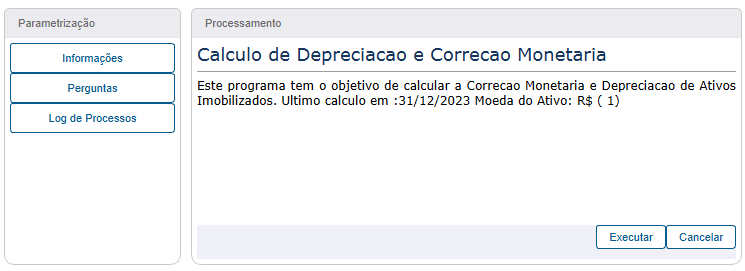
After executing depreciation in the Fixed Assets module, generate the EFD Contributions through the Fiscal Module.
05. OTHER INFORMATION
DT Automatic Routine ATFA012 – Fixed Assets Update
Cross Segment – Backoffice Protheus Line – SIGAATF – ATFA012 Add Asset via TXT MILE
Fixed Asset (ATFA012 – SIGAATF)
Parameter Configuration MV_ULTDEPR – 108844
EFDCON – PIS/COFINS Calculation and EFD Contributions File
Official download of the EFD Contributions Manual
EFD Contributions – Content of Field CL2_VLEXCL
EFD Contributions – F120 and F130 – Fixed Asset
...
Após bem imobilizado cadastrado, necessário realizar o processamento da depreciação, em Miscelanea > Processamentos > Cálculo Mensal, conforme nosso exemplo ele busca o ultimo calculo baseado no parâmetro MV_ULTDEPR.
Após depreciação executada no módulo do Ativo Fixo, será necessário executar\gerar o EFD Contribuições através do Módulo Fiscal.
05. DEMAIS INFORMAÇÕES
DT Rotina automática ATFA012-Atualização de Ativos Imobilizados
Cross Segmento - Backoffice Linha Protheus - SIGAATF - ATFA012 incluir ativo via txt MILE
Ativo fixo (ATFA012 - SIGAATF)
Configuração do parâmetro MV_ULTDEPR -- 108844
EFDCON - Apuração PIS/COFINS e Arquivo EFD Contribuições
Download oficial do manual do EFD Contribuições
Visão Geral
Import HTML Content
Conteúdo das Ferramentas
Tarefas