Histórico da Página

| Section | ||||||||||||||||||
|---|---|---|---|---|---|---|---|---|---|---|---|---|---|---|---|---|---|---|
|


| Nota | ||
|---|---|---|
| ||
|
...
Check out the new features in the Voyager (2.0) update of TOTVS Fluig:
| Índice | ||
|---|---|---|
|
A era espacial chegou no TOTVS Fluig! 🚀
Segurem os cintos, a nossa plataforma acaba de decolar para uma nova dimensão! 🌌 Chegou a Voyager, uma release feita para transformar sua experiência em algo de outro mundo.
De cara, você vai notar um visual totalmente modernizado — com direito a modo escuro para quem prefere trabalhar no lado oculto da força. Nossa inteligência artificial agora faz parte da tripulação, acelerando processos e ajudando você a ser ainda mais produtivo.
Tem também novos desenhadores de processos e formulários, uma Central de Tarefas prontinha para organizar sua missão, pesquisas de opinião para ouvir toda a tripulação e... muito mais que você vai descobrir nessa jornada espacial.
Pronto para embarcar? 🚀
Onboarding: seu primeiro passo para uma experiência mais ágil
A experiência de primeiro acesso no TOTVS Fluig ficou ainda melhor! Agora, ao se autenticar pela primeira vez, você é guiado por um passo a passo intuitivo, com instruções interativas que ajudam a configurar os dados iniciais, descobrir recursos chave e explorar recomendações personalizadas.
Tudo isso para garantir mais autonomia desde o primeiro clique!
| Dica | ||
|---|---|---|
| ||
Acesse a documentação completa para ver todos os detalhes da atualização. |

Ao concluir a widget de primeiro acesso, a experiência continua com uma página inicial completamente renovada, pensada para facilitar o dia a dia de quem usa o TOTVS Fluig.
O novo layout traz uma navegação mais intuitiva, além de widgets essenciais que conectam você diretamente ao que mais importa na plataforma, desde seus processos até os últimos acessos. Conheça as novas widgets presentes na nova Home:
 Links úteis: acesso rápido a links importantes, preenchido inicialmente com links úteis para ajudar você a extrair o máximo da plataforma;
 Últimos acessos: continue de onde parou com uma visão dos últimos lugares que navegou;
 Processos: inicie ou acompanhe seus processos com mais agilidade, incluindo favoritos ou filtros personalizados;
 Templates: crie novos processos com base em templates prontos ou do zero, acelerando a operação.

O TOTVS Fluig evoluiu, uma experiência ainda melhor
O TOTVS Fluig que você conhecia acaba de ganhar um novo visual, muito mais moderno, limpo e alinhado à identidade visual da companhia. Uma evolução que conecta tecnologia, design e experiência em uma jornada muito mais fluida entre
as soluções da plataforma.
Com componentes atualizados e uma interface prática, você navega com mais leveza, clareza e velocidade — como se estivesse em gravidade zero.
Modo escuro: um dos destaques da missão 
| Conector de Widget | ||||||
|---|---|---|---|---|---|---|
|
The space age has arrived at TOTVS Fluig! 🚀
Buckle up, our platform has just taken off to a new dimension! 🌌 Introducing Voyager, a release designed to transform your experience into something out of this world.
Right away, you will notice a completely modernized look — complete with a dark mode for those who prefer to work on the dark side of the force. Our artificial intelligence is now part of the crew, speeding up processes and helping you become even more productive.
There are also new process and form designers, a Task Center ready to organize your mission, opinion polls to hear the entire crew, and... much more that you will discover on this space journey.
Ready to get aboard? 🚀
Onboarding: Your First Step Towards a More Agile Experience
...
The first access experience on TOTVS Fluig has gotten even better! Now, when you login for the first time, you are guided through an intuitive step-by-step process, with interactive instructions that help you set up initial data, discover key features, and explore customized recommendations.
All this to ensure more autonomy from the very first click!
| Dica | ||
|---|---|---|
| ||
Access the complete documentation to see all the details of the update. |

Upon completing the first access widget, the experience continues with a completely revamped homepage designed to make daily life easier for those using TOTVS Fluig.
The new layout offers more intuitive navigation, along with essential widgets that connect you directly to what matters most on the platform, from your processes to your recent accesses. Discover the new widgets available on the new Home:
Useful Links: quick access to important links, initially filled with helpful links to help you get the most out of the platform;
Last accesses: pick up where you left off with a view of the last places you navigated;
Processes: start or track your processes more efficiently, including favorites or custom filters;
Templates: create new processes based on ready-made templates or from scratch, speeding up operations.

TOTVS Fluig has evolved, providing an even better experience
...
The TOTVS Fluig you knew has just received a new look that is much more modern, clean, and aligned with the company's visual identity. An evolution that connects technology, design, and experience in a much smoother journey between
the platform's solutions.
With updated components and a practical interface, you navigate with more ease, clarity, and speed — as if you were in zero gravity.
Dark mode: one of the highlights of the mission
One of the highlights of this transformation is the dark mode — designed to provide more visual comfort and greater emphasis on content for you. You can enable or disable it at any time in your profile settingsUm dos destaques dessa transformação é o modo escuro — pensado para proporcionar mais conforto visual e maior destaque do conteúdo para você. Podendo ser habilitado ou desabilitado a qualquer momento nas informações do seu perfil.
| Deck of Cards | ||||||||||||||
|---|---|---|---|---|---|---|---|---|---|---|---|---|---|---|
| ||||||||||||||
|


Páginas do Painel de Controle agora são acessíveis pelo menu
Com a vinda da atualização Voyager, uma grande mudança visual chegou na plataforma. E com isso, alguns comportamentos de recursos que você já conhecia, mudaram um pouco.
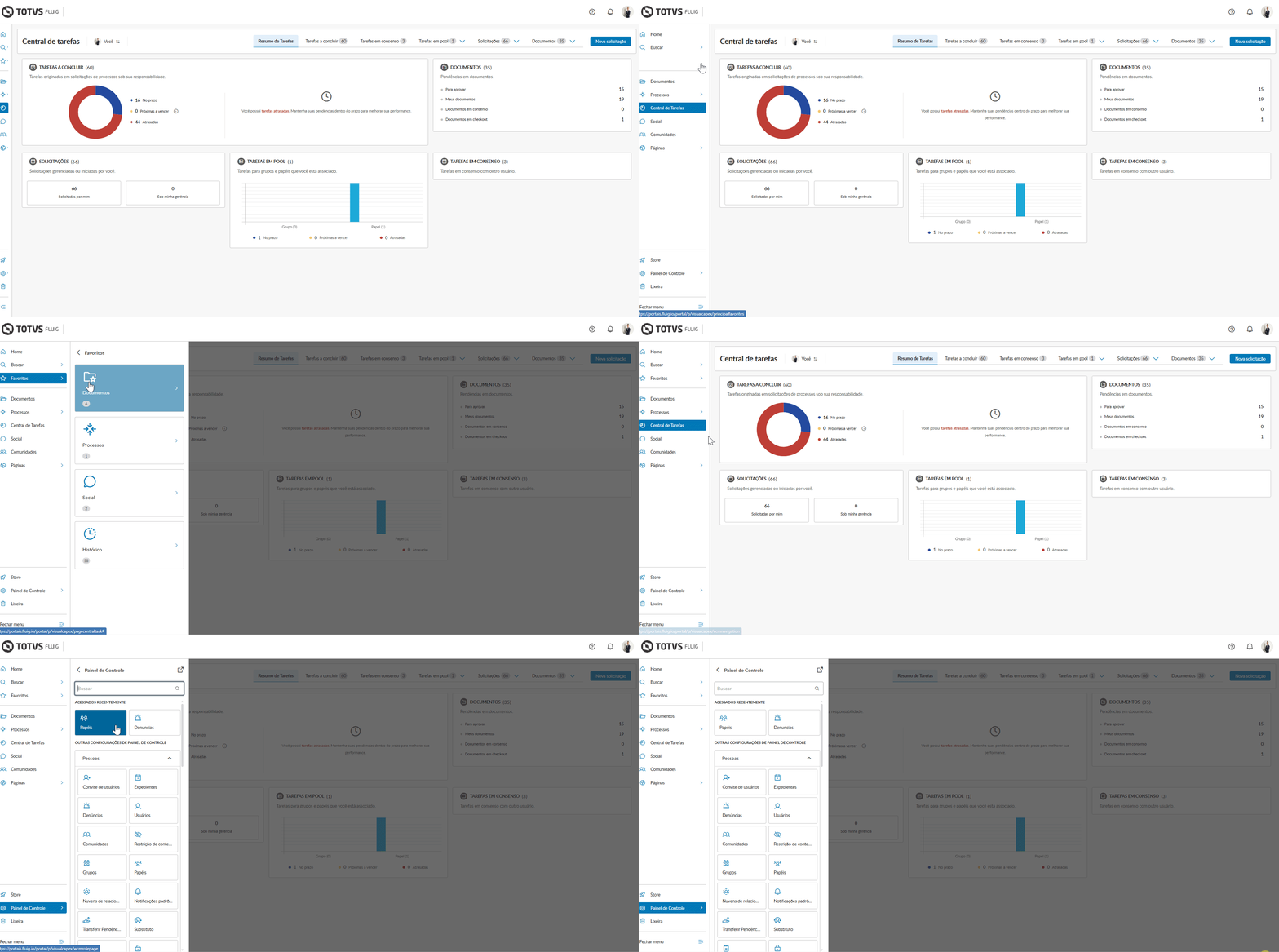
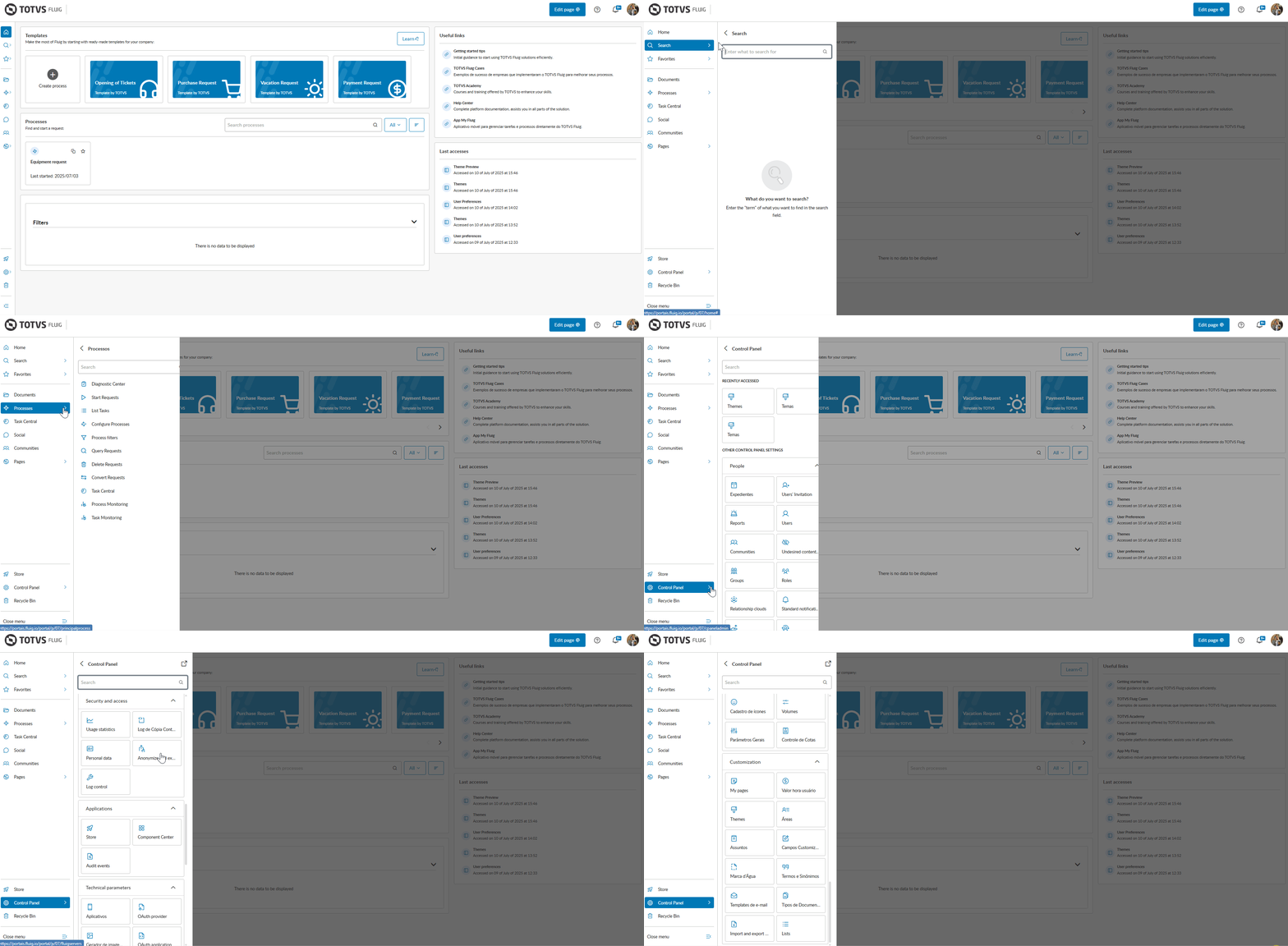
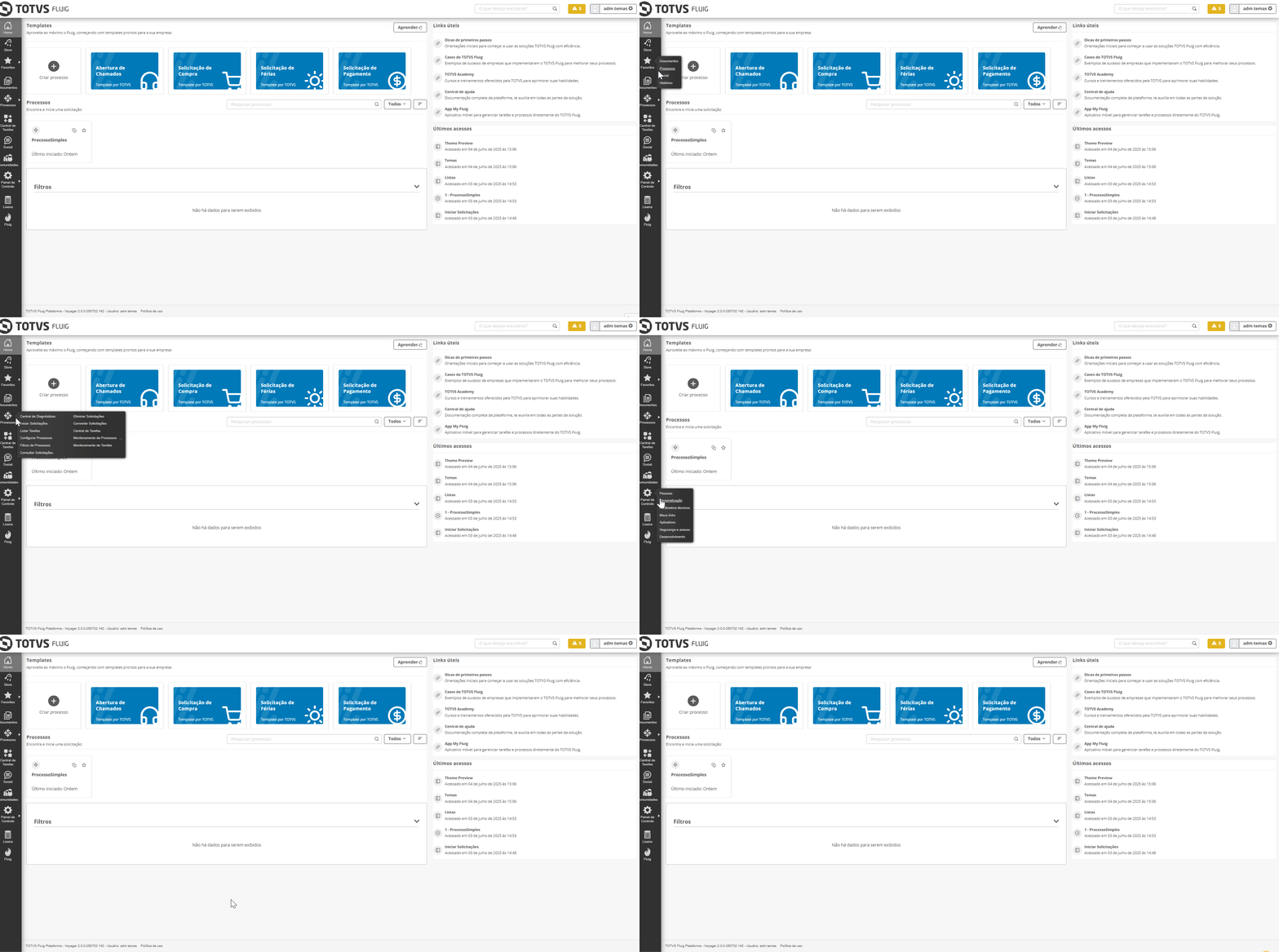
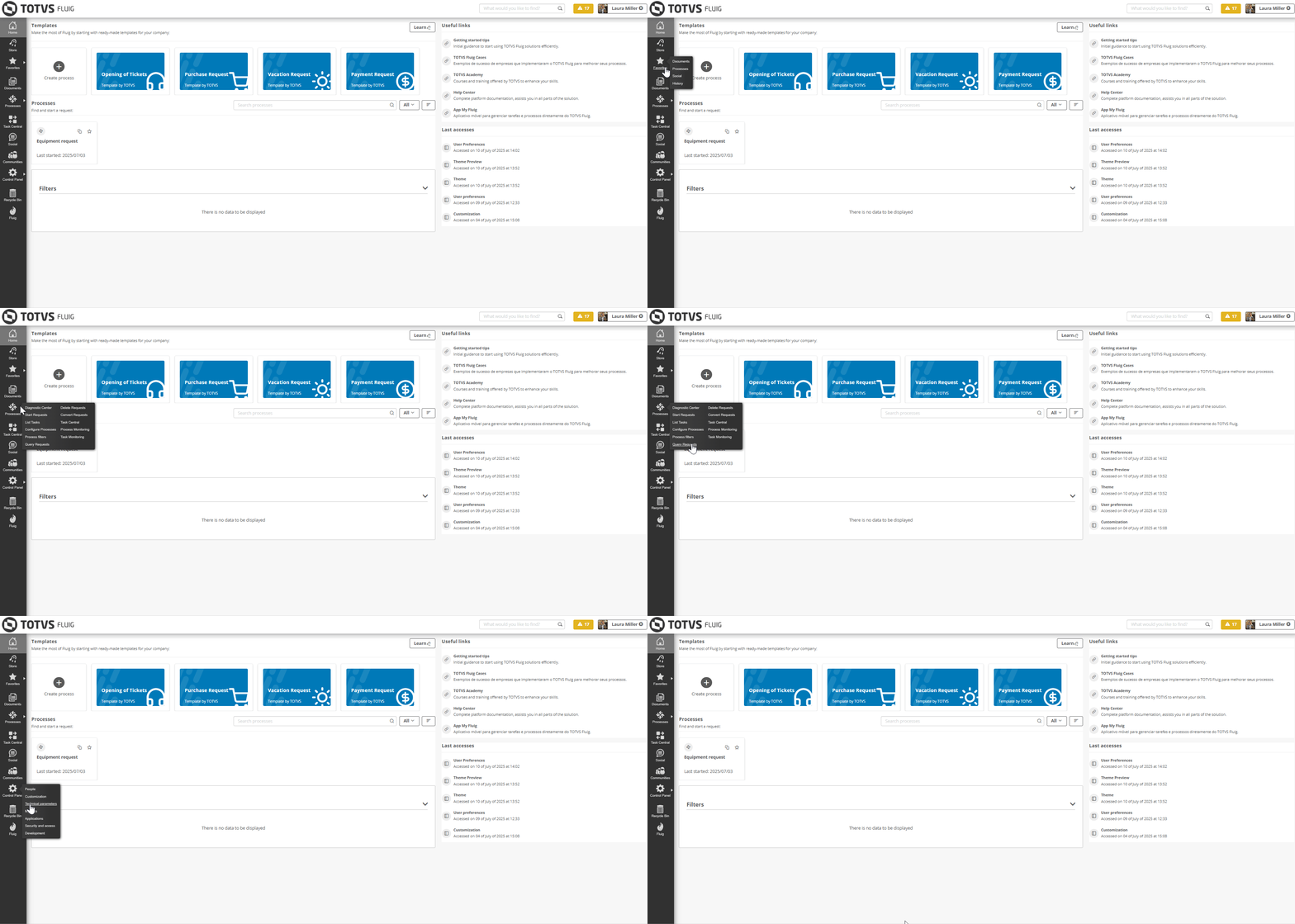
Os agrupadores do Painel de controle, agora funcionam como páginas filhas, ou seja, ao posicionar o cursor sobre o Painel de controle, os agrupadores que você já conhecia, agora são exibidos como páginas vinculadas ao Painel de controle e podem ser acessadas diretamente, assim como já ocorria nos itens de menu Processos e Favoritos.
Essa mudança ocorre em todos os temas disponíveis na plataforma atualmente e tem por objetivo alinhar a identidade visual da plataforma com sua versão mais atual. Confira como ficou essa mudança!
|

You can now access Control Panel pages from the menu
...
With the arrival of the Voyager update, a significant visual change has come to the platform. As a result, some behaviors of features you were already familiar with have changed slightly.
The groupings in the Control Panel now function as child pages, meaning that when you hover over the Control Panel, the groupings you already knew are now displayed as pages linked to the Control Panel and can be accessed directly, just as it already happened with the menu items Processes and Favorites.
This change occurs across all themes currently available on the platform and aims to align the visual identity of the platform with its most current version. Check out how this change looks!
| Deck of Cards | ||||||||||||||
|---|---|---|---|---|---|---|---|---|---|---|---|---|---|---|
| ||||||||||||||
| Deck of Cards | ||||||||||||||
| ||||||||||||||
|
Processes: an editor that allows you to create flows with more autonomy and less dependence on coding
...
...
Do you want to empower your business areas by giving them the autonomy to create their own processes? The new editor makes this a reality!
With its modern interface and easy-to-understand language, it allows you to:
create and configure processes simply, with flexibility and good practices of standardization and governance;
model the process diagram by dragging and dropping components to the desired location, making the flow easy to understand and beautiful at the same time;
 configure components more practically, optimizing the deployment of the process;
 define rules set rules to attach documents to requests, ensuring that the necessary inputs required are present at each stage;
 define assignment mechanisms to automatically direct requests to their respective responsible parties;
 create complete processes in seconds with artificial intelligence, enjoying the benefits and agility that AI provides;
 know the available resources interactively and within in the interface itself with the Usage Utilization Guide.
In addition, it also features the new form editor, which allows you to build modern and user-friendly forms.
...
Pretty cool, right? Access the new editor now and check out all these new features.

...
Create complete processes with Artificial Intelligence!
| Âncora | ||||
|---|---|---|---|---|
|
A Inteligência artificial agora é aliada na construção de processos dentro do TOTVS Fluig!
Com recursos de IA integrados diretamente nos diagramas e formulários dos novos editores, mesmo quem não tem conhecimento técnico consegue criar fluxos e telas de forma rápida, intuitiva e com autonomia.
💡 O que a IA pode fazer por você?
Sugerir diagramas completos com base na sua descrição.
 Gerar formulários automaticamente, com campos inteligentes baseados no contexto do processo.
Ajudar você a transformar ideias em processos e formulários reais, sem complicação!
Artificial Intelligence is now an ally in building processes within TOTVS Fluig!
With AI features integrated directly into the diagrams and forms of the new editors, even those without technical knowledge can create flowcharts and screens quickly, intuitively, and autonomously.
💡 What can AI do for you?
Suggest complete diagrams based on your description.
Automatically generate forms with smart fields based on the context of the process.
Help you transform ideas into real processes and forms, hassle-free!
This innovation puts more power in your hands and accelerates the construction of solutions on the platform, with a total focus on productivity and efficiencyEssa novidade coloca mais poder nas suas mãos e acelera a construção de soluções na plataforma, com foco total em produtividade e eficiência.
| Dica | ||
|---|---|---|
| ||
Saiba mais sobre como usar IA para criar processos. | ||
| ||
Learn more about how to use AI to create processes. |


| Nota | ||
|---|---|---|
| ||
Os recursos que utilizam Inteligência artificial (IA) requerem uma liberação adicional para serem utilizados. Para garantir o funcionamento adequado desses recursos, é necessário que o ambiente tenha acesso liberado ao seguinte endereçoFeatures that use Artificial Intelligence (AI) require additional authorization to be used. To ensure the proper functioning of these features, you must grant the environment access to the following address: |
Modelos prontos de processos para agilizar seu dia a dia
Chegou uma nova experiência para acelerar a construção de processos na plataforma TOTVS Fluig! Agora, você pode explorar modelos prontos de fluxos e formulários, facilitando a criação de solicitações em poucos cliques ou usando como base para personalizar seus próprios processos.
Do insight à ação em minutos: os templates foram pensados para cobrir demandas comuns do dia a dia, como:
 Abertura de chamado;
 Solicitação de compra;
 Solicitação de férias;
 Solicitação de pagamento.

...
Please be sure to allow HTTPS access to this address in the network infrastructure. For more details, refer to Ports and Addresses. |
Ready-made process templates to streamline your daily activities
A new experience has arrived to accelerate the construction of processes on the TOTVS Fluig platform! Now, you can explore ready-made templates for flows and forms, making it easier to create requests in just a few clicks or using them as a basis to customize your own processes.
From insight to action in minutes: we have designed the templates to cover common daily demands, such as:
Ticket creation;
Purchase request;
Vacation request;
Payment request.

Forms: a more modern and practical form creation tool 
| Âncora | ||||
|---|---|---|---|---|
|
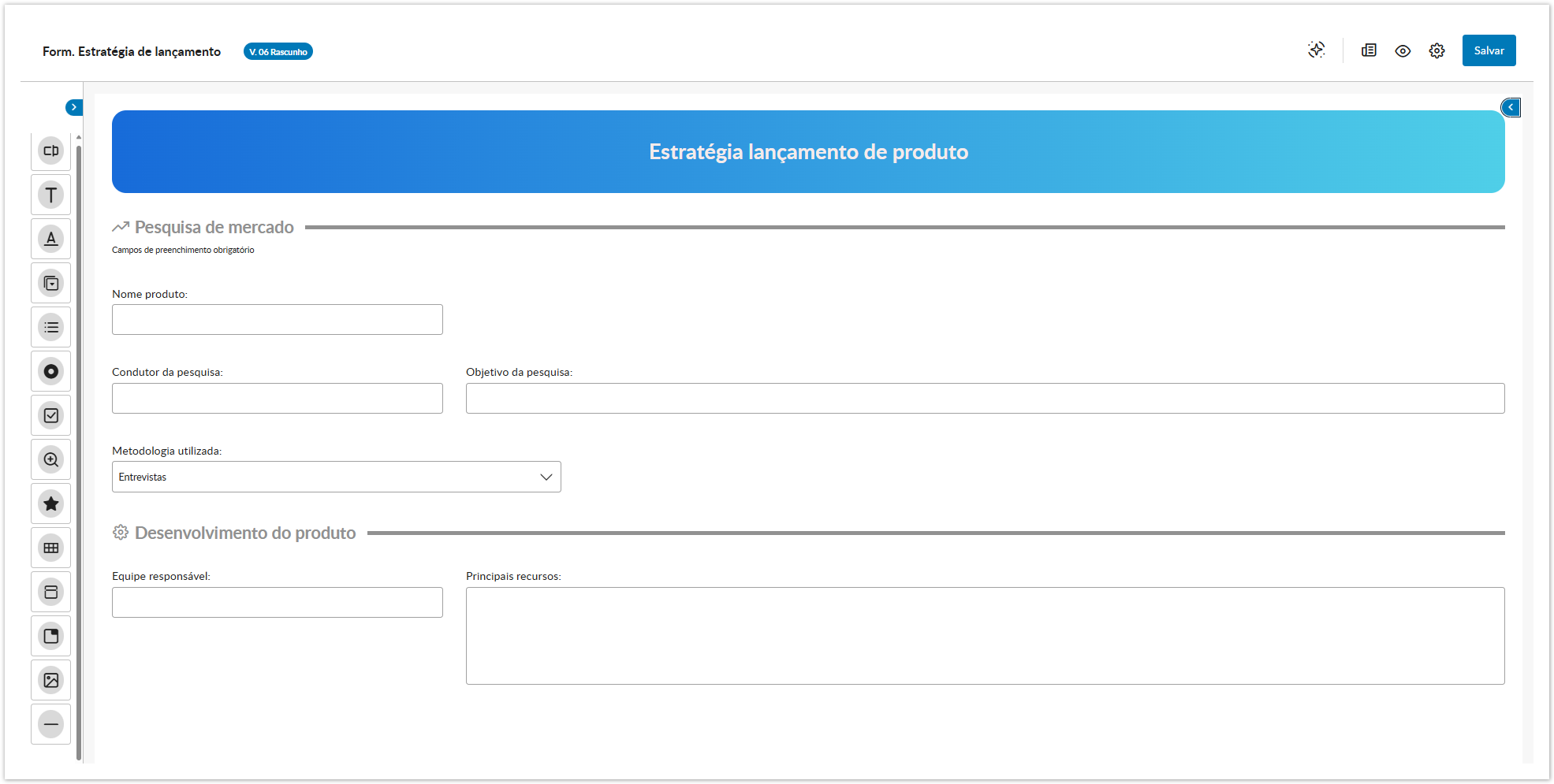
Assim como o editor de processos passou por modernizações, o editor de formulários também chegou com uma nova experiência para você, que cria e edita formulários de processos: Com novos campos, propriedades e recursos, pensados para tornar sua rotina ainda mais intuitiva, completa e eficiente.
...
Just as the process editor has undergone modernizations, the form editor has also arrived with a new experience for you to create and edit process forms: With new fields, properties, and features designed to make your routine even more intuitive, complete, and efficient.

 Collapsible menu:the collapsible field menu allows for better use of the construction area, providing more space and focus during creation.
 Quickly access properties: we have improved the properties of the fields, which are now much easier to access and fill out — just a click on the field automatically displays the properties menu.
Configuring datasets has become easier
We have also enhanced fields with dataset configuration, making the addition and selection of values much more intuitive and agile.

Send fields to Analytics with just one click! 
Another important highlight is the modernization of the way to select fields for submission to Analytics: now, just enable the Use Analytics? button in the properties of the added field. This new feature is compatible with Process Management, Datasets, and the mobile applications My Fluig and My Approval — ensuring simpler and more efficient integrations.
Task Center: a new TOTVS Fluig task management experience
...
We present a completely renewed experience for you to manage your tasks with more practicality and efficiency: the new TOTVS Fluig Task Center.
With a refreshed look, simplified menu, new Approaching Due filter, optimized batch actions, and different viewing modes, it has become much easier to manage your daily tasks.
Check out the news!
Task Summary Redesigned
We have modernized the new Task Summary tab to provide clearer and more accessible information. The interactive charts display the status of tasks — on time, overdue, or approaching due — with visual and objective highlights. With the new Approaching Due status, you can easily identify what requires attention in the next 24 hours. The Documents panel gathers all your document-related pending items with direct access to the context.
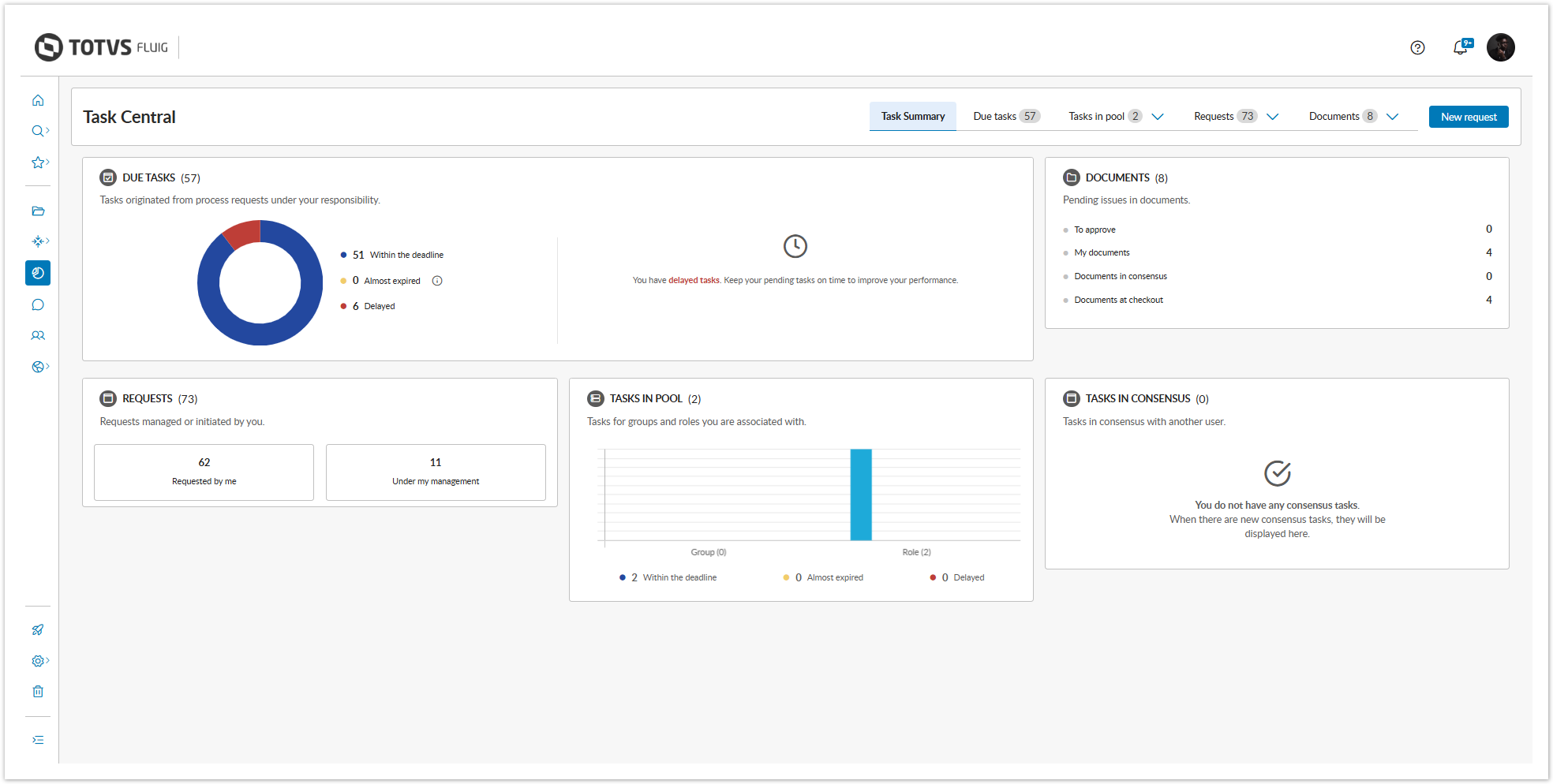
Simplified Menu
We have simplified the menu by grouping related items, and now you can find your documents to approve, consensus documents, checked out documents, and my documents in the Documents tab. Similarly, the requests that you have opened or that are under your management are now found in the Requests tab.
View your tasks as you wish!
We have developed new types of task visualization with the aim of providing a complete experience, eliminating the need for additional customizations, as well as allowing you to switch between modes to check all task information.
The Table view is ideal for tasks with more compact information, being especially useful for data comparison.

We recommend the Board view for tasks with more detailed information, highlighting the most relevant elements of requests and forms.

The Column view allows for a more agile management of tasks, enabling you to act and monitor the progress of activities without the need to switch screens.

| Dica | ||
|---|---|---|
| ||
All view modes offer various sorting options, in addition to the ability to display tasks according to their status. The flexibility of the layout is another highlight as it provides a responsive experience, adapting to various different resolutions. |
New filter management: more control, more customization
Create and manage your filters with agility. The filters are now displayed as tags at the top of the task list. Set a filter as default, adjust the order, delete, mark as favorite, and share with specific groups and roles — in accordance with the permissions granted.
Customize to the fullest
Choose the fields you want to display, mark information as sensitive data, adjust the appearance, and preview everything before saving with the preview feature, which is now available, making everything more practical and intuitive.

Faster and more intuitive bulk actions
Now you can transfer, claim, or cancel multiple tasks much more quickly. When selecting multiple tasks, the Transfer in batches and Claim in batches buttons are automatically enabled, allowing for a more agile movement with fewer clicks!
Another highlight is that you can now cancel tasks directly from the list, without needing to access each task individually.

Actions on documents made more practical and agile
We have modernized the document actions in the Task Center to facilitate your routine and expedite decisions.
- In the My Documents tab, you can access properties, cancel submissions for approval, and easily identify rejected documents, now with visual highlights.
- In Documents to Approve, you can approve or reject directly from the list, without opening the document.
- In Documents in Consensus, you can change the decision or quickly access the content and properties.
- In the Checked Out Documents section, confirm or cancel the check-out directly from the listing.
And more: in all sections, you can download documents individually or all at once, with just one click.

Quick access to diagrams and attachments
Now it’s even easier to access what you need. We have included direct shortcuts to diagrams  and attachments
  in task and document listings, streamlining your routine.
Did you like it? Update your platform and make the most of all the new features!
Discover what's new in the mobile apps!
...
My Fluig: more modern and intuitive!
My Fluig has undergone a complete transformation! We redesigned the entire app so you can make the most of our application. Smoother navigation, modern visuals, and enhanced features to make your daily life easier.
Ready to check out what's new?
- New home: much more complete, it brings together all the important resources, as well as shortcuts to processes and communities.
- Enhanced Settings: we have now intelligently grouped the options between the account settings used in the app and the app settings themselves.
- Multiple account management: add extra accounts, manage, and switch between them easily and quickly.
- Favorites always at hand: access your favorite items quickly and conveniently through the floating menu, in the star option.
- Notifications: quickly access the most important notifications through the floating menu.
- Smoother pages: more pleasant navigation, with optimized layout and display of responsive icons directly in the listing.
- Modernized substitutes: improved visuals, quick addition of new substitutes, and a new section to track expired substitutes.
My Approval has also undergone changes!
My Approval has also received important updates, and now features a completely revamped interface, bringing more practicality and making navigation smoother.
Another very cool highlight is the ability to view only the tasks that are modeled for the application, ensuring more organization and efficiency for the workflow.

Updates to the Style Guide
...
Update on the Rich Text Component
The rich text component used in the platform has undergone an important update to ensure greater stability, security, and alignment with the current product standards.
Although direct use through the interface remains unchanged, customers who use this component via code should be aware of possible adjustments.
| Dica | ||
|---|---|---|
| ||
Check the changes and guidelines in our official documentation. |
Architecture: technological evolutions for more security and performance
...
Thinking about ensuring a more secure, efficient technological environment aligned with the best market practices, we have reviewed the technologies officially supported by TOTVS Fluig.
More recent and modern versions provide benefits such as increased performance, enhanced features, and, most importantly, greater security, minimizing risks related to known vulnerabilities in older versions. Check below the technologies that have been ratified in this update:
| Painel | |||||||||||||||||||||||||||||||||||||||||||||||||||||||||||||||||||||
|---|---|---|---|---|---|---|---|---|---|---|---|---|---|---|---|---|---|---|---|---|---|---|---|---|---|---|---|---|---|---|---|---|---|---|---|---|---|---|---|---|---|---|---|---|---|---|---|---|---|---|---|---|---|---|---|---|---|---|---|---|---|---|---|---|---|---|---|---|---|
| |||||||||||||||||||||||||||||||||||||||||||||||||||||||||||||||||||||
|


We emphasize that the technologies below – which were already ratified – remain ratified for
Acesse rapidamente as propriedades: as propriedades dos campos foram aprimoradas e agora estão muito mais fáceis de acessar e preencher — basta um clique no campo para exibir automaticamente o menu de propriedades.
Configurar datasets ficou mais fácil
Os campos com configuração de datasets também foram aprimorados, tornando a inclusão e seleção de valores muito mais intuitiva e ágil.

Envie campos ao Analytics com apenas um clique!
Outro destaque importante é a modernização do modo de seleção dos campos que serão enviados ao Analytics: agora, basta habilitar o botão Usar Analytics? nas propriedades do campo adicionado. Essa novidade é compatível com Gestão de Processo, Datasets e com os aplicativos móveis My Fluig e My Approval — garantindo integrações mais simples e eficientes.
Central de tarefas: uma nova experiência na gestão de tarefas no TOTVS Fluig
Apresentamos uma experiência totalmente renovada para você gerenciar suas tarefas com mais praticidade e eficiência. A nova Central de tarefas do TOTVS Fluig.
Com um visual renovado, menu simplificado, novo filtro de Próximas a vencer, ações em bloco otimizadas e diferentes modos de visualização, ficou muito mais fácil gerenciar suas tarefas do dia a dia.
Confira as novidades!
Resumo de Tarefas repaginado
A nova aba Resumo de Tarefas foi modernizada para trazer informações mais claras e acessíveis. Os gráficos interativos mostram o status das tarefas — em dia, atrasadas ou próximas do vencimento — com destaque visual e objetivo. Com o novo status Próximas a Vencer, você identifica facilmente o que exige atenção nas próximas 24 horas. Já o painel Documentos reúne todas as suas pendências documentais com acesso direto ao contexto.
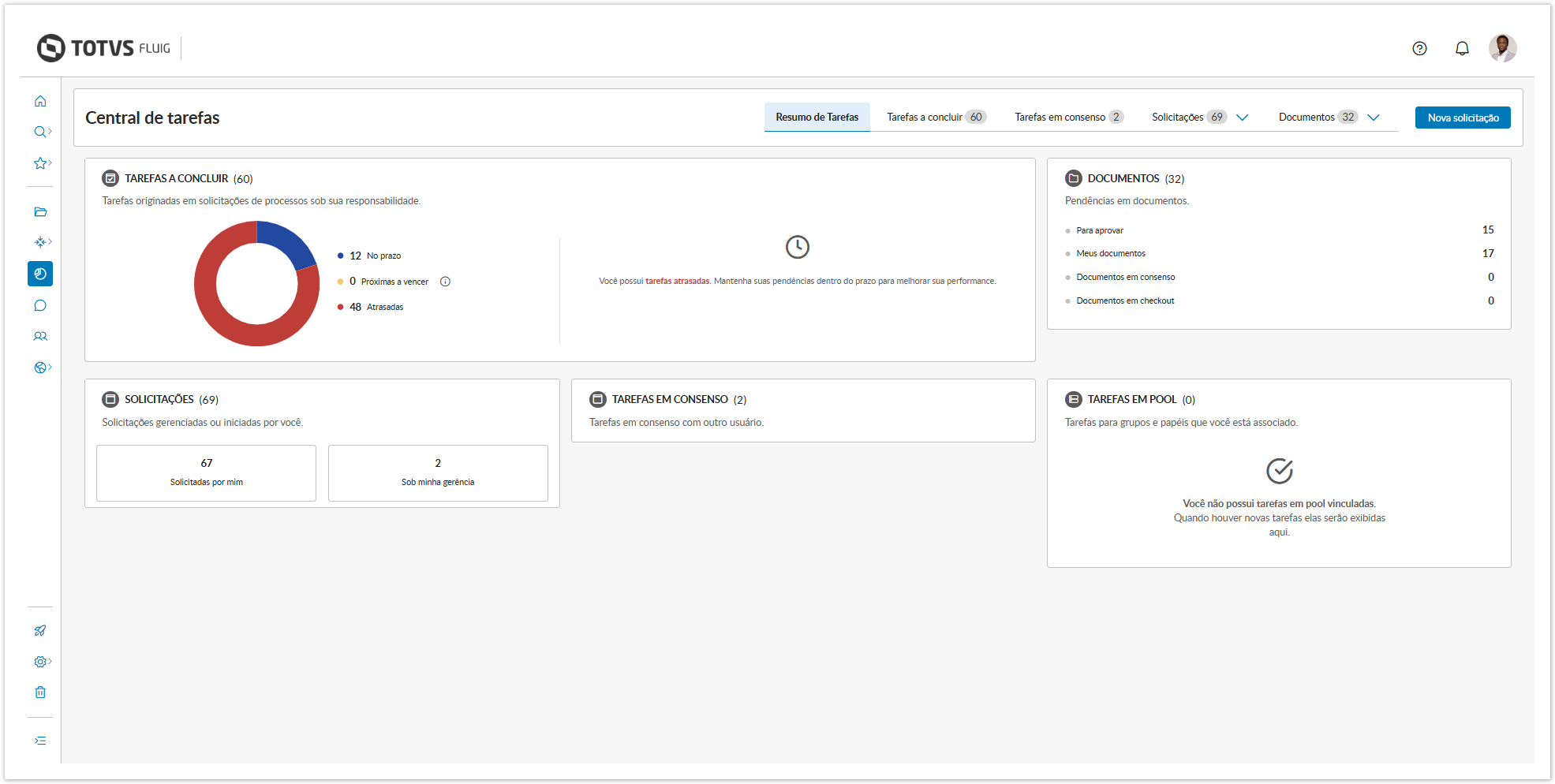
Menu simplificado
Simplificamos o menu agrupando os itens relacionados e agora você encontra seus documentos a aprovar, documentos em consenso, documentos em check-out e meus documentos na aba Documentos. Assim como as solicitações abertas por você ou que estão sob sua gerência, que agora são encontradas na aba Solicitações.
Visualize suas tarefas como quiser!
Desenvolvemos novos tipos de visualização de tarefas com o objetivo de oferecer uma experiência completa, eliminando a necessidade de personalizações adicionais, além de poder alternar entre os modos para verificar todas as informações da tarefa.
A visualização em Tabela é ideal para tarefas com informações mais compactas, sendo especialmente útil para a comparação de dados.

A visualização em Quadro é recomendada para tarefas com informações mais detalhadas, destacando os elementos mais relevantes das solicitações e formulários.

Já a visualização em Colunas permite uma gestão mais ágil das tarefas, possibilitando atuar e acompanhar o progresso das atividades sem a necessidade de trocar de tela.

| Dica | ||
|---|---|---|
| ||
Todos os modos de visualização oferecem diversas opções de ordenação, além da possibilidade de exibir tarefas de acordo com seu status. A flexibilidade do layout é outro ponto de destaque por proporcionar uma experiência responsiva, adaptando-se a várias resoluções diferentes. |
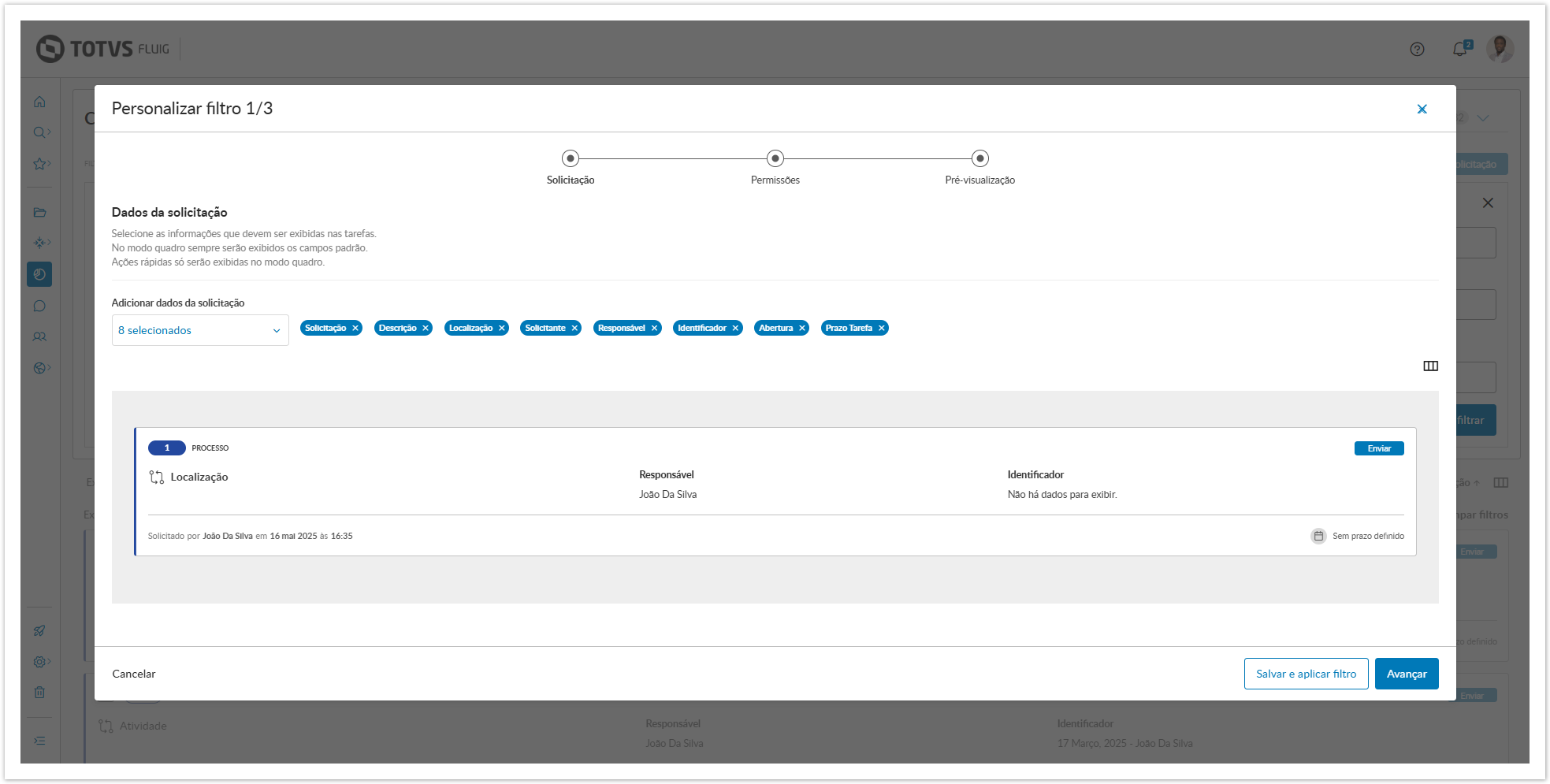
Nova gestão de filtros: mais controle, mais personalização
Crie e gerencie seus filtros com agilidade. Os filtros agora são exibidos como etiquetas no topo da lista de tarefas. Defina um filtro como padrão, ajuste a ordem, exclua, marque como favorito e compartilhe com grupos e papeis específicos — conforme as permissões concedidas.
Personalize ao máximo
Escolha os campos que deseja visualizar, marque informações como dados sensíveis, ajuste o visual e visualize tudo antes de salvar com a pré-visualização, que agora está disponível tornando tudo mais prático e intuitivo.
Ações em bloco mais rápidas e intuitivas
Agora você pode movimentar, assumir ou cancelar várias tarefas com muito mais agilidade. Ao selecionar múltiplas tarefas, os botões Movimentar em bloco e Assumir em bloco são automaticamente habilitados, permitindo uma movimentação mais ágil e com poucos cliques!
Outro destaque é que agora é possível cancelar tarefas diretamente na lista, sem precisar acessar cada tarefa individualmente.

Ações em documentos mais práticas e ágeis
As ações de documentos na Central de Tarefas foram modernizadas para facilitar sua rotina e agilizar decisões.
- Na aba Meus documentos, você acessa propriedades, cancela envios para aprovação e identifica facilmente os documentos rejeitados, agora com destaque visual.
- Em Documentos a aprovar, é possível aprovar ou rejeitar direto pela lista, sem abrir o documento.
- Já em Documentos em consenso, você pode alterar a decisão ou acessar o conteúdo e propriedades rapidamente.
- Na seção Documentos em check-out, confirme ou cancele o check-out direto da listagem.
E mais: em todas as seções, é possível baixar os documentos individualmente ou todos de uma vez, com apenas um clique.

Acesso rápido a diagramas e anexos
Agora ficou ainda mais fácil acessar o que você precisa. Incluímos atalhos diretos para diagramas e anexos nas listagens de tarefas e documentos, agilizando sua rotina.
Gostou? Atualize sua plataforma e aproveite ao máximo todas as novidades!
Descubra o que chegou de novo nos aplicativos móveis!
My Fluig: mais moderno e intuitivo!
O My Fluig passou por uma transformação completa! Redesenhamos todo o aplicativo para que você possa aproveitar ao máximo nosso aplicativo. Navegação mais fluída, visual moderno e funcionalidades aprimoradas para facilitar mais o seu dia a dia.
Bora conferir o que há de novo?
- Nova home: muito mais completa, reúne todos os recursos importantes, além de atalhos para processos e comunidades.
- Configurações aprimoradas: agora as opções estão agrupadas de forma inteligente entre as configurações da conta utilizada no app e as configurações do aplicativo em si.
- Gestão de múltiplas contas: adicione contas extras, gerencie e alterne entre elas de forma simples e rápida.
- Favoritos sempre à mão: acesse seus itens favoritos de forma rápida e prática pelo menu flutuante, na opção de estrela.
- Notificações: acesse rapidamente as notificações mais importantes por meio do menu flutuante.
- Páginas mais fluidas: navegação mais agradável, com layout otimizado e exibição dos ícones de responsividade diretamente na listagem.
- Substitutos modernizado: visual aperfeiçoado, inclusão rápida de novos substitutos e uma nova seção para acompanhar os substitutos que estão expirados.
- Nova home: muito mais completa, reúne todos os recursos importantes, além de atalhos para processos e comunidades.
My Approval também passou por mudanças!
O My Approval também passou por importantes atualizações, e agora conta com uma interface totalmente repaginada, trazendo mais praticidade e tornando a navegação mais fluida.
Outro destaque muito bacana, é a possibilidade de visualizar apenas as tarefas que foram modeladas para o aplicativo, garantindo mais organização e eficiência para o fluxo de trabalho.
Atualizações no Style-guide
Atualização no componente de texto rico
O componente de texto rico utilizado na plataforma passou por uma atualização importante para garantir maior estabilidade, segurança e alinhamento com os padrões atuais do produto.
Embora o uso direto pela interface continue inalterado, clientes que utilizam esse componente via código devem estar atentos a possíveis ajustes.
| Dica | ||
|---|---|---|
| ||
Confira as mudanças e orientações na nossa documentação oficial. |
Architecture: technological evolutions for more security and performance
Thinking about ensuring a more secure, efficient technological environment aligned with the best market practices, we have reviewed the technologies officially supported by TOTVS Fluig.
More recent and modern versions provide benefits such as increased performance, enhanced features, and, most importantly, greater security, minimizing risks related to known vulnerabilities in older versions. Check below the technologies that have been approved in this update:
| Painel | ||||||||||||||||||||||||||||||||||||||||||||||||||||||||||||||||||||||||||||||||||||||||||||
|---|---|---|---|---|---|---|---|---|---|---|---|---|---|---|---|---|---|---|---|---|---|---|---|---|---|---|---|---|---|---|---|---|---|---|---|---|---|---|---|---|---|---|---|---|---|---|---|---|---|---|---|---|---|---|---|---|---|---|---|---|---|---|---|---|---|---|---|---|---|---|---|---|---|---|---|---|---|---|---|---|---|---|---|---|---|---|---|---|---|---|---|---|
| ||||||||||||||||||||||||||||||||||||||||||||||||||||||||||||||||||||||||||||||||||||||||||||
|

On the other hand, discontinuing old versions is a preventive and essential measure to maintain the integrity of the platform, avoiding security failures and loss of support from manufacturers. The technologies below are officially discontinued as of this update:
| Painel | ||||||||||||||||||||||||||||||||||||||||||||||||||||||||||||||||||||||||||||||||||||||||||||||||
|---|---|---|---|---|---|---|---|---|---|---|---|---|---|---|---|---|---|---|---|---|---|---|---|---|---|---|---|---|---|---|---|---|---|---|---|---|---|---|---|---|---|---|---|---|---|---|---|---|---|---|---|---|---|---|---|---|---|---|---|---|---|---|---|---|---|---|---|---|---|---|---|---|---|---|---|---|---|---|---|---|---|---|---|---|---|---|---|---|---|---|---|---|---|---|---|---|
| ||||||||||||||||||||||||||||||||||||||||||||||||||||||||||||||||||||||||||||||||||||||||||||||||
* If you are still using one of these MySQL versions, it is mandatory you are required to update your database to MySQL version 8.0 to upgrade TOTVS Fluig to 2.0. In this case, we recommend consulting a database specialist due to the complexity of the upgrade procedures. Get more details inMySQL Database Configuration. |

...
| Dica | ||
|---|---|---|
| ||
|
...
Still thinking about technological evolution, we also updated the SQL Server driver from version 4 to 12 in the platform installer, aiming to modernize database queries and benefit from the consistency and security provided by a newer version.

...
Share your opinion with us!
...
Now,
...
TOTVS Fluig
...
has a native feedback collection feature, bringing the experience of our users even closer to the reality of those who evolve the platform.
More than just listening, it’s about acting based on who matters most: you, the user of our platform!
Share your opinion and help us improve every day, so we can increasingly contribute to generating value for your business
...
Mais do que ouvir, é agir com base em quem mais importa: você, que é quem usa nossa plataforma!
...
.
| Dica | ||
|---|---|---|
| ||
Quer ajudar a melhorar a plataforma que você já usa no dia a dia? Estamos montando uma rede de clientes e usuários parceiros que ajudam a validar, cocriar e testar as inovações do TOTVS Fluig. Se inscrevendo, você pode ser convidado(a) para:
Se inscreva em: Acessar formulário |
O que ainda não está disponível no modo escuro?
| |
Do you want to help improve the platform you already use every day? We are building a network of customers and partner users who help validate, cocreate, and test the innovations of TOTVS Fluig. By signing up, you may be invited to:
Sign up at: Access form. |

What is still not available in dark mode?
...
In this version, we launched dark mode, designed to provide greater visual comfort. However, this first stage still has some exceptions where dark mode is not compatible — such as in platform customization areas, for exampleNesta versão, lançamos o modo escuro, pensado para proporcionar maior conforto visual. No entanto, esta primeira etapa ainda conta com algumas exceções, em que o modo escuro não é compatível — como em áreas de personalização da plataforma, por exemplo.
| Dica | ||
|---|---|---|
| ||
Preparamos um material com todos os detalhes e informações técnicas para que você fique por dentro do tema. |
Descontinuações
Descontinuação do LMS
...
We have prepared a material with all the details and technical information so that you can stay informed about the topic. |
Discontinuations
...
Discontinuation of the LMS
The LMS (Learning Management System)
...
has not received innovations since 2019 and, as announced in November 2024, was discontinued in April 2025.
Starting from this release, the LMS is no longer part of the Fluig platform.
Discontinuation of the Snowflake and Classic themes
With the advancement of releases, new technologies are emerging in TOTVS Fluig, and we are working to make our platform lighter, more modern, and easier to maintain. Therefore, we will discontinue the old themes in the future.
We believe that with the availability of the responsive theme, which is lighter and aligned with current technologies, the old themes will eventually become obsolete.
Future discontinuation of the jQuery Migrate plugin
The jQuery Migrate plugin will be discontinued in the future to allow for future evolutions in the platform, making it increasingly robust, modern, and secure.
As previously announced in the Mist 1.8 release, we have now disabled the plugin by default, but if necessary, you can re-enable it by following the steps described in the documentation.
Corrections and Improvements
...
- Adjusted the WCMAPI to function correctly when using the richEditor component.
- We have improved security for accessing document content via API.
- Adjusted to correctly display the version of the document pending approval when viewed in the Task Center > My Documents.
- Adjusted to allow the user to have permission to access the colleague dataset data via the displayFields event correctly.
- Adjustment made to prevent slowness in accessing the application and the web when used by regular users.
- Correction made to allow exporting datasets from the staging server to the production server when using the Export routine in the dataset listing.
- Adjusted so that when granting Community permission via the control panel to a regular user, they can edit the community information.
- Adjusted so that when starting a new request based on the previous one, the attachments are loaded correctly in the Form tab and the request is initiated correctly.
- Correction made so that when moving a document to checkout, the comment text box becomes active for typing.
- Adjusted to allow videos to be attached correctly in communities.
- Preventive maintenance performed to ensure the security of the platform.
- Correction made to allow the correct transfer of a subprocess activity with the assignment mechanism.
- Adjusted so that the user listing API functions in accordance with the permissions granted.
- Inconsistency corrected when adding form attachments to the request.
- Correction made to prevent slowness when defining users during process movement.
- Platform update performed to enhance its performance and stability.
- Implemented adjustment to prevent the registration of empty comments in the request history.
- Correction made to allow generating a master folder list that is in the root.
- Correction made to ensure that no empty folder is created in the volume when using the
A partir desta release o LMS deixa de fazer parte da plataforma Fluig.
Descontinuação dos temas Snowflake e clássico
Com o avanço das releases, novas tecnologias vão surgindo no TOTVS Fluig e com isso, estamos trabalhando para tornar nossa plataforma, mais leve, moderna e fácil de manutenir. Por isso, os temas antigos serão descontinuados futuramente.
Acreditamos que com a disponibilização do tema responsivo, que é mais leve e alinhado às tecnologias atuais, os temas antigos acabarão se tornando obsoletos.
Descontinuação futura do plugin jQuery Migrate
O plugin jQuery Migrate será descontinuado futuramente para permitir evoluções futuras na plataforma à tornando cada vez mais robusta, moderna e segura.
Como anunciamos anteriormente na release Mist 1.8, o plugin passou a vir desabilitado por padrão, mas caso necessidade, pode ser habilitado novamente seguindo os passos descritos na documentação.
Correções e melhorias
- Realizado ajuste para que o WCMAPI funcione corretamente quando utilizado o componente richEditor.
- Evoluímos a segurança no acesso ao conteúdo de documentos via API.
- Realizado ajuste para que exiba corretamente a versão do documento pendente de aprovação ao ser visualizado na Central de Tarefas > Meus Documentos.
- Realizado ajuste para permitir que o usuário tenha permissão para acessar os dados do dataset colleague via evento displayFields corretamente.
- Ajuste realizado para que não ocorra lentidão no acesso ao aplicativo e na web, quando utilizado por usuários comuns.
- Realizada correção para que seja possível exportar datasets do servidor de homologação para o servidor de produção quando utilizada a rotina Exportar na listagem de dataset.
- Realizado ajuste para que ao conceder permissão de Comunidade via painel de controle para um usuário comum, o mesmo consiga editar as informações da comunidade.
- Realizado ajuste para que ao iniciar nova solicitação com base na anterior, os anexos sejam carregados corretamente na aba Formulário e a solicitação seja iniciada corretamente.
- Realizada correção para que ao movimentar um documento para check-out, a caixa de texto de comentário fique ativa para digitação.
- Realizado ajuste para que seja possível anexar vídeos corretamente em comunidades.
- Manutenção preventiva realizada para garantir a segurança da plataforma.
- Realizada correção para que seja possível movimentar corretamente uma atividade de subprocesso com mecanismo de atribuição.
- Realizado ajuste para que a API de listar usuários funcione conforme as permissões concedidas.
- Corrigida a inconsistência ao adicionar anexos de formulário na solicitação.
- Realizada correção para que não ocorra lentidão ao definir usuários durante a movimentação de processos.
- Realizada atualização na plataforma para aprimorar sua performance e estabilidade.
- Implementado ajuste para impedir o registro de comentários vazios no histórico da solicitação.
- Realizada correção para que seja possível gerar lista mestra de pasta que está na raiz.
- Correção realizada para que não seja criado pasta vazia no volume ao utilizar a API /ecm-forms/api/v2/cardindex/.
- Realizada correção para que ao editar as permissões de uma widget em uma página, a opção Por Grupo carregue a lista de usuários do grupo selecionado.
- Correção realizada para centralizar corretamente a marca d'água em documentos do tipo A3 durante a impressão de cópias controladas.
- Ajuste realizado para que, ao configurar a expiração de tarefas em horas, a plataforma converta corretamente esse valor para dias.
- Realizado ajuste para que o componente upload-component não seja exibido em duplicidade.
- Realizado ajuste para que a numeração de páginas seja preservada ao imprimir arquivos .docx via cópia controlada.
- Correction made so that when editing the permissions of a widget on a page, the option By Group loads the list of users from the selected group.
- Correction made to center the watermark correctly in A3 type documents during the printing of controlled copies.
- Adjustment made so that, when you set the expiration of tasks to hours, the platform correctly converts this value to days.
- Adjustment made to not display the upload-component in duplicate.
- Adjustment made to preserve the page numbering when printing .docx files via controlled copy.
- Correction made so that only users with granted permission can act as community administratorsCorreção realizada para que apenas usuários com permissão concedida possam atuar como administradores da comunidade.
| HTML |
|---|
<script>
	$("b:contains('oculto')").parent().parent().hide();
</script>

 <!-- Hotjar Tracking Code for http://tdn.totvs.com/display/fb -->
<script>
    (function(h,o,t,j,a,r){
        h.hj=h.hj||function(){(h.hj.q=h.hj.q||[]).push(arguments)};
        h._hjSettings={hjid:1280165,hjsv:6};
        a=o.getElementsByTagName('head')[0];
        r=o.createElement('script');r.async=1;
        r.src=t+h._hjSettings.hjid+j+h._hjSettings.hjsv;
        a.appendChild(r);
    })(window,document,'https://static.hotjar.com/c/hotjar-','.js?sv=');
</script> |
...
Visão Geral
Import HTML Content
Conteúdo das Ferramentas
Tarefas