|
|
Check out the new features in the Voyager (2.0) update of TOTVS Fluig:

Buckle up, our platform has just taken off to a new dimension! 🌌 Introducing Voyager, a release designed to transform your experience into something out of this world.
Right away, you will notice a completely modernized look — complete with a dark mode for those who prefer to work on the dark side of the force. Our artificial intelligence is now part of the crew, speeding up processes and helping you become even more productive.
There are also new process and form designers, a Task Center ready to organize your mission, opinion polls to hear the entire crew, and... much more that you will discover on this space journey.
Ready to get aboard? 🚀
The first access experience on TOTVS Fluig has gotten even better! Now, when you login for the first time, you are guided through an intuitive step-by-step process, with interactive instructions that help you set up initial data, discover key features, and explore customized recommendations.
All this to ensure more autonomy from the very first click!
Access the complete documentation to see all the details of the update. |

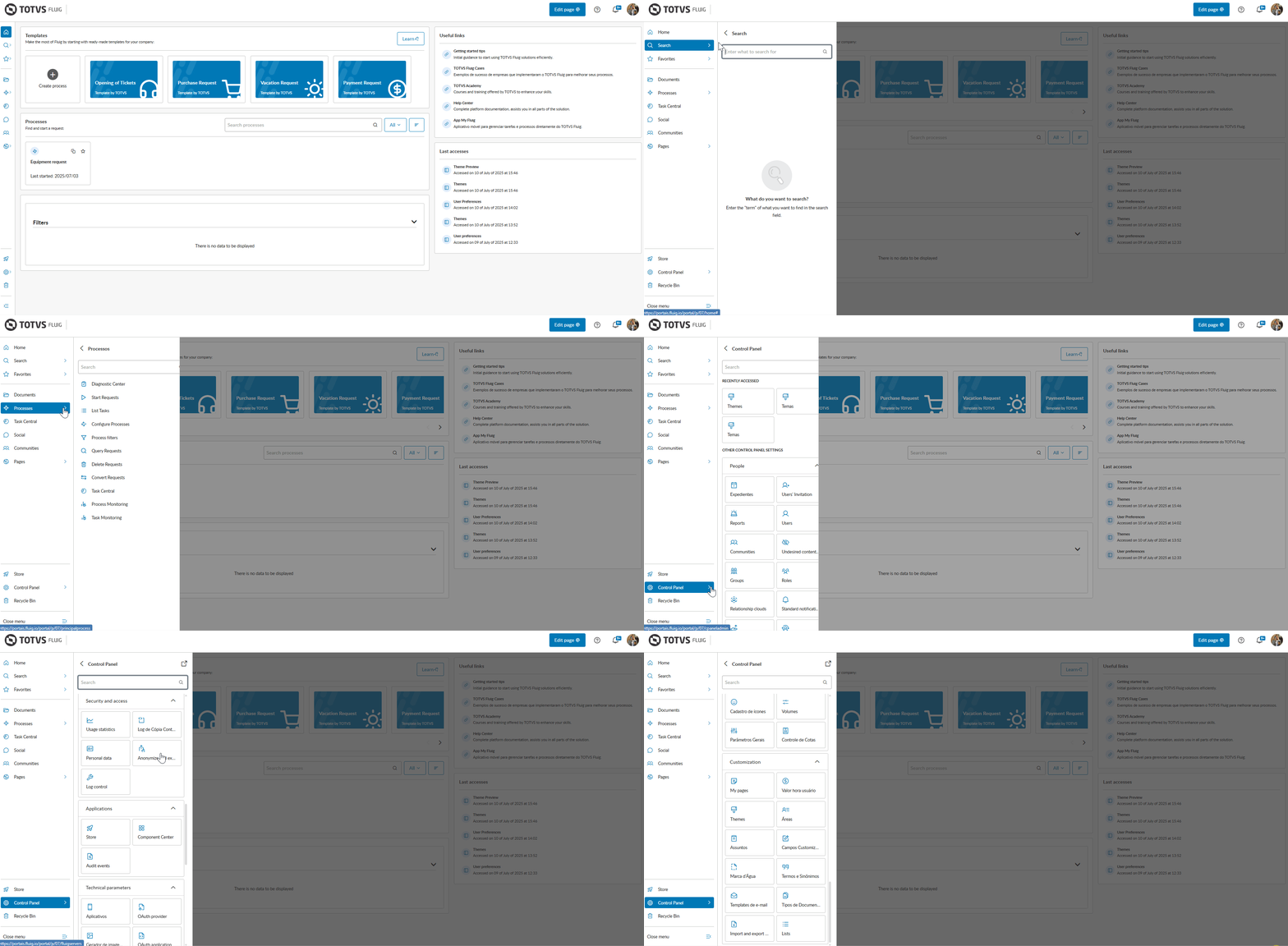
Upon completing the first access widget, the experience continues with a completely revamped homepage designed to make daily life easier for those using TOTVS Fluig.
The new layout offers more intuitive navigation, along with essential widgets that connect you directly to what matters most on the platform, from your processes to your recent accesses. Discover the new widgets available on the new Home:
 Useful Links: quick access to important links, initially filled with helpful links to help you get the most out of the platform;
 Last accesses: pick up where you left off with a view of the last places you navigated;
 Processes: start or track your processes more efficiently, including favorites or custom filters;
 Templates: create new processes based on ready-made templates or from scratch, speeding up operations.

The TOTVS Fluig you knew has just received a new look that is much more modern, clean, and aligned with the company's visual identity. An evolution that connects technology, design, and experience in a much smoother journey between
the platform's solutions.
With updated components and a practical interface, you navigate with more ease, clarity, and speed — as if you were in zero gravity.

One of the highlights of this transformation is the dark mode — designed to provide more visual comfort and greater emphasis on content for you. You can enable or disable it at any time in your profile settings.
|
With the arrival of the Voyager update, a significant visual change has come to the platform. As a result, some behaviors of features you were already familiar with have changed slightly.
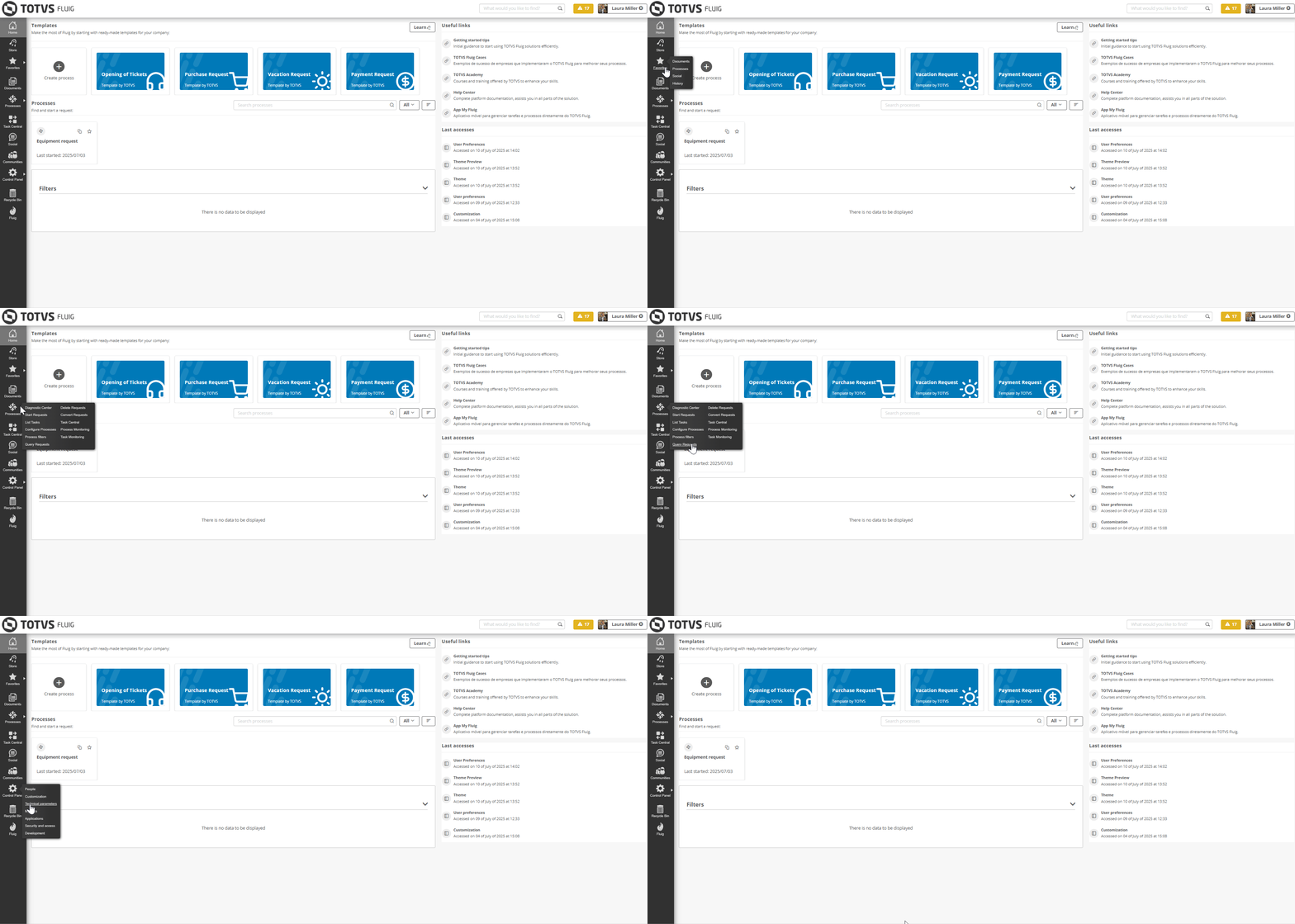
The groupings in the Control Panel now function as child pages, meaning that when you hover over the Control Panel, the groupings you already knew are now displayed as pages linked to the Control Panel and can be accessed directly, just as it already happened with the menu items Processes and Favorites.
This change occurs across all themes currently available on the platform and aims to align the visual identity of the platform with its most current version. Check out how this change looks!
|
Do you want to empower your business areas by giving them the autonomy to create their own processes? The new editor makes this a reality!
With its modern interface and easy-to-understand language, it allows you to:
create and configure processes simply, with flexibility and good practices of standardization and governance;
model the process diagram by dragging and dropping components to the desired location, making the flow easy to understand and beautiful at the same time;
 configure components more practically, optimizing the deployment of the process;
 set rules to attach documents to requests, ensuring that the inputs required are present at each stage;
 define assignment mechanisms to automatically direct requests to their respective responsible parties;
 create complete processes in seconds with artificial intelligence, enjoying the benefits and agility that AI provides;
 know the available resources interactively and in the interface itself with the Utilization Guide.
In addition, it also features the new form editor, which allows you to build modern and user-friendly forms.
All this without lines of code and without complications. This way, you empower your team, accelerate the delivery of processes, and focus on what really matters: generating value for your business!
Pretty cool, right? Access the new editor now and check out all these new features.

Artificial Intelligence is now an ally in building processes within TOTVS Fluig!
With AI features integrated directly into the diagrams and forms of the new editors, even those without technical knowledge can create flowcharts and screens quickly, intuitively, and autonomously.
💡 What can AI do for you?
Suggest complete diagrams based on your description.
 Automatically generate forms with smart fields based on the context of the process.
Help you transform ideas into real processes and forms, hassle-free!
This innovation puts more power in your hands and accelerates the construction of solutions on the platform, with a total focus on productivity and efficiency.
Learn more about how to use AI to create processes. |

Features that use Artificial Intelligence (AI) require additional authorization to be used. To ensure the proper functioning of these features, you must grant the environment access to the following address: |
A new experience has arrived to accelerate the construction of processes on the TOTVS Fluig platform! Now, you can explore ready-made templates for flows and forms, making it easier to create requests in just a few clicks or using them as a basis to customize your own processes.
From insight to action in minutes: we have designed the templates to cover common daily demands, such as:
 Ticket creation;
 Purchase request;
 Vacation request;
 Payment request.


Just as the process editor has undergone modernizations, the form editor has also arrived with a new experience for you to create and edit process forms: With new fields, properties, and features designed to make your routine even more intuitive, complete, and efficient.

 Collapsible menu: the collapsible field menu allows for better use of the construction area, providing more space and focus during creation.
 Quickly access properties: we have improved the properties of the fields, which are now much easier to access and fill out — just a click on the field automatically displays the properties menu.
Configuring datasets has become easier
We have also enhanced fields with dataset configuration, making the addition and selection of values much more intuitive and agile.

Send fields to Analytics with just one click! 
Another important highlight is the modernization of the way to select fields for submission to Analytics: now, just enable the Use Analytics? button in the properties of the added field. This new feature is compatible with Process Management, Datasets, and the mobile applications My Fluig and My Approval — ensuring simpler and more efficient integrations.
We present a completely renewed experience for you to manage your tasks with more practicality and efficiency: the new TOTVS Fluig Task Center.
With a refreshed look, simplified menu, new Approaching Due filter, optimized batch actions, and different viewing modes, it has become much easier to manage your daily tasks.
Check out the news!
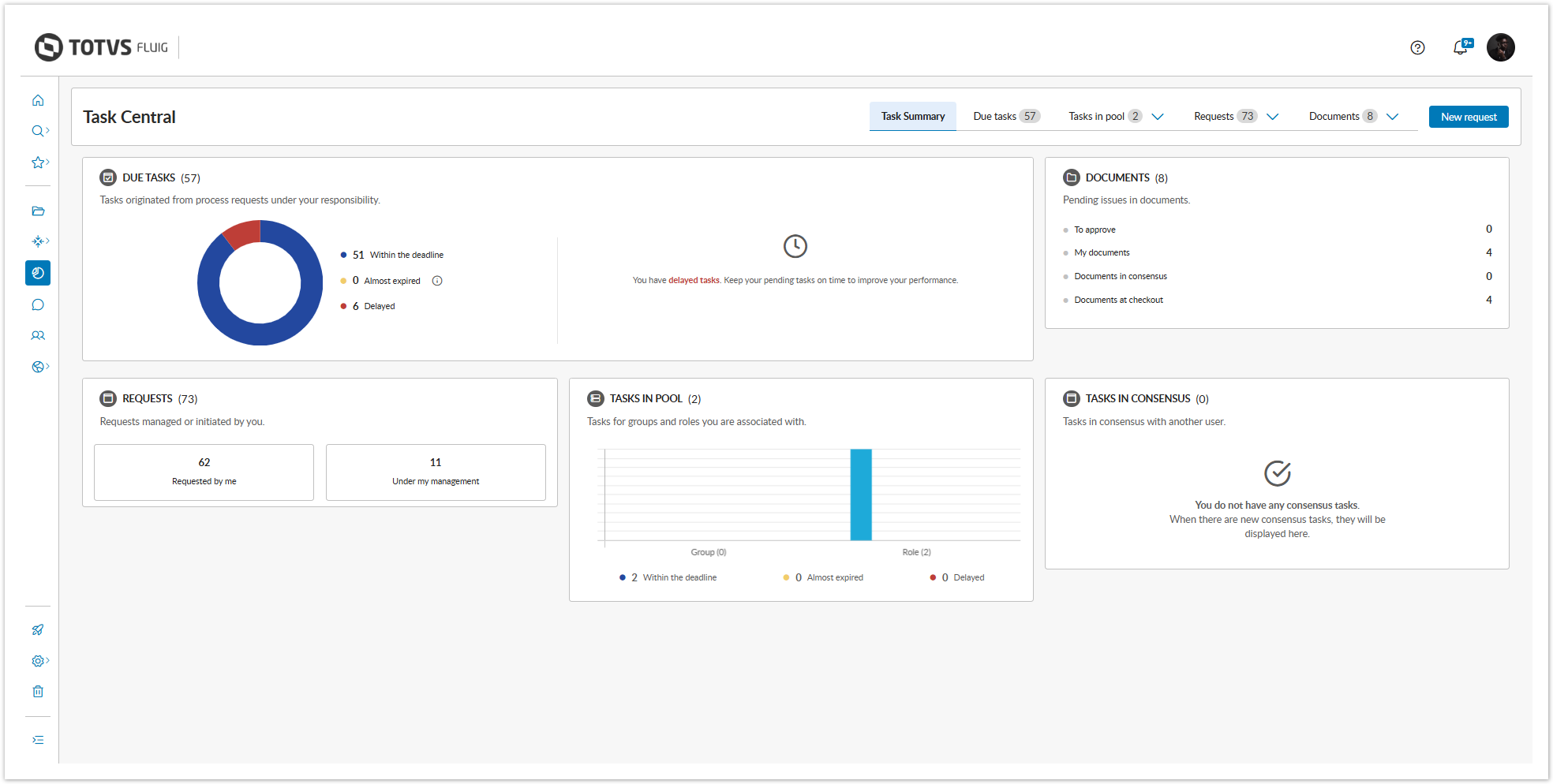
Task Summary Redesigned
We have modernized the new Task Summary tab to provide clearer and more accessible information. The interactive charts display the status of tasks — on time, overdue, or approaching due — with visual and objective highlights. With the new Approaching Due status, you can easily identify what requires attention in the next 24 hours. The Documents panel gathers all your document-related pending items with direct access to the context.
Simplified Menu
We have simplified the menu by grouping related items, and now you can find your documents to approve, consensus documents, checked out documents, and my documents in the Documents tab. Similarly, the requests that you have opened or that are under your management are now found in the Requests tab.
View your tasks as you wish!
We have developed new types of task visualization with the aim of providing a complete experience, eliminating the need for additional customizations, as well as allowing you to switch between modes to check all task information.
The Table view is ideal for tasks with more compact information, being especially useful for data comparison.

We recommend the Board view for tasks with more detailed information, highlighting the most relevant elements of requests and forms.

The Column view allows for a more agile management of tasks, enabling you to act and monitor the progress of activities without the need to switch screens.

All view modes offer various sorting options, in addition to the ability to display tasks according to their status. The flexibility of the layout is another highlight as it provides a responsive experience, adapting to various different resolutions. |
New filter management: more control, more customization
Create and manage your filters with agility. The filters are now displayed as tags at the top of the task list. Set a filter as default, adjust the order, delete, mark as favorite, and share with specific groups and roles — in accordance with the permissions granted.
Customize to the fullest
Choose the fields you want to display, mark information as sensitive data, adjust the appearance, and preview everything before saving with the preview feature, which is now available, making everything more practical and intuitive.

Faster and more intuitive bulk actions
Now you can transfer, claim, or cancel multiple tasks much more quickly. When selecting multiple tasks, the Transfer in batches and Claim in batches buttons are automatically enabled, allowing for a more agile movement with fewer clicks!
Another highlight is that you can now cancel tasks directly from the list, without needing to access each task individually.

Actions on documents made more practical and agile
We have modernized the document actions in the Task Center to facilitate your routine and expedite decisions.
And more: in all sections, you can download documents individually or all at once, with just one click.

Quick access to diagrams and attachments
Now it’s even easier to access what you need. We have included direct shortcuts to diagrams  and attachments
  in task and document listings, streamlining your routine.
Did you like it? Update your platform and make the most of all the new features!
My Fluig: more modern and intuitive!
My Fluig has undergone a complete transformation! We redesigned the entire app so you can make the most of our application. Smoother navigation, modern visuals, and enhanced features to make your daily life easier.
Ready to check out what's new?
My Approval has also undergone changes!
My Approval has also received important updates, and now features a completely revamped interface, bringing more practicality and making navigation smoother.
Another very cool highlight is the ability to view only the tasks that are modeled for the application, ensuring more organization and efficiency for the workflow.

The rich text component used in the platform has undergone an important update to ensure greater stability, security, and alignment with the current product standards.
Although direct use through the interface remains unchanged, customers who use this component via code should be aware of possible adjustments.
Check the changes and guidelines in our official documentation. |
Thinking about ensuring a more secure, efficient technological environment aligned with the best market practices, we have reviewed the technologies officially supported by TOTVS Fluig.
More recent and modern versions provide benefits such as increased performance, enhanced features, and, most importantly, greater security, minimizing risks related to known vulnerabilities in older versions. Check below the technologies that have been ratified in this update:
|
We emphasize that the technologies below – which were already ratified – remain ratified for this update:
|
On the other hand, discontinuing old versions is a preventive and essential measure to maintain the integrity of the platform, avoiding security failures and loss of support from manufacturers. The technologies below are officially discontinued as of this update:
|
Access the Portability Matrix and stay updated on all technologies supported by TOTVS Fluig. |
As we are always looking to improve our platform, from this update on, the configuration file will no longer be domain.xml and will now be standalone.xml.
This change aims to enhance the platform's efficiency, as the standalone mode initializes fewer services and optimizes resource consumption, making it faster and more suitable for running both in containers and in the cloud. Additionally, it is much simpler to configure.
Thus, we reinforce our commitment to simplifying our architecture, improving scalability and flexibility with a focus on innovation and performance, offering solutions adaptable to market needs.
|
The temporary folders and the server.log file have also changed locations. Now, the folders are located at [installation_directory]\appserver\standalone and the server.log at [installation_directory]\appserver\standalone\log. |
Still thinking about technological evolution, we also updated the SQL Server driver from version 4 to 12 in the platform installer, aiming to modernize database queries and benefit from the consistency and security provided by a newer version.

Now, TOTVS Fluig has a native feedback collection feature, bringing the experience of our users even closer to the reality of those who evolve the platform.
More than just listening, it’s about acting based on who matters most: you, the user of our platform!
Share your opinion and help us improve every day, so we can increasingly contribute to generating value for your business.
Do you want to help improve the platform you already use every day? We are building a network of customers and partner users who help validate, cocreate, and test the innovations of TOTVS Fluig. By signing up, you may be invited to:
Sign up at: Access form. |

In this version, we launched dark mode, designed to provide greater visual comfort. However, this first stage still has some exceptions where dark mode is not compatible — such as in platform customization areas, for example.
We have prepared a material with all the details and technical information so that you can stay informed about the topic. |
The LMS (Learning Management System) has not received innovations since 2019 and, as announced in November 2024, was discontinued in April 2025.
Starting from this release, the LMS is no longer part of the Fluig platform.
With the advancement of releases, new technologies are emerging in TOTVS Fluig, and we are working to make our platform lighter, more modern, and easier to maintain. Therefore, we will discontinue the old themes in the future.
We believe that with the availability of the responsive theme, which is lighter and aligned with current technologies, the old themes will eventually become obsolete.
The jQuery Migrate plugin will be discontinued in the future to allow for future evolutions in the platform, making it increasingly robust, modern, and secure.
As previously announced in the Mist 1.8 release, we have now disabled the plugin by default, but if necessary, you can re-enable it by following the steps described in the documentation.
<script>
	$("b:contains('oculto')").parent().parent().hide();
</script>

 <!-- Hotjar Tracking Code for http://tdn.totvs.com/display/fb -->
<script>
    (function(h,o,t,j,a,r){
        h.hj=h.hj||function(){(h.hj.q=h.hj.q||[]).push(arguments)};
        h._hjSettings={hjid:1280165,hjsv:6};
        a=o.getElementsByTagName('head')[0];
        r=o.createElement('script');r.async=1;
        r.src=t+h._hjSettings.hjid+j+h._hjSettings.hjsv;
        a.appendChild(r);
    })(window,document,'https://static.hotjar.com/c/hotjar-','.js?sv=');
</script> |